
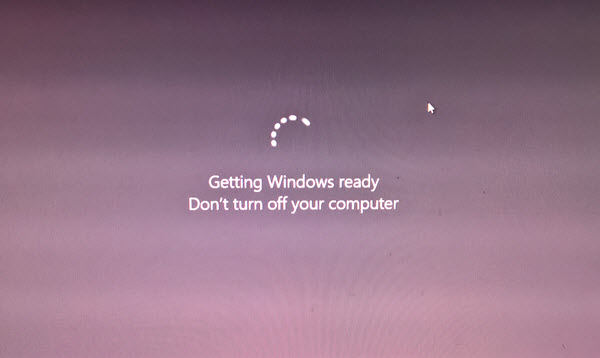
If Windows 11/10 is stuck on restarting, loading some screen with the spinning dots animation moving endlessly, welcome mode, login screen, starting Windows or will not boot, you will have to boot in Safe Mode or Advanced Startup Options to either troubleshoot or restore the system.
One fine day, you boot your Windows PC, and you see that it is stuck on the loading screen. What do you do? How do you fix your Windows PC when you can’t even access the desktop? There are many similar situations.
This can happen after a driver update, some graphics issue, and sometimes even after a major Windows Update. Your PC may be stuck on any screen – it could be stuck restarting or in an endless reboot loop, stuck at log in screen, Ready to install, Please wait screen, Cleaning up, Preparing security options, Restoring your previous version of Windows, Lock Screen, We couldn’t complete the updates screen, on the OEM or Windows logo screen or the Failure configuring Windows updates screen – or it could be any screen where you have the spinning dots animation moving endlessly.

Windows 11/10 is stuck on loading some Screen
The only option here is to get into Safe mode or Advanced Startup mode. So in this guide, we will share how to access Safe Mode or Advanced Startup Options when Windows 11/10 is stuck on some loading screen.
Access Safe Mode or Advanced Startup Options when PC is stuck
Safe Mode or Advanced Startup Options let you repair your Windows PC either by restoring it to previous working condition or when in safe mode, you can uninstall software or drivers which might have caused the issue. The Advanced Startup option offers you System Restore, System Image Recovery, Startup Settings, Startup Repair, and several such recovery or repair options. Safe Mode offers you access to all system tools like the CMD, System Restore, etc., that can help you.
So when your computer doesn’t boot normally, is stuck in an endless reboot loop or stuck on some screen, then your focus should be on getting into Safe Mode or boot to the Advanced Startup Options screen
The thing to do next is to power down your computer. Disconnect external drives, peripherals, etc, wait for a minute and power on your system.
Access Advanced Startup Options during boot
Every time your Windows PC boots up, you have two options. You can press F2 to access your BIOS settings or press F8 to access the boot or startup menu. This is how it looks on my HP. But this can vary from OEM to OEM.
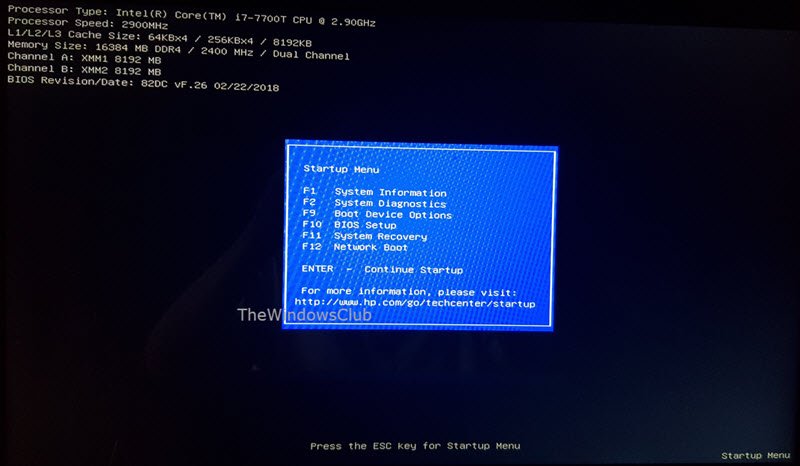
When you access the boot menu, you may have to press F11 to open the Choose an option screen. From here you have to press Troubleshoot and then Advanced Options to reach the following screen.
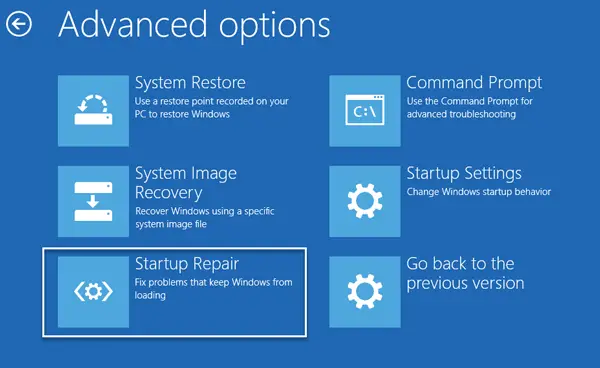
Once here, you can use any of these options:
- System Restore: Useful if you want to restore your Windows PC.
- System Image Recovery: Lets you recover your Windows using a system image file.
- Startup Repair: Fixes startup problems
- Command Prompt: Using the CMD you can access the more advanced built-in Windows tools
- Startup Settings: It lets you change Windows startup options
- Go back to the previous build.
Boot Windows in Safe Mode
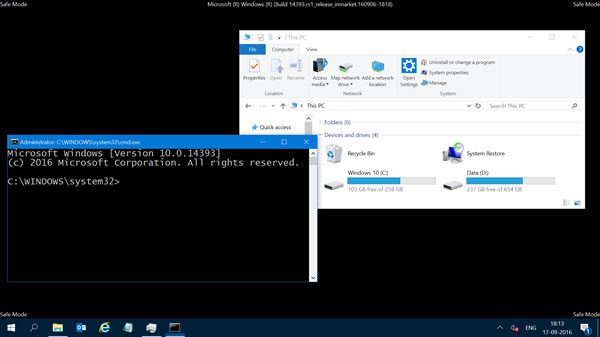
If you have enabled the F8 key in Windows 11/10, then when you start your system, you may continuously press the F8 key to boot in Safe Mode. Once you are in Safe Mode, you will have access to your Start Menu, as well as Mouse and Keyboard, and you will also be able to access your files. If you wish to use System Restore or run your antivirus scan to remove malware, which is often the case with most home users, this is the best mode to boot into. Apart from this function you also get access to other built-in Windows tools, like Command Prompt, PowerShell, Computer Manager, Device Manager, Event Log Viewer, etc.
If you have not enabled the F8 key, then the only way to boot Windows to Safe Mode in this scenario is via the Advanced Startup Options menu discussed above. Once on this menu, select Troubleshoot > Advanced Options > Startup Settings > Restart > Press No 4 key.
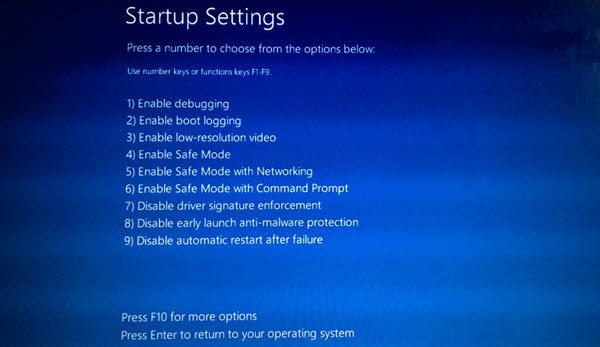
Pressing the ‘4’ key will restart your PC in Safe Mode. To reboot in Safe Mode with Networking, press ‘5’ key. To reboot in Safe Mode with Command Prompt, press the ‘6’ key.
Once in Safe Mode, you can use any of the built-in system tools to troubleshoot or restore your system to a good working point.
For some strange reason if you can boot in Safe Mode but cannot access the Advanced Startup Options screen, when in Safe Mode, you may use the Command Prompt to boot Windows directly to Advanced Startup Settings screen.
If none of the above two help you, then read on.
Boot using a Windows Bootable Disk
It’s highly recommended that you always have a bootable disk handy. You can create a bootable disk using a Windows ISO from any PC. Once done, you will need to change settings in the BIOS, so it boots from the bootable USB instead of from your PC. Now follow the steps below:
- Plug in the USB and the BIOS will choose to boot from the USB instead of your hard-disk.
- It will ask you to install Windows, click on the Next Button.
- The next screen will have a “Repair your computer” option at the bottom left.
- Press R on your keyboard or click on it.
- This will then show you the Advanced Startup Options screen.
From this screen, you can choose to restore to previous working conditions or boot into various modes of Safe Mode to resolve your issue.
Force PC to launch the Automatic Repair Screen
This is the last, not recommended option, but if you have nothing else remaining, try this at your risk. Abruptly power down the PC when you have powered it up. Do it multiple times. After 3 times this may force Windows to think that there is some problem with your PC, and it will force push the Automatic Repair screen. From here, you can get access to the Advanced Startup Options.
If none of the above solutions work, there could be a problem with your hard disk. You may want to connect it with another PC and see if you can boot from it, or get access to the files. If you cannot, or the other PC fails to detect it, you might want to replace it with a new hard disk. You don’t have to worry about your Windows license, though, especially if you have connected it with a Microsoft Account. Windows, once installed, will automatically activate it.
Specific scenarios:
- Windows install is stuck
- Computer stuck on BIOS Splash Screen.
- Windows stuck on Welcome screen
- Windows stuck on signing out screen
- Windows stuck on Getting Windows ready screen
- Windows stuck on Working on updates
- Windows Upgrade stuck at blank screen with only Recycle Bin & Taskbar
- Windows stuck at login screen after upgrade.
Why is my PC stuck on starting Windows 11?
There can be various reasons why your PC is stuck on the Windows 11 start-up screen. The issue may occur due to a hardware or software conflict. Disconnect all your external hardware and then restart your computer. It is also possible that the recently installed program is causing the issue. Sometimes, this issue occurs due to corrupted system image files, whereas in some cases, the recently installed Windows Update is the culprit.
Why is my computer stuck in a Bootloop?
If your computer keeps restarting or is stuck in a boot loop, the cause of the problem might be corrupted system image files, corrupted drivers, a bad Windows Update, etc. You can fix this problem by entering Safe Mode. If you cannot enter Safe Mode, try to enter Windows Recovery Environment so that you could run Automatic Repair. You can also use Windows Installation Media to repair your computer.
Pro Tip: Always create frequent Restore Points
That said, here is a tip from my personal experience. Go ahead and enable Automatic Restore Point creation on startup. A recent System Restore Point can be a big help at times! If you have a restore point, it will not only save a lot of time for you but also ensure that things are back to normal, and you can start your PC for important work.
