
Internet Explorer 11 is a pretty stable browser and runs very well on Windows. But there maybe be times when you may find that, for some unknown reasons, your Internet Explorer freezes, crashes or frequently hangs in Windows 10/8/7 – or that it does not load or start at all. You may even see a Internet Explorer has stopped working message.

Internet Explorer Freezes Or Crashes
Here are some troubleshooting steps you may want to try if you find that your Internet Explorer freezes or crashes frequently:
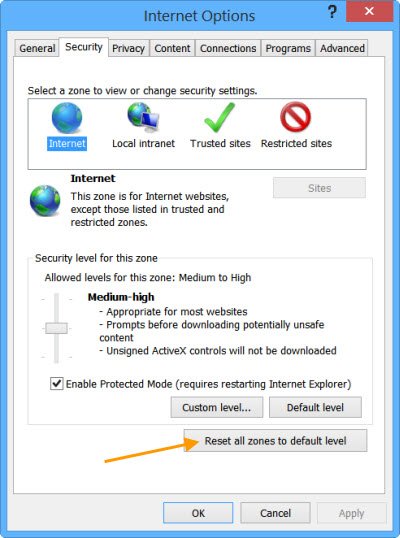
1] To begin with, clear Internet Explorer Cache via it Settings or by using Disk Cleanup Tool or run CCleaner. Next, run your antivirus software to check for malware infections. Run sfc /scannow and at the end, reboot if asked for. This will replace corrupted system files if any. Finally, Open IE, click Tools > Internet Options > Security > Reset all Zones to Default level, and see if it helps.
2] If still, you find your IE giving problems, close it and run IE (No Add-ons). This opens up the browser without loading any add-ons, toolbars or plug-ins. If it works fine, then it is obviously one of your add-ons that may be causing problems. Use the Manage Add-ons tool, and disable each one after the other to find out which one is causing the problem.
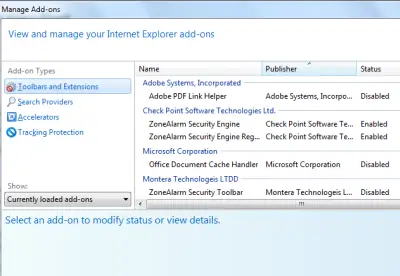
Try to narrow down and identify the offending add-on and then disable or remove it completely.
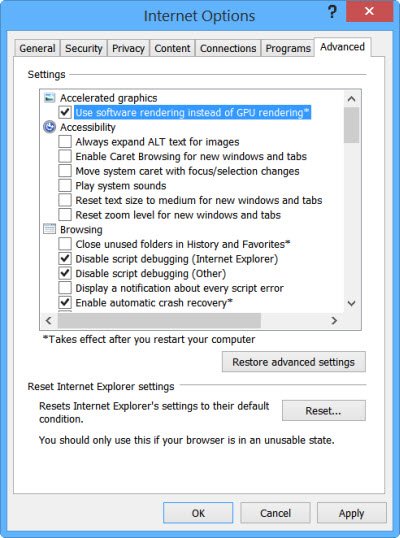
3] In Internet Options, go to Advanced Tab and click on Reset tab. Restart IE. The Reset Internet Explorer option deletes all temporary files disables any add-ons, plug-ins, toolbars, and resets all changed settings to default. Although this is a quick-fix, you will have to re-install the add-ons.
4] Use Software Rendering instead of GPU Rendering and see if stops the crashes. You will find the setting under Internet Options > Advanced tab.
5] You may want to read this article on how to Repair Internet Explorer and see if something helps you.
6] You can also see if the Internet Explorer Troubleshooter Fix It helps in resolving your problems. It fixes issues like IE freezes, running slow, security issues, etc.

7] However if you find that the problem persists, you may have to make a few changes in the Registry. Do back up your registry and create a System Restore Point, before making any changes.
Run regedit and navigate to the following key:
HKEY_CURRENT_USER\Software\Microsoft\Windows\CurrentVersion\Internet Settings
Right-click in the right side and select New.
Create a New DWORD value called “MaxConnectionsPerServer”
Double-click “MaxConnectionsPerServer” and give the value as “10”
Create another new DWORD with the name “MaxConnectionsPer1_0Server”
Double-click it and give the value as “10“.
Save and Exit from the registry.
Restart Windows.
Additionally, also see if the following registry subkey is enabled:
HKEY_LOCAL_MACHINE\Software\Microsoft\Windows\CurrentVersion\Internet Settings\UseCoInstall
If it is absent, no issues. But if it is present and of its DWORD value is set at 1, change this value to 0, Click OK and Exit.
8] See these posts if Internet Explorer tabs freeze or open slowly or if you receive a Program not responding message.
9] If you are facing other specific problems with Internet Explorer, you may see these posts:
- Internet Explorer does not open links
- IE cannot display webpage
- Internet Explorer error messages on page
- Download Manager is missing in Internet Explorer
- Internet Explorer opens and closes immediately
- Internet Explorer does not save History Settings.
I hope something helps you!
Fix Freezes or Crashes with these resources from The Windows Club:
