
The Windows operating system includes built-in tools that let you backup and make copies of your files and create a system image. It now also includes a System Image Backup Tool, with which you can now backup or clone an image of your disk. But it is found wanting in some features, and that is why many prefer to use one or the other free backup software available.
We have already been individually covering many such freeware backup solutions on this website. Today, I am going to list some free Imaging/Backup/Recovery software here, for the convenience of our readers.
Free Backup software for Windows 11/10
Here is a list of some free imaging, backup and recovery software for Windows 11/10. Do check if they run on your version of Windows OS.
- Areca Backup
- Clonezilla
- Cobian Backup
- EASEUS Todo Backup
- AOMEI Backupper
- Macrium Reflect
- DriveImage XML
- DiscWizard
- GFI Backup
- PartImage
- PING
- Paragon Backup & Recovery
- Redo Backup & Recovery
- SimpleBackup
- Auslogics BitReplica
- Genie Timeline Free
- Handy Backup Free
- Veeam
- JaBack
- MiniTool ShadowMaker
- Renee Lab Data Backup software
- Ocster Backup
- Ashampoo Backup Free
- Duplicati
- Iperius Backup
- SyncBack Free Backup Software
- BackupPC
- Bacula
- Rescuezilla
- Back4Sure
- Cryotek CopyTools
Let us now take a look at them in brief.
1] Areca Backup
Areca Backup is an Open Source file backup software that runs on Windows and Linux. It allows users to select and create backup copies of files, which can be encrypted and compressed, or directories for storing them on external drives, pen drives, FTP servers, and others. Areca also provides tools required for Archive recovery – with or without deleted files.
Read: How to recover files when Windows won’t boot.
2] Clonezilla
Clonezilla is based on DRBL, Partition Image, ntfsclone, partclone, and udpcast, allows you to do bare metal backup and recovery. Two types of Clonezilla are available, Clonezilla Live and Clonezilla SE (Server Edition). Clonezilla Live is suitable for single machine backup and restore.
Also read: How to use Windows 11 Backup feature?
3] Cobian Backup
Cobian Backup has a lot of options that we mostly find in commercial backup software. The interface is simple, and we find it quite easy to set up the backup. You don’t need to be an IT wizard to set this up; the developers have made it very simple.
4] EASEUS Todo Backup for Windows
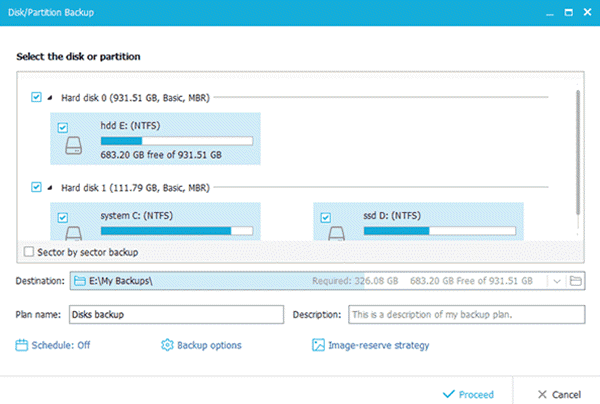
EASEUS Todo Backup Home is a free file backup and disaster recovery software, protecting your data, including photos, music, videos, documents, financial data, and applications. It provides backup, restore, disk-clone functions based on Windows operating systems with ease and reliability.
5] AOMEI Backupper
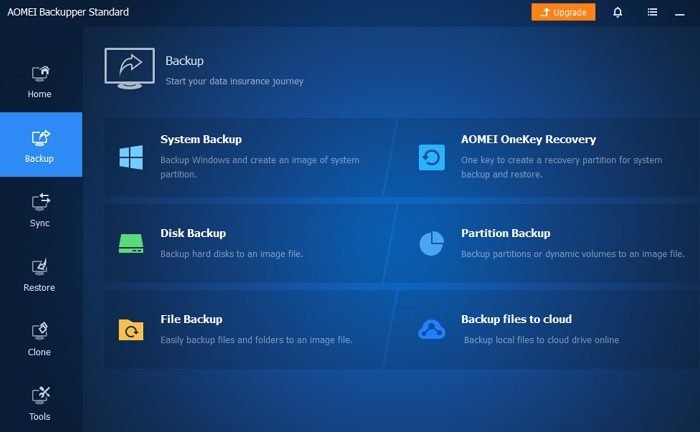
AOMEI Backupper offers three main functions: Backup, Restore, and Clone. It is easy to find them on the left side of the main interface.
TIP: @MAX SyncUp: Create Time Machine-like backups, Sync Windows Computers over the Internet
6] Macrium Reflect
Macrium Reflect Free version is a favorite of many. It offers the following features: Compatible disk imaging software with BartPE and Linux-based recovery options; Create a disk image whilst running Windows using Microsoft Volume Shadow Copy Service (VSS); Image to Network, USB, FireWire drives and DVD; Built-in scheduler; 32-bit and native 64-bit versions; Industry-leading compression levels and speed; Linux-based Rescue CD with Network access and full GUI. Only 6.5MB in size; Built-in CD/DVD packet writing engine. Supports packet writing to DVD DL media; HTML log files, etc.
7] DriveImage XML
DriveImage XML is A “Norton Ghost Alternative”! It is an HDD backup and restoration software similar to Norton Ghost but FREE; the software enables you to create a complete backup image of any drive or partition, which you can restore later restore the image to the same, or another partition, you can also clone a drive to another. The program also includes an image explorer similar to Norton Ghost Image Explorer that lets you explore previously created backup images and extract individual files.
8] DiscWizard
DiscWizard is an “Acronis Clone”! Most know of Acronis True Image, which is a popular hard-drive backup software. But you can get a re-branded version of True Image with the name DiscWizard as a free legal download from the Seagate website.
9] GFI Backup
GFI Backup – Home Edition, is a freeware backup solution that has just been launched. GFI Backup 2009 allows you to back up all your important documents, photos, music, emails and program settings using a simple but smart wizard-driven interface to nearly every storage device, including local and external disk drives, LAN, CD/DVD, removable devices, remote FTP servers, etc.
10] PartImage
Partimage is a Linux utility which saves partitions having a supported file system to an image file. Most Linux and Windows filesystems are supported. The image file can be compressed with the gzip / bzip2 programs to save disk space, and they can be split into multiple files to be copied on CDs / DVDs.
11] PING
Ping is considered by some as the best available Linux toolbox for rescuing a system. Features include – Backup and Restore partitions or files locally or to the network; Backup and Restore the BIOS data as well; Either burn a bootable CD / DVD, either integrate within a PXE / RIS environment; Possibility to Blank local admin’s password; Create your own restoration bootable DVD; Partition and Format a disk before installing Windows and more.
12] Paragon Backup & Recovery
Paragon Backup & Recovery Free Edition is a powerful disc-imaging and recovery solution. It claims to be the only one that can do differential backups; create a bootable USB/flash drive and execute an automatic data exclusion option. It also supports all existing backup techniques, performs disc imaging to any backup destination, and supports Windows 11/10/8/7 too.
13] Redo Backup & Recovery
Redo Backup & Recovery is a free open source tool based on xPUD and part-clone, which not only works with Windows but also supports Linux. It is a recovery tool that even works when your hard disk crashes because it boots from a live CD. Redo offers many other tools that are really helpful if you are performing a system restore. It sports a web browser, IM tool, a Facebook app, hard disk manager, and Google apps. In short, Redo is a complete package of must-have tools required at the time of a disaster.
14] SimpleBackup
SimpleBackup is free backup software, which adds the backup option to the right-click context menu of files and folder. SimpleBackup makes it easier for you to back up your files and folders regularly and very quickly on the fly!
15] Auslogics BitReplica
Auslogics BitReplica is another free tool for backing up files stored on your Windows PC. The tool is so intelligent that it lets you specify file groups to back up, such as Internet Explorer favorites or Windows Mail contacts, or select individual folders to back up under each profile you create.
16] Genie Timeline Free
Genie Timeline Free is a Metro UI-inspired Backup Tool for Windows. Using It, you can easily back up images, videos, music, and, of course, documents!
17] Handy Backup Free
Handy Backup Free comes with a basic set of features. It lets you back up your files and folders locally, or to their Online Backup service. Let me know if I have missed out on any or if you have any favorites.
18] Veeam
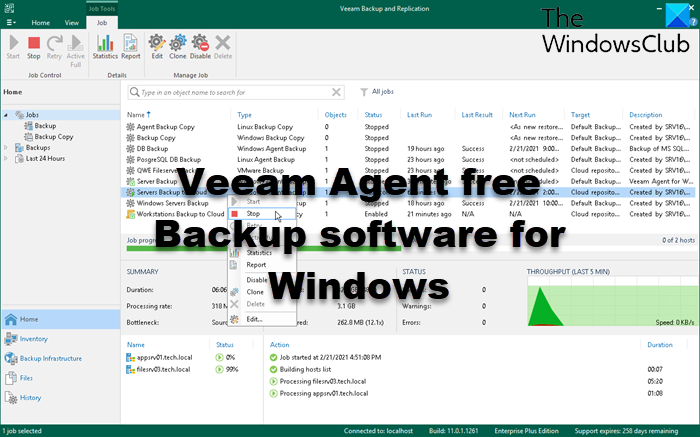
Veeam Endpoint Backup Free provides Image-based backups of your files, drives, or even the whole PC. Veeam Backup Free lets you backup, restore, and manage Virtual machines.
19] JaBack
JaBack is a free backup software with automation and email notifications.
20] MiniTool ShadowMaker
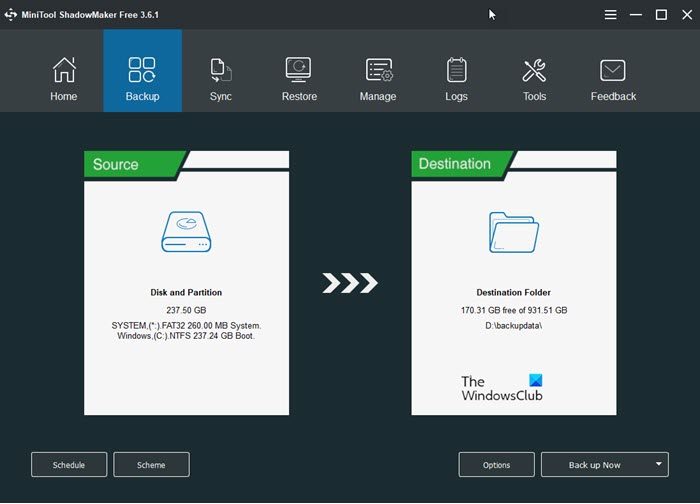
MiniTool ShadowMaker backup software offers an easy way to backup and restore data.
21] Renee Lab Data Backup software
Renee Lab Data Backup software lets you back up, recover, and clone your Windows installation easily.
22] Ocster Backup
Ocster Backup is a user-friendly application, and no technical knowledge is required for installation. You can backup the whole data of the computer with this tool. It saves the data in a compressed format so that the backup will occupy less space on your computer. Incremental backups and encryption of data with AES are the other special features of Ocster backup freeware. UPDATE: Ashampoo has acquired all Ocster Backup products, so we suggest you use Ashampoo instead.
23] Ashampoo Backup Free
Ashampoo Backup Free seems user-friendly. It has an uncluttered interface, and there aren’t too many tabs and options that can make the process overwhelming. You have to simply select which disk partition you want to back up, set a target location and time of the day when you’d like the backup to occur, and you’re done.
24] Duplicati
Duplicati is designed for online backups and you can use it to store encrypted backups online. It works with standard protocols like FTP, SSH, WebDAV as well as popular services like Backblaze B2, Tardigrade, Microsoft OneDrive, Amazon S3, Google Drive, box.com, Mega, hubiC. Also, you can back up the data locally.
25] Iperius Backup
Iperius Backup is a free backup software for Windows PC and Windows Server.
26] SyncBack Free Backup Software
SyncBack Free is the free version of SyncBack backup application that is available for personal, educational, charity, government, and commercial use.
27] BackupPC
BackupPC is a high-performance, enterprise-grade system for backing up Linux, Windows and macOS PCs and laptops to a server’s disk. BackupPC is highly configurable and easy to install and maintain. Get it at Github.
Read: Free backup software for Windows Server.
28] Bacula
Bacula is a set of computer programs that permit managing backup, recovery, and verification of computer data across a network of computers of different kinds. Based on Source Forge downloads, Bacula is an Open Source backup program available at sourceforge.net.
29] RescueZilla
RescueZilla is free software that lets you backup your computer. You can create a backup of all the disk partitions or a specific one. You can use this backup to restore your computer in case of a hard drive failure or if your data gets corrupted.
30] Back4Sure
Back4Sure is Windows freeware to backup your important data, documents, pictures, audio, video, and other files easily.
31] Cryotek CopyTools
Cryotek CopyTools can back up different files at the time they were scheduled.
Read next: 10 best professional Backup and Data recovery software for Windows.
If you are looking for cloud options, you might want to check out these Free Online Backup Services. Also, check out our post on Free Acronis True Image Alternative software. Here is a list of the best free backup software for VMware and Hyper-V virtual machines.
