
Most of you, using Microsoft Office, may be familiar with its Picture Manager. This tool includes basic functions and lets you manage, edit, share, and view your pictures wherever they are stored on your Windows computer. But if you are looking for a little more, you can check out these free photo editing software for Windows 11/10.
Free Image Editing Software for Windows 11/10
Here is a list of some of the best free Photo Editors for Windows 11/10:
- PhotoScape
- Image Tuner
- Artweaver
- GIMP
- Photoshop Clone Tool Alternatives,
- Paint.NET
- ON1 Effects
- GIMPShop
- Gimphoto
- Fotor Free Image Editing App
- FotoMix
- Photopus
- Hornil StylePix
- Toolwiz Pretty Photo
- Krita painting software
- Picture Window Pro
- Picasa desktop application
- Google Nik Collection photo editing software
- LazPaint.
Let us take a look at them.
1. PhotoScape
In my opinion, PhotoScape is one of the best free software for a complete image editing experience. If you see the feature list of this program, you would call this program, an image editor, image converter, image viewer, and a screen capturing tool, all rolled into one. PhotoScape is actually a fast and easy-to-use tool meant for superb image editing.
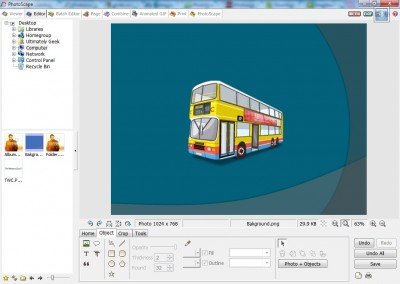
PhotoScape offers many features and allows many changes such as:
- Frames
- Change size
- You can add texts and other items while editing with PhotoScape
- Auto Contrast
- Balloons
- Bloom
- Brightness controller
- Combining
- Cropping
- Filter
- Mosaic
- Vignetting Filter
- Support for creating Animated GIF
- Clone Stamp
- Red-eye Removal
- And many more…
That was all in the list of photo editing features in PhotoScape, and I hope you will discover more features while using this application.
PhotoScape has many other tools built in that can help you a lot with photo editing. The following are the features of the PhotoScape:
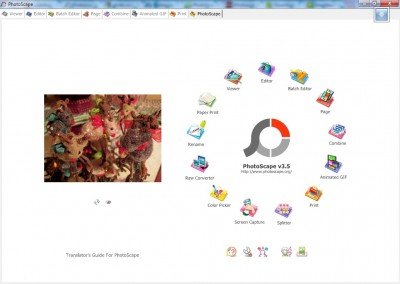
- Viewer: It can view photos from your folder or create a slideshow
- Editor: Already mentioned above
- Batch editor: You can batch edit multiple photos
- Page: You can merge multiple photos on the page frame to create one concluding photo
- Combine: You can even attach multiple photos vertically or horizontally to generate single concluding photo
- Animated GIF: Creates a final animated photo in .GIF format
- Print: It can print portrait shots and passport shots.
- Splitter: Splitter can wedge a photo into numerous pieces
- Screen Capture: A great tool for screen capturing.
- Color Picker: Color picking becomes very easy with PhotoScape.
- Rename: You can change photo file names in batch mode
- Raw Converter: It can convert RAW to JPG format
- Face Search: An awesome feature that can find similar faces on the Internet
I would definitely say that it is an awesome free image editor, with loads of features.
Read: Best Free Adobe Photoshop Alternatives for Windows PC
2. Image Tuner
This is another free software for batch resizing, converting, watermarking and renaming your digital photos and images from and to JPG, BMP, PNG, TIF and GIF formats.
The freeware will help you to prepare your digital photos to upload and publish them on the Internet or send via e-mail. It can be used to perform a basic set of operations, including batch resizing, converting, watermarking and renaming digital photos and images.
3. Artweaver Free
Artweaver Free is a simple freeware program that allows you to simulate natural brush effects, add artistic effects, and more to your images and paintings.
The free edition includes common image editing tools like gradient, crop, fill and selection tools, many brushes, allows Saving and playback of events, arrangeable palettes, many image and effect filters.
If you are looking for an online tool, you might want to check out these free online photo editors.
Other similar image editing freeware you may want to have a look at:
- GIMP
- Inkscape
- Photoshop Clone Tool Alternatives,
- Paint.NET
- ON1 Effects
- GIMPShop
- Gimphoto
- Fotor Free Image Editing App
- FotoMix
- Photopus
- Hornil StylePix
- Toolwiz Pretty Photo
- Krita painting software
- Picture Window Pro
- Picasa desktop application
- Google Nik Collection photo editing software
- Icecream Photo Editor
- LazPaint
TIP: Bzzt! Image Editor will let you create web-friendly images.
Is Adobe Photoshop Express free on Windows 11?
Yes, the Adobe Photoshop Express app for Windows 11 is free to download and use. However, there are some features that can be unlocked with the paid plan only. You may be able to use a paid option, but the changes can’t be saved for the output image.
Can I get Photoshop without paying?
No, you can’t get Adobe Photoshop without purchasing a membership. You can only get a 7-day free trial to the full version of the Photoshop app. When the trial period expires, your Adobe Creative Cloud Membership continues, unless you cancel it before expiring the trial period.
These free Batch Photo Editor software support batch processing which allows you to apply basic edits to multiple photos at the same time.
