
This post covers some of the best free AI Watermark Remover tools for photos and videos. If you have images or videos and are looking for an easy way to remove watermarks, logos, text, or other objects, these tools will help. Instead of manual work, the watermark removal process is handled automatically and hassle-free by AI. Unlike other free tools out there, these don’t blur the watermark or add a black strip/box on it, and completely remove it to get the output. We have covered online tools and AI watermark remover software in this list.
Best AI Watermark Remover tools for photos and videos
Here is a list of the best free AI Watermark Remover tools for photos and videos:
- Unwatermark AI
- Pixbim Video Watermark Remover AI
- EzRemove AI.
Let’s check these tools.
1] Unwatermark AI
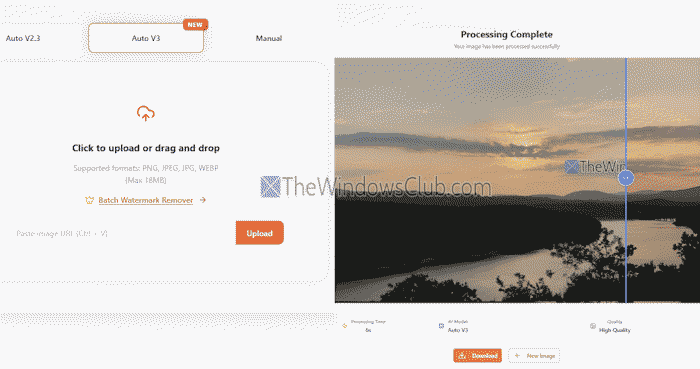
Unwatermark AI is an online AI watermark removal tool to remove a watermark or text from an image using AI. Its processing speed is faster, which makes it useful. Also, the entire process is fully automatic. You only have to upload an image, and it will process it in seconds. No sign-up is required to use it.
It supports PNG, WEBP, JPEG, and JPG image formats, and allows a maximum image size of 18 MB. You can upload an image from a PC or paste an image URL. After processing the input image, you can compare the input and output images for the watermark and quality. There won’t be any blurred area or patch covering the watermark in the output. If you like the output, use the Download option to save it to your PC.
Video files are not supported with this tool. There’s a separate tool for that that requires AI credits. You can access this tool from https://unwatermark.ai/.
Related: How to remove a watermark from a PDF on a Windows PC
2] Pixbim Video Watermark Remover AI
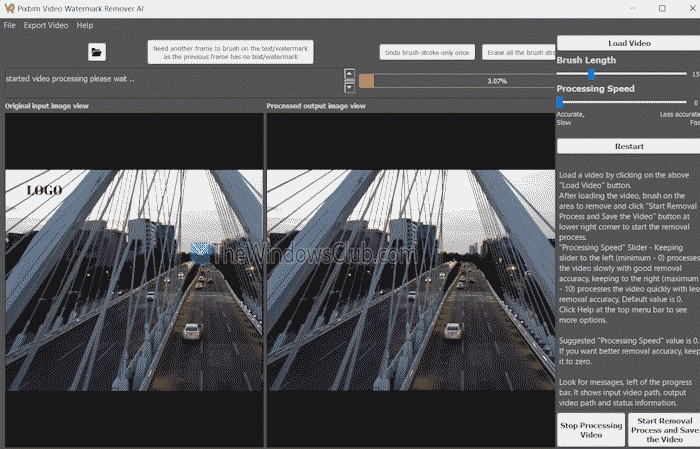
Pixbim Video Watermark Remover AI is a free software for Windows PC. It supports unlimited videos to remove the watermark. MP4, WMV, MPV, and other video formats are supported for watermark removal. Images are not supported. The best part is that it can remove static and dynamic watermarks. However, it works better with static text watermarks.
On its interface, use the Load Video button to add the input video, and it will show the original and processed output view modes. There, specify the region or watermark you want to remove using the brush, and press the Start Removal Process and Save the Video button.
If you find the processing speed slower, you can also adjust the processing speed and brush length to mark the watermark and process the video faster.
You can download this tool from pixbim.com/video-watermark-remover.
3] EzRemove AI
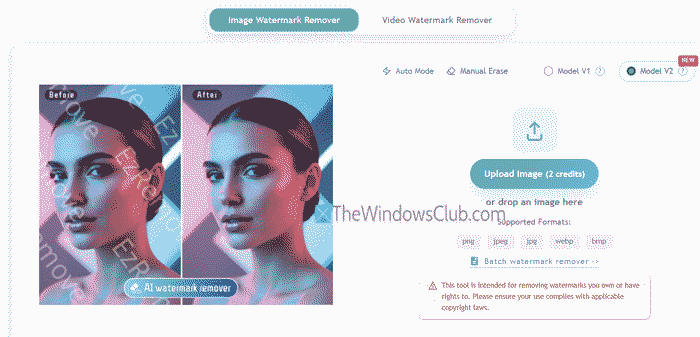
EzRemove AI is an online suite with AI Background Editor, AI Photo Editor, AI Photo Enhancer, Image Watermark Remover, Video Watermark Remover, etc. While most of its tools have limited or no access with a free trial, its Image Watermark Remover can be used for free, and only 2 credits per image are used to use its AI image watermark removal tool. With its free sign-up, you get 10 credits per day to process your images.
You can add WEBP, PNG, BMP, JPG, and JPEG format images to process them. Only one image can be added at once in the free version. Select the Auto Mode for AI processing, choose the AI model (Model V1 for standard quality or Model V2 for clearer quality), and upload your image. The rest of the process is done automatically to remove text or a watermark from the image.
Once done, press the Download HD button to get the output. To use this tool, visit ezremove.ai/watermark-remover/.
That’s it.
Now read: How to remove a Watermark in Word
Can AI remove watermarks from video for free?
Yes, AI tools can help remove watermarks from a video, but the free part is tricky. They might offer you a free trial, but that too will be very limited, and the user experience is not satisfactory. Instead, you can use other free tools to remove a watermark from a video. BeeCut and Apowersoft Video Watermark Remover are a few tools that can help you remove a watermark from a video.
What is the best AI to remove watermarks from photos?
Kapwing, PixelBin, Apowersoft, WatermarkRemover.ai, etc., are some good paid tools that can help you remove watermarks from photos. But there are also free tools that can help you remove a watermark from photos with one click. EzRemove AI and Unwatermark AI are tools of this kind. These offer limited features on their free plans, but are good to use. You can also use other free watermark removal tools for PC (without AI), like GIMP and Paint.NET, etc.
Read next: Best Free Watermark software for Windows PC.
