
If Streets of Rage 4 keeps crashing, freezes with a black screen, or won’t launch and gets stuck on the loading screen on your Windows PC or Xbox console, this post can help. There are different instances of this error: the game starts freezing and then crashes, or it crashes at startup. In this article, we will talk about this issue and see what you need to do to resolve it.
Why does my game keep freezing and crashing?
Usually, your game will freeze and then crash if the system requirements are not met or your computer is not capable of running the game for long periods. As for the former, first, check the system requirements of Street of Rage 4, and if they’re not met, you need to upgrade your hardware; but for the latter, you can start troubleshooting by ending all the related tasks and then try playing at lower graphics settings.
However, for some users, the game is not even launching; it crashes at startup. They should try to repair the game files as it’s most likely that it’s corrupted. There are some other solutions mentioned hereinafter that you need to check out.
Streets of Rage keeps crashing or freezing on Windows PC
If Streets of Rage 4 keeps crashing, freezing with a black screen, or won’t launch and is stuck on the Loading screen, on your PC or Xbox console, try the following solutions:
- Restart your computer or Xbox
- Remove Xbox Cache
- Verify Game Files
- Update your graphics drivers
- Install the latest version of Visual C++ Redistributables and DirectX
- Troubleshoot in Clean Boot
Let us talk about them in detail.
1] Restart your computer or Xbox
Let us start by restarting your computer or Xbox and see if that helps. If the issue is because of a temporary glitch, restarting will do the job. If you are on a computer, click the Power Button and select Restart. You should also restart your console, as this solution will work for that device as well.
2] Remove Xbox Cache
Xbox users should try to remove the cache as the issue can occur because of corrupted caches. You can try the following steps to do the same.
- Click and hold onto the power button for 10 seconds until you hear a beep sound.
- Turn the console back on.
- Try playing the game.
Hopefully, this will do the job for you.
3] Verify Game Files
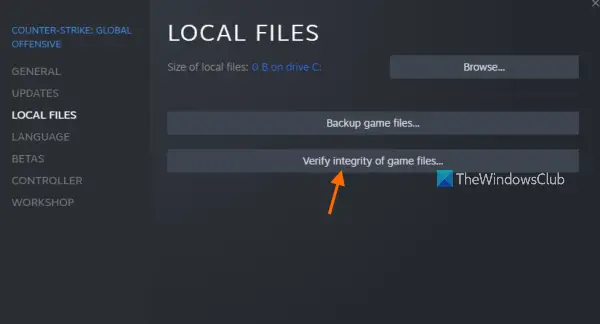
If your game files are corrupted, the game will obviously crash. To check if this is the case and repair it, you can use the Steam client app to verify its integrity. To do the same, follow the prescribed steps.
- Open Steam.
- Go to Library.
- Right-click on the game and select Properties.
- Click on Local Files > Verify the integrity of game files.
Wait for it to finish and check if the issue persists.
4] Update your graphics drivers
You can not play a graphics-intensive game without updating your GPU drivers from time to time. There are a dozen ways to do this; below, we have mentioned a few methods that you can try.
- Download Driver and Optional Updates from Settings.
- Go to the manufacturer’s website and download the driver.
- Use free driver update software.
- Update your GPU driver from the Device Manager.
Once you have updated your drivers, try playing the game, and hopefully, your issue will be resolved.
5] Install the latest version of Visual C++ Redistributables and DirectX
Visual C++ Redistributables and DirectX are required to create an environment to run the game. The game may be crashing because of incompatibility, as both of these tools are outdated on your system. You need to install the latest version of DirectX and Visual C++ Redistributable on your computer and check if the issue persists.
6] Troubleshoot in Clean Boot
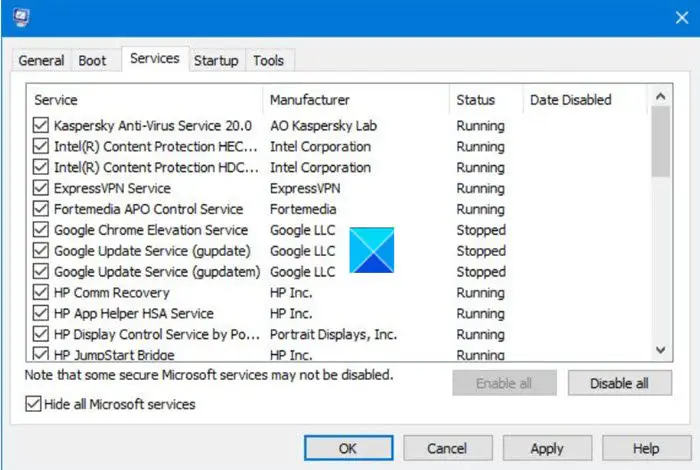
Last but not least, we can not forget the existence of a ton of third-party applications on your system. These apps can interfere with your game or Steam and cause trouble. So, you need to perform Clean Boot and disable the processes one by one. This way, you will stumble upon the culprit, just remove it and your issue will be resolved.
Hopefully, these solutions will do the job for you.
System Requirements of Streets of Rage 4
The following are the system requirements to play Streets of Rage 4
Recommended
- OS: Windows 11/10
- Processor: Intel i5+
- Memory: 8 GB RAM
- Graphics: NVIDIA GTX 960 / Radeon HD 5750 or better
- Storage: 10 GB available space
It is very important to check the system requirements before downloading the game, especially if it’s a paid one.
Why does my game keep crashing?
If your game is just crashing without freezing, then check if the game files are corrupted. To do that, check the third solution, as it will scan and repair your game. But if that doesn’t work and you know your game files are corrupted, you’ll need to uninstall the game.
Also Read: Fix Fallout Stuttering and Lag issues on Windows PC.
