Fix: Metro Tiles are not responding in Windows 8

Speed Up My PC

Some users, using Windows 8 are finding that their Tiles on the Start Screen, do not work or respond. One of the most common issues some of them have encountered, is when you try to click on a Metro tile nothing happens i.e. it won’t open any application. In this article I’ll suggest you few tips that would help resolve this problem.

Step 1:

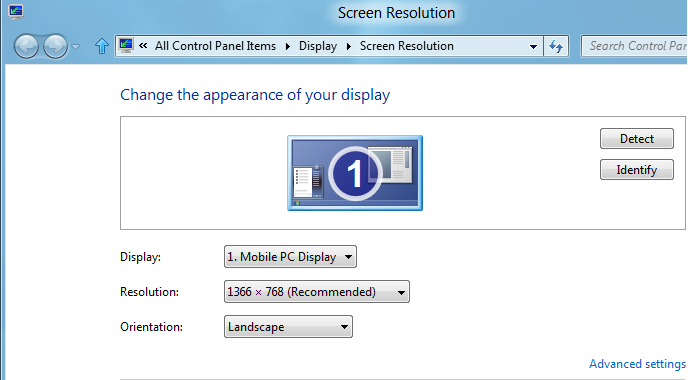
According to lot of cases I have come across – in order for the Metro tiles to work, we need our screen resolution to be more than 1024×768. So make sure you have a display resolution on or over 1024×768.  To change the resolution Right click on Desktop and click on Screen Resolution.

1 Fix: Metro Tiles are not responding in Windows 8

Step 2:

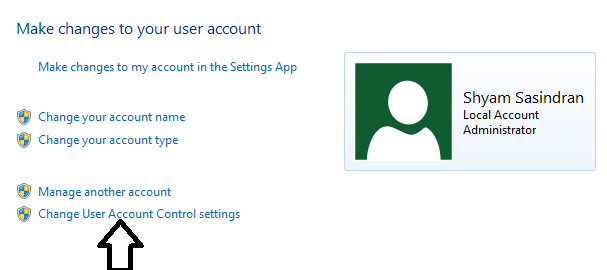
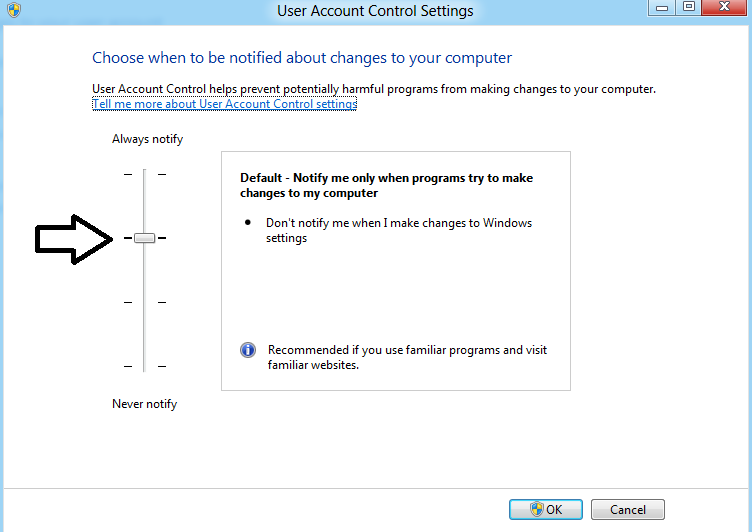
It’s been reported that if UAC is turned off completely then the Metro applications won’t work properly. So make sure you don’t disable UAC. To check it

  • Click on Control Panel
  • Scroll down and click on “More Settings

2 Fix: Metro Tiles are not responding in Windows 8

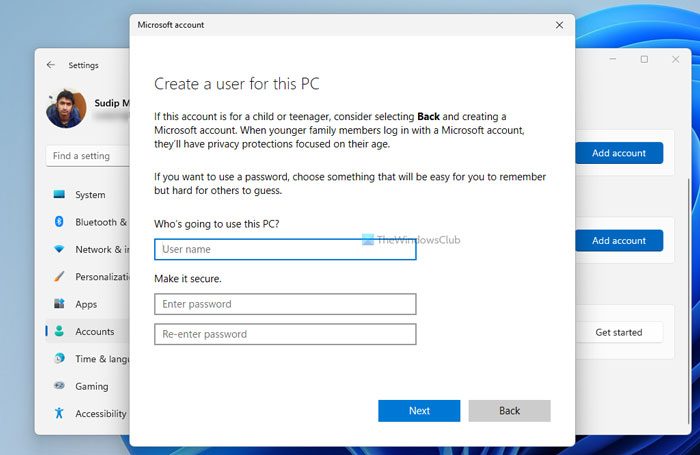
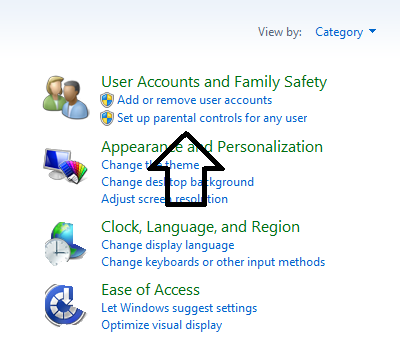
  • Click on “User Accounts and Family Safety”
3 Fix: Metro Tiles are not responding in Windows 8

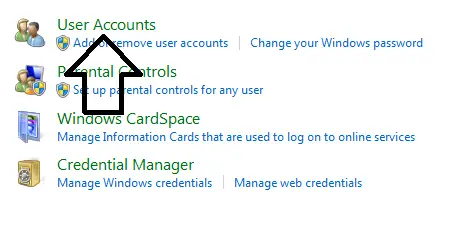
  • Click on User Accounts

4 Fix: Metro Tiles are not responding in Windows 8

5 Fix: Metro Tiles are not responding in Windows 8

  • Make sure the you have set the settings to “Default” as shown in the below picture.
6 Fix: Metro Tiles are not responding in Windows 8


Step 3:

Some users have reported facing this problem when using Windows Live Account as the default login, if you are doing so, change it to Local account, i.e. Create a new Windows user make it login under Local account. Then see if it works.

  • Click on Control Panel and Highlight Users then click on Other users (Add User)

7 Fix: Metro Tiles are not responding in Windows 8

  • Now click on “More about logon options”.

8 Fix: Metro Tiles are not responding in Windows 8

  • Now select “Local Account

9 Fix: Metro Tiles are not responding in Windows 8

  •  Then fill in your information and Log off you account to log-in to new account.

10 Fix: Metro Tiles are not responding in Windows 8

Step 4:

Finally if you have issues with your Display drivers Metro tiles cause not to work. So I would recommend to install latest display drivers. If the drivers are not installing try to install it under compatibility mode. Few GPU manufactures has tweeted that they would send the drivers through Windows update. So apply all the Windows update and see if it works.

Note: If you are using Avast antivirus software, you might want to turn it off and see if it helps resolve the issue.

If nothing works then run a Repair Install of Windows 8.

Posted by on , in Category Windows with Tags
Shyam aka “Captain Jack” is a Microsoft MVP and a Windows Enthusiast whose area of expertise is Crash Dump Analysis and Advanced Windows troubleshooting. He has developed Windows based Tools like SF IE Restorator for troubleshooting Internet Explorer issues and SF Diagnostic Tool for collecting Crash dump files for troubleshooting purpose. He blogs at captaindbg.com.
  • Naim Oliveira

    e para quem tem resolução de 1280x720p? nenhum fix?

  • Naim Oliveira

    and who has a resolution of 1280x720p? any fix?

  • Rbruton

    The Metro wont work on HP mini since the max screen res is 1028×600 is that corrct

  • Atif Hassan

    many thanks, had the local ac issue so logged out of live and in as local and bingo!

  • http://www.facebook.com/Astralprojection Drew Milet

    Garbage None of those fixed them

  • James Harris

    I was having this problem, and it turned out that the cause was Avast!, my antivirus program. Disabling avast’s shields fixed the problem.

    (Windows 8 has its own built-in antivirus software, so I’m not worried about getting infected.)

  • Shydinesh

    This was it. Avast causing problem at my end too. Thanks. I was about to go back to Windows 7 (which I may in future after exploring it more).

  • http://twitter.com/j0lliyo njalk

    Worked for me aswell! Turning off avast!

  • Richard

    Tried all the fixes (apart from repair install) – nothing works. The apps – Weather/Bing/Finance/News/Travel etc. all update Metro Start screen thumbnails ok but just show loading symbol when full screen version selected.

    I have Windows 8 RTM x64 on notebook – default resolution 1680 x 1050.

    They did work briefly during installation but stopped working after first post-install updates.

  • Joel Sansregret

    Same here, was working fine at first but now 2 days after windows 8 installation they stopped working, now I tried deleting them and re installing them and some of them work, Mail, Music, Video but some others still don’t like News and Weather…

  • pally

    Thanks! This problem was was really, really bugging me – I’ve tried everything! Avast is now off and everything’s fine :) )

  • giovannipds

    Your comment was helpful for me as well. Thank you James!

  • Pixilico

    the apps stopped to work just when i`ve run the system repair… how can it be?

  • Marcelo Jardim

    Hey, I disabled avast and solved my problem. Thank You!

  • Educ8r

    YAY, I’m so glad I found this! Avast was indeed the culprit.

  • cvfMan

    Are you using the free version? I’m asking because I don’t know how to turn it off. Help!!!!

  • cvfMan

    No Worries!!! I fix it, it was indeed Avast! Thanks a lot! :)

  • MissCheevis

    Had to remove Avast! for it to work. Get rid of any antivirus software you have running — you don’t need it if you’re using Windows 8

  • Hans de B.

    Avast was the problem. There’s a essential update available at Avast. After installing this update Windows 8 including apps is running great.

  • Micahihli

    that was my problem as well, just need to edit behavioral sheild

  • fatboy

    Uninstalling AVAST did the trick for me. Thanks!

  • Coolmona

    none of the solutions here or on the Internet so far could fix my metro apps not working, unfortunately

  • Richard

    As by far the most common fix is removing Avast AV I tried the same with Kaspersky Internet Security 2013 I use. It immediately solved the problem.

    I then re-installed it and the metro apps still work fine. The issue seems to be with the in-place upgrade I made from Windows 7. It doesn’t seem to migrate across correctly.

  • TheCapt548

    I wish I would have read this first, I backed up my files and did a fresh install which worked…but I haven’t re-installed Avast. Now I know not to re-install it.

  • Windows8Sucker

    I have AVAST and disabling it doesn’t fix this problem.
    First the Store was broke with the message “Something is wrong…”
    , now I can’t open apps that were originally installed. I can install NEW apps , but can’t open existing ones installed at an earlier date.

  • Stefi Ash

    I have the same problem, have you found out anything? I need help

  • Taowine

    Thanks James. I disabled Avast and it works :)

  • Joseph Cascio

    Yeah this just started happening. Any app I click open for a second or two on the loading screen then kicks me back to the Start Menu. I don’t have Avast. Any suggestions

  • Shaun Ryal

    Not mentioned here is the fact a simple update in the windows 8 store will fix the issue of applications not running… Try it guys it worked for me :)

  • R79133

    And where or how do you get to this fix?

  • Lux

    Exactly the same here (The Only difference I have Windows 8 Pro)

  • David Rance

    Initially the tiles worked. After a few days they didn’t and so I tried all of the suggestions listed above. None of them worked. Lastly I tried the repair and that was so slow. It managed to go from 19% to 22% done in over an hour. I couldn’t wait any longer so I tried a clean install. That went fast and smoothly – until I came to activation. It refused to activate, saying that mine was an upgrade and needed an earlier version of Windows. So I reinstalled Win XP, had then to download Service Pack 3, and finally I was able to reinstall Windows 8. The tiles worked fine and I’ve had no more trouble, apart from the fact that I don’t know what caused the problem in the first place so I’m waiting for it to happen again! :-|

  • Pablo de A. Gomes

    ATTENTION, FRIENDS!

    Ok, people, all my problems with the apps was over when I updated the Avast Internet Security. Its new version identify the Windows 8 apps, and everything is doing well, now!

  • Daveyde

    I have the identical problem as Richard. I have an HP Touchsmart. My downloaded upgrade to W8 worked fine, then a Windows update screwed it up. Still not working well, all of the above cited sites do not open. I do not have Avast on my computer, so that’s not the culprit.

  • Ajay

    Had the same problem. But it was due to Kaspersky Internet security 2013. All issues were solved once I uninstalled the interenet security. Once the windows store was updated, reinstalled kaspersky and everything works fine…

  • Chas Cartmel

    My weather and Travel tiles suddenly stopped working after a batch of Windows updates. All settings here are as stipulated above. All other tiles function as they used to do.

  • brianmef

    This can also be caused by Kaspersky or possibly other anti virus programs. I do know AVG works with Windows 8 ok.

  • Joseph Cascio

    I’m not using any antivirus other than Windows Defender which comes with windows 8. The issue since then has stopped happening though. Not sure what or why.