
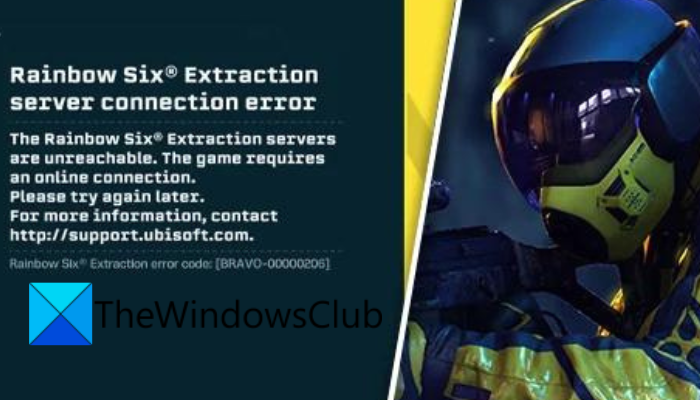
Are you experiencing the Rainbow Six Extraction server connection error code BRAVO-00000206? Rainbow Six Extraction is a popular multiplayer tactical shooter game that is developed by Ubisoft. It is loved by millions of gaming enthusiasts. However, many users have reported a “server connection error” when trying to play the game or connect to game servers. This error is accompanied by the error code BRAVO-00000206 and the following message:
The Rainbow Six® Extraction servers are unreachable. The game requires an online connection.
Please try again later.
For more information, contact http://support.ubisoft.com.
Now, if you are one of the affected users, this guide will help you get rid of the error code BRAVO-00000206 on Rainbow Six Extraction. But before that, let us try to understand the scenarios triggering this error.
Why am I getting Rainbow Six Extraction server connection error?
There can be several reasons why the error at hand is triggered. Here are some of the potential causes:
- The game servers may be down. Make sure Rainbow Six Extraction servers are up and running.
- If your internet connection is unstable or unreliable, you may experience this error. Hence, test your internet connection and make sure it is working fine.
- It could also be caused due to missing or corrupted game files. So, try verifying the integrity of your game files to fix the error.
- DNS inconsistency can also cause the same error. In that case, you can switch to a public DNS like Google DNS to fix the error.
- Your antivirus or firewall might have blocked the game from connecting to the servers and thus the error. So, try disabling your security suite and see if the problem is fixed.
Fix Rainbow Six Extraction server connection error code BRAVO-00000206
Here are the solutions you can try to fix the Rainbow Six Extraction server connection error with error code BRAVO-00000206:
- Check the server status of Rainbow Six Extraction.
- Restart the game and/or Ubisoft Connect.
- Check your internet connection.
- Power cycle your router/ modem.
- Verify the game files.
- Switch to Google DNS.
- Disable antivirus or firewall.
1] Check the server status of Rainbow Six Extraction
Before trying any advanced fix, check the current server status of Rainbow Six Extraction. If the servers are down at the moment, you will face the error at hand. Rainbow Six Extraction’s servers might be experiencing technical difficulties like server outage or maintenance work. In that case, you will need to wait for the servers to come back online to clear the error.
To check the current server status of Rainbow Six Extraction, try a free server-status detector tool. You can also check for related updates on the official social media pages of Rainbow Six Extraction. The support team keeps the users informed regarding server issues on their Twitter and other social networks.
In case there is no server issue at the end of Rainbow Six Extraction and you still get the same error, you can move on to the next potential fix to resolve the error.
Read: Disconnected due to transmission error on Modern Warfare.
2] Restart the game and/or Ubisoft Connect
It is recommended to restart the game and/or Ubisoft Connect a couple of times and see if the error is resolved or not. Since the game or launcher may have a temporary glitch, a simple restart should work in these cases. So try this simple method before moving on to advanced solutions. If it works for you, well and good. If it doesn’t, try the next fix to resolve the error.
3] Check your internet connection
The connection errors or being unable to connect to server issues are usually facilitated due to an unstable internet connection. Since this game requires an active internet connection to run smoothly, make sure your internet connection is working and stable.
You can test your internet speed and ensure that it is good enough for gaming. If there are some internet connection problems on your PC, you can try troubleshooting the WiFi issues. Additionally, make sure you have updated your network driver as connectivity problems and errors can also be caused by outdated network drivers.
For gaming, users prefer a wired connection over wireless because it is more reliable. You can switch to a wired connection and see if it fixes the error for you. Or, you can try changing to a different stable network connection and check if the error is resolved.
In case you find out there is no internet problem, you can try some other fix to resolve the error.
See: Connection Interrupted error in COD Black Ops Cold War.
4] Power cycle your router/ modem
At times, connectivity issues are caused due to bad router cache. If this error is caused by a corrupted router cache, power-cycling your router or modem should fix it. Here’s how to do that:
- Firstly, turn off your router, remove its power cord, and then wait for at least 30 – 45 seconds.
- Now, plug in your router and switch it on.
- After that, connect to the internet and open your game to check if the error is resolved or not.
If that doesn’t work, try the next fix.
Read: You have been disconnected from the local network Halo Infinite.
5] Verify the game files
Next, verify the integrity of your game files. In many instances, such errors are triggered due to broken and missing game files. Hence, if there are bad game files of Rainbow Six Extraction, you should be to fix the error by verifying the integrity of the game files and repairing them.
Ubisoft Connect users can follow the below steps to verify and repair the game files:
- First, start Ubisoft Connect and navigate to its Games tab.
- Now, select the Rainbow Six Extraction game and then click on the Properties option.
- Next, press the Verify Files option and when you get a prompt, choose the Repair option. Ubisoft Connect will take a few minutes to verify and fix your game files.
- Once the process is complete, relaunch the game and check if the error is resolved or not.
If the error still persists, try the next potential fix.
See: Fix Dying Light Network Disconnected error on PC.
6] Switch to Google DNS
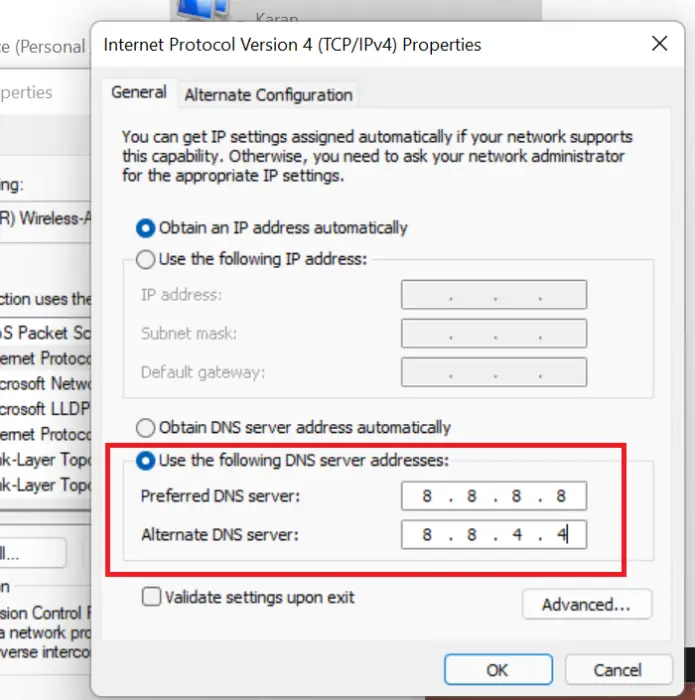
This error might be facilitated due to inconsistency with your DNS server. So, if the scenario is applicable, you can try changing your default DNS server by setting up a public DNS server on your PC which is more reliable. Most of the users prefer using Google DNS Server. So, try switching to Google DNS and see whether the error is resolved.
You can follow the below steps to switch to Google DNS Server on Windows PC:
- Firstly, open the Run dialog box by pressing Win+R and then enter ncpa.cpl in it to bring up the Network Connections window.
- Next, right-click on your active connection, and from the appeared context menu, choose the Properties option.
- After that, in the newly opened Properties window, tap on the Internet Protocol Version 4 (TCP/IPv4) option and then click on the Properties button.
- Now, click on the Use the following DNS server addresses option and type in the below addresses:
Preferred DNS server: 8.8.8.8
Alternate DNS server: 8.8.4.4
- Lastly, press the Apply > OK button to save changes.
You can now relaunch the game and check whether the error is stopped now.
See: You have lost connection to the Destiny servers error.
7] Disable antivirus or firewall
If nothing else works, try disabling your antivirus or firewall and see whether the error is resolved. Many a time, your security suite blocks the connection between your game client and the game servers due to false-positive alarms. As a result, you end up seeing errors like the Rainbow Six Extraction server connection error. If this applies, you can fix it by disabling your antivirus/firewall.
In case disabling your security suite works, you can try whitelisting the game and the game launcher through your firewall. And, add them to the exception or exclusion list of your antivirus. Hopefully, this method will work for you.
That’s it.
Can’t connect to Rainbow Six Extraction servers?
If you are unable to connect to Rainbow Six Extraction servers, make sure that the game servers are not down at the moment. Also, check your internet connection to make sure there are no connectivity issues. If that doesn’t work, try verifying your game files, switching to Google DNS, or disabling your security suite.
Why is Rainbow Six Extraction not working?
If Rainbow Six Extraction is not working properly or keeps crashing, it could be caused because of outdated graphics drivers. In other scenarios, the problem might be caused due to overclocking, corrupted game files, and software conflicts.
Now read:
