
When trying to access Outlook.com or accessing any of its sections, you get a looping error that eventually stops and says: Something went wrong, and we can’t sign you in right now. Please try again later, then here is how to resolve this. It can happen with Office 365, Outlook WebApp, etc.
Something went wrong, and we can’t sign you in right now error in Outlook.com
Forum users report that the issue occurs only on Edge, but not on Chrome or any other browser they try. It is likely a browser issue where the cookies have become corrupted. Here are our suggestions:
- Clear your browser cache
- Check Microsoft Services Status
- Disable Extensions & Add-ons
- Reset the browser.
Since we will talk about resetting the browser, make sure to take note of all extensions and a backup of passwords, if any.
1] Check Microsoft Services Status
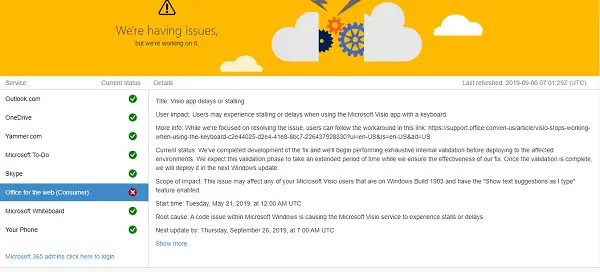
Check if any Microsoft online services are down or facing issues here. If you see Outlook.com with a red cross, it’s happening because of it. Wait for the Outlook service to restore, and then sign in again.
2] Clear your browser cache
The files may be corrupt. It could be any file, such as cookies or a security file, which verifies your identity. If that’s the case, then Outlook.com cannot verify whether you have been authenticated earlier. You need to clear your browser cache.
On Edge
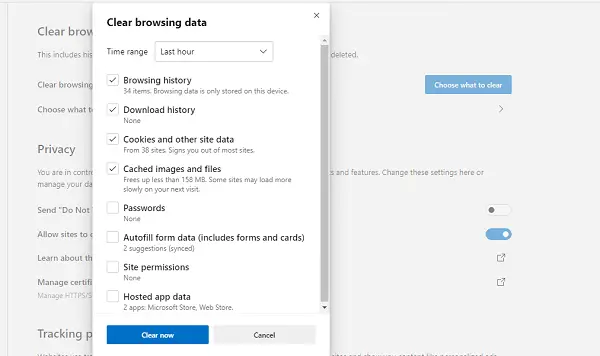
- Type edge://settings/privacy in a new tab, and hit Enter
- Click on what to clear
- Select Time Range as All time and check the box against Cookies and other site data
- Click on Clear now button.
On Chrome
- Go to chrome://settings/privacy
- Scroll to the end to find Clear Browsing Data
- Select Cookies and other site data.
On Firefox
- Go to about:preferences#privacy
- Select Cookies and Site data
- Click on Clear data.
In any of these browsers, you can delete only website cookies and site data.
3] Disable Extensions & Add-ons
You may have extensions that control the way you connect to the internet. It would be best if you can disable the extensions or addons or start the browser in safe mode. This way, you can check if they are responsible.
4] Reset the browser
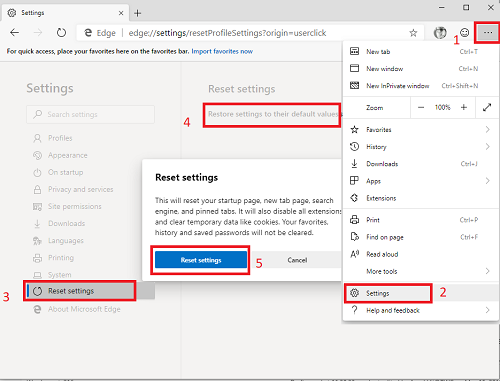
If nothing works, it would be best to reset the browser in which you are experiencing the problem. You will lose all extensions, settings, and other features that you use daily. Read our tutorial on resetting Chrome, Firefox, and Edge.
If you have connected your account to an account on the browser, you should be able to access most of the features once the problem is resolved.
I hope these tips were useful and helped you resolve the “Something went wrong, and we can’t sign you in right now” error.
