
If your Firefox crashes frequently, then starting Firefox in Safe Mode or Troubleshoot Mode is a good way to troubleshoot Firefox issues, before you decide to reset Firefox settings. Today, we will see four ways to start Firefox in safe mode on Windows 11/10, with Add-ons, Themes, and other extensions disabled.
How to start Firefox in Safe Mode or Troubleshoot Mode
1] Via the about:support page
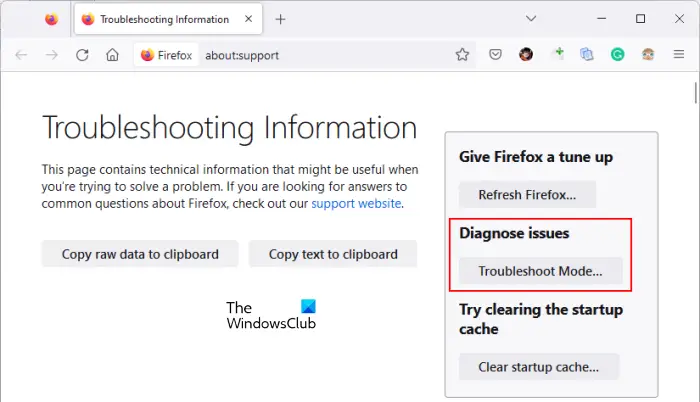
Firefox Safe Mode is also known as Troubleshoot Mode. Troubleshoot Mode is a feature for diagnosing issues in Firefox. When you open Firefox in this mode, all extensions, themes, and other custom settings are temporarily disabled.
To start Firefox in Safe Mode or Troubleshoot Mode, follow the steps provided below:
- Click on the three horizontal lines on the top right side.
- Go to “Help > More troubleshooting information.”
- A new tab will open in Firefox. Click Troubleshoot Mode under the Diagnose issues section.
2] Using UI
Open the Firefox browser, and click on the Settings button in the top right corner. Next click on the small blue circular question mark sign. The following menu will open.

Select Restart with Add-ons disabled. You will be asked if you are sure.

Click Restart. And you will see the following message box.
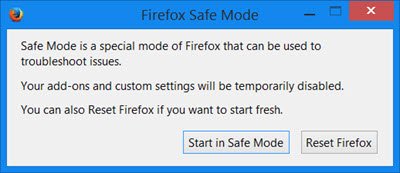
You need to select Start in Safe Mode.
Firefox will start in safe mode with all add-ons disabled.
3] Using Shift Key
You can also press the Shift key and click on the Firefox icon to start it in safe mode. You will see the same two message boxes displayed above.
4] Using Run box
In Windows 11/10, from the WinX Menu, open the Run box, type the following, and press Enter key:
firefox -safe-mode
You will see the same two message boxes displayed above – before the browser opens in safe mode.
5] Launch Firefox in safe mode using the command line
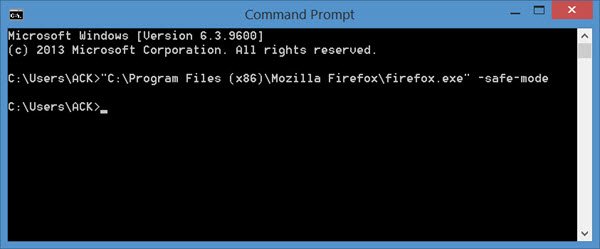
Open a command prompt windows, type the following and hit Enter:
"C:\Program Files (x86)\Mozilla Firefox\firefox.exe" -safe-mode
You will see the same two message boxes displayed above, and Firefox will start in safe mode.
Firefox stuck in safe mode
If Firefox is stuck in Safe Mode and keeps opening in Safe Mode, it’s possible the firefox.exe process hasn’t exited. You can end the process using Task Manager, or you can restart your Windows PC. This is known to help.
