
Check out the new Windows 10 features Edge Browser, Windows Hello, better Virtual Desktop. new security features like Enterprise Data Protection, Device Guard, Antimalware Scan Interface, and so on to keep malware at bay. Continuum, Cortana, Universal Apps, Start Menu, Task View and more! Deciding to skip a version number, Microsoft chose to name ‘Windows Threshold’ as Windows 10 instead of Windows 9.
Where did Windows 9 go
There were many reports in the market sharing various titles for this new OS. They referred to it as “Windows vNext”, “Threshold” (The official internal development codename), “Windows 9” (logical) and even “Windows TH”, Windows 365 or simply that it would be called just Windows. But, Microsoft halted these rumors and presented its new OS as the “Windows 10”.
After analyzing the last few Windows names, it was logical to conclude that Microsoft would be calling it Windows 9, but to everyone’s surprise, Microsoft broke this chain. Many people are curious to know that where is Windows 9? While Microsoft has not commented officially, Microsoft said:
This product, when you see the product in your fullness I think you’ll agree with us that it’s a more appropriate name. Windows 10 will run across an incredibly broad set of devices – from the Internet of Things, to servers in enterprise datacenters worldwide. Some of these devices have 4 inch screens – some have 80 inch screens – and some don’t have screens at all. Some of these devices you hold in your hand, others are ten feet away. Some of these devices you primarily use touch/pen, others mouse/keyboard, others controller/gesture – and some devices can switch between input types.
It appears that Microsoft wanted to signify that this release would be the last ‘major’ Windows update, since in future, the company is planning to make smaller updates regularly to the Windows 10 code base.
If you remember, the software giant had skipped a version with Microsoft Office too!
Windows 10 features and highlights
1. Compatibility & One App Store for all
Windows 10 will be compatible with all the devices such as Xbox, PCs, smartphones, tablets or other tiny gadgets that run the Windows Operating System. Further, Microsoft has planned to deliver a Unified App Store for developers so that they can easily create and deploy their applications across multiple device types. Now, it will become very easy for the consumers also to discover, purchase or update the apps. Apart from Modern UI or Universal apps, the Windows Store will also support desktop apps, as well as other digital content.
2. Modern Business Specific
Microsoft with its Windows 10 has tried to reduce the business complexities regarding the security, identity and information protection by offering better solutions to such problems. Now, the organizations can also customize an app store according to their needs and environment. This unique app store will support volume app licensing, flexibility distribution and reuse of licenses when necessary. Read more at Improvements in Windows 10 for Business and Enterprise.
3. The Start Menu is Back
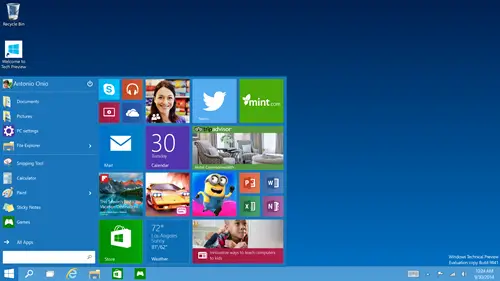
Windows 10 brings back the Start Menu similar to the Windows 7 and enables the users to access their frequently used files and functions in a go. Further, it comes with a new space for personalization of programs, favorite apps, people and websites – and includes Tiles as well.
4. Everything runs in a window
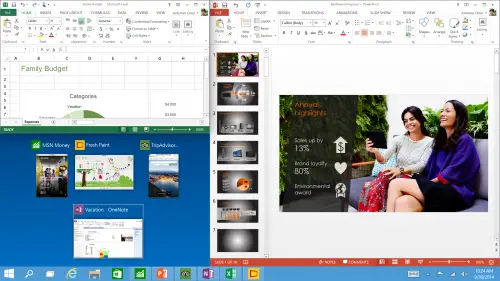
Windows Store apps now opens up in the form of a Window and allows the users to resize or move them around like any other program window. Users can even maximize, minimize or close the app with a click on the title bars at the top of the app window. They are being now called Universal Apps.
5. Multiple Desktops
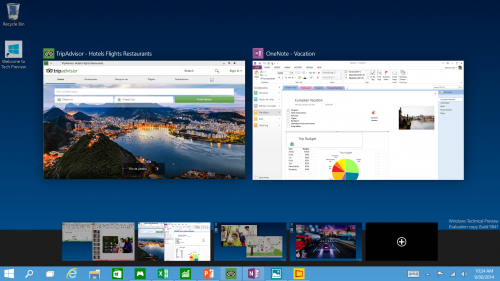
It’s now easy to create and switch among distinct desktops while working to avoid overlapping of several apps or files on a single desktop.
6. Faster File Search
File Explorer now displays the recently as well as frequently visited files and folders, thereby making it easier to find your files on which you were working.
7. New Task View Button
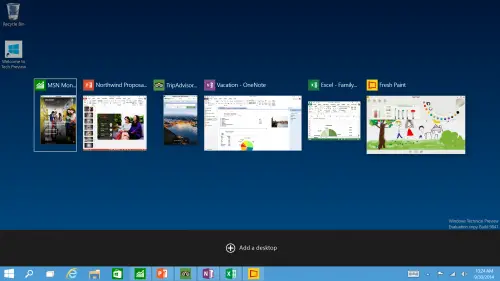
Addition of a new Task View Button on the task bar enables the users to view all the open apps and files collectively in one view. It allows quick switching as well as one-touch access to any of the created desktops.
8. Snap Enhancements
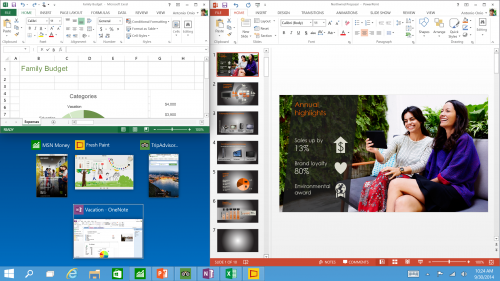
Includes a new quadrant layout which allows at most four apps to be snapped on the same screen. In addition, Windows will also display other running apps and programs for additional snapping. Even, it will also provide smart suggestions to fill the available screen space with the other open apps. Snap Assist is a new feature on Snap.
9. The Command Prompt will get common keyboard shortcuts.
10. Continuum is a new technology that automatically senses how you are using your device and adapts the UI accordingly. Useful, when you are using your Surface Pro as a laptop or as a tablet.
11. Edge, the new browser will be introduced, along with new security features.
12. Integration with Microsoft’s digital assistant – Cortana.
13. Music and playlist integration in OneDrive.
14. Universal apps that work on Windows 10 PC, Windows 10 Mobile and XBOX One. An XBOX App for Streaming of live games to a PC.
15. Unified messaging using Skype Integration
16. A new Notification Center
17. Touch optimized Office applications
18. Windows Hello and Passport for personalized authentication without the use of passwords.
19. Device Guard for protecting devices against malicious applications.
20. Support for media formats such as FLAC and MKV
New features in Windows 10 v1809
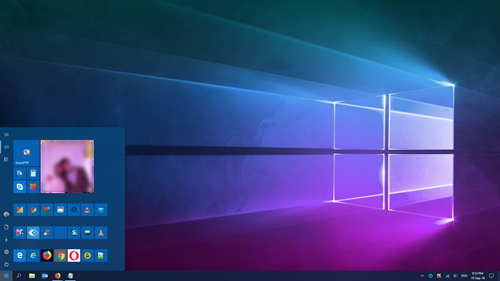
Microsoft has removed some features in Windows 10 v1809, but it has also added new features. Let us take a look at them.
Windows Settings Changelog
This is one place where changes are very much visible. Windows has now enabled/added features which either has been long awaited or has been very useful to be enabled by default.
- Settings Section is more helpful now: Microsoft has been trying to improve Windows Settings to help users to solve their common problems without going anywhere. It now suggests common questions on the sidebar, and also offers tips and suggestions on the home page.
- Smarter Windows Update: Windows will use machine learning to figure out when the update should be installed. Right now it’s either predefined or manual. Depending on how you use your PC, and when you use the PC, it will now offer a smarter solution on when to update your PC.
- Dedicated HD / HDR Settings: Windows now offers anew Windows HD color page which lets you configure HDR settings.
- Work for different Region? If yes, You can change the regional format settings like Calendar, First day of the week, Currency, Dates, Times, and Currency.
- Keyboard: Typing insights are now available along with SwiftKey which now powers the touch and on-screen keyboards.
- Bluetooth: Similar to smartphones, you can see battery percentage of devices like mouse, keyboard within settings. They should also appear in the action center.
Apart from there are two subtle, but important changes. First, Focus Assist will automatically enable for all the games, and the mouse can be centered on the screen when using the magnifier tool.
Microsoft Edge Changelog
- Reading & PDF: Edge offers themes for reading along with line focus which will help you in reading big articles. When reading PDF and Books you can add notes, pin/unpin the toolbar, look up definitions of words, refresh the books pane using a pull gesture, pinned books will have a progress icon view, and local PDf files appear in history.
- Edge Hub & UI: It’s settings page has been redesigned to give a HUB like look with an acrylic navigation pane. When it comes to UI, a lot of cosmetic changes including drop shadow tabs, icons instead of text, and you can now control which website can play the video automatically. If any website starts playing media, the volume icon will light up to draw your attention.
Windows UI Changelog
- Dark Mode is taking over Windows. It’s now available for File Explorer, and Settings as well. If you love it, you can now have a true dark mode in Windows.
- Finally, a clipboard which is smart. The new Cloud Clipboard experience not only syncs between devices, but you can also see the copied content by using the WIN+V shortcut.
- Snipping Experience: The current Snipping tool has been replaced with a Snip & Sketch app which includes support for the freehand screenshot as well. A shortcut will be available in the action center for quick access. You can also configure to open this Snip & Sketch app.
- Screen projection: Depending on your content, you can choose how to stream from your PC to an external device. You have modes for gaming, productivity or work, and video.
- Mixed Reality: You don’t need to use a monitor anymore for Mixed Reality, and the user can view the real world as well when using the headsets with its inbuilt camera.
System apps changelog
Apps on Windows 10 has received some important changes. Starting with the Phone App now can sync with both Android and iPhone for photos, notifications, SMS and more. The older version of Phone App has been deprecated.
Notepad is one of the apps that has got serious attention. It not only features line endings support for Unix but also for Mac, i.e., LF and CR. You can choose to wrap around text to make sure they are not lost in infinity! Apart from that, you can Zoom in and out and also see line numbers. Making sure Bing is not left behind, right-click, and you can search on Bing.
If any of your apps are consuming too much battery, you can see them under Power usage and tends tabs in Task Manager
Pen Changelog
- You can use the new snipping experience by pressing a button on your Pen. You will need to configure your pen though.
- Configure your pen to use it as a mouse.
- You can ink directly into text boxes.
Activity History Sync with Fresh Install
When you clean install Windows 10 on a new PC, the OOBE or Out of Box Experience setting will offer consumers to enable activity history sync. This means when they use the same account, they can start from where the left.
Windows 10 Hardware requirements
The hardware requirements would remain the same as for Windows 8.1.
- Processor: 1 GHz or faster with support for PAE, NX, and SSE2
- RAM: 1 GB (32-bit) or 2 GB (64-bit)
- Hard disk space: 16 GB (32-bit) or 20 GB (64-bit)
- Graphics card: Microsoft DirectX 9 graphics device with WDDM driver.
Windows 10 in action video
Microsoft has also released an official video for the public under the tagline “Introducing Windows 10 – The best Windows yet”. This video is presented by Joe Belfiore, the current Corporate Vice President at Microsoft Operating Systems Group, showing a glimpse of the new Windows operating system. Refer this Checklist for smooth installation of Windows 10 Technical Preview .
Windows 10 availability
Microsoft has planned to release the “Windows 10 Technical Preview” today as part of the “Microsoft’s Insider Program”. The download will enable the developers as well as the enthusiasts to get their hands dirty with this new OS. For now, the preview will be available for the laptops and desktops only and later the tech-giant will release a version for servers also. Microsoft also confirmed that the full version of Windows 10 will globally release in mid-2015.
Windows 10 pricing
Unfortunately, Microsoft hasn’t revealed any info regarding the pricing of Windows 10, but, we hope to hear something from the Redmond at its next BUILD conference in April 2015.
Now read: Windows 10 under the hood features.
So, stay tuned with us, to know more about Windows 10! Read our Windows 10 Review for more!
