
If WWE 2K26 or WWE 2K25 keeps crashing on your PC, this post will help you. WWE is a professional wrestling video game developed by Visual Concepts and published by 2K. But recently, users have complained that the game keeps crashing on Windows devices. Fortunately, you can follow a few simple steps to fix it.

Fix WWE Keeps Crashing on Windows PC
If WWE 2K26 or WWE 2K25 keeps crashing on your Windows 11/10 PC, follow these suggestions to resolve the issue:
- Check System Compatibility
- Lower Graphics Settings
- Verify the Integrity of Game Files
- Update Visual C++ Redistributable
- Update Graphics Drivers
- Close Background Application
- Run WWE on dedicated GPU
- Turn off Steam Overlay
- Whitelist WWE from Windows Firewall
- Troubleshoot WWE in Clean Boot Mode
- Reinstall WWE.
Now let’s see these in detail.
1] Check System Compatibility
Before you make any major changes to your device, check if it meets the recommended requirements to run WWE 2K26 or WWE 2K25. It’s possible it doesn’t meet the requirements to run the game, which could cause it to crash.
The recommended PC specs for running WWE 2K26 are an Intel i7‑7700 or AMD Ryzen 5 2600 CPU, 16 GB RAM, and a GPU like NVIDIA RTX 3060 (12 GB VRAM) or AMD RX 6700XT, running Windows 11/10 with 120 GB free storage.
2] Lower Graphics Settings

Misconfigured graphics settings can also be why WWE 2K26 or WWE 2K25 keeps crashing. Lower the game’s graphics settings, restart it and see if it helps.
3] Verify the Integrity of Game Files
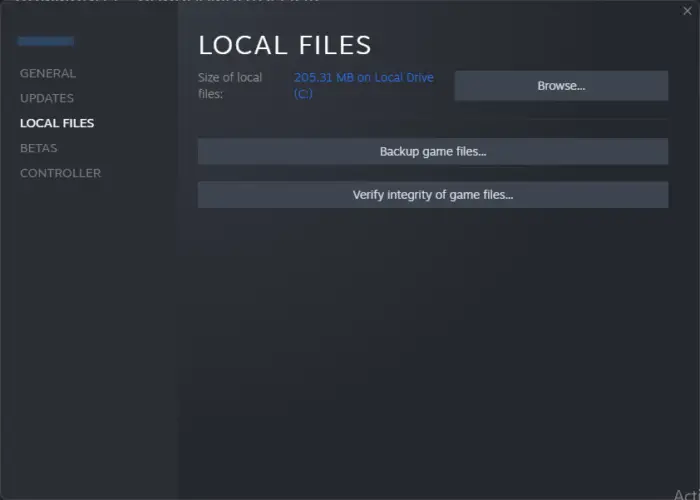
Outdated or corrupted game files can make WWE 2K26 or WWE 2K25 crash. This can happen due to a bug or a recent update. Verify the integrity of the game files and see if it helps. Here’s how:
- Open Steam and click on Library.
- Right-click on WWE 2K26 from the list.
- Select Properties > Local Files
- Then click on Verify Integrity of Game Files.
4] Update Visual C++ Redistributable
C++ Redistributable is a set of runtime library files that enables the use of pre-built code and helps with app installation. If its packages become corrupted, it can cause several programs to misbehave. In that case, you will need to reinstall the required version. Here’s how you can update Visual C++ Redistributable.
5] Update Graphics Drivers
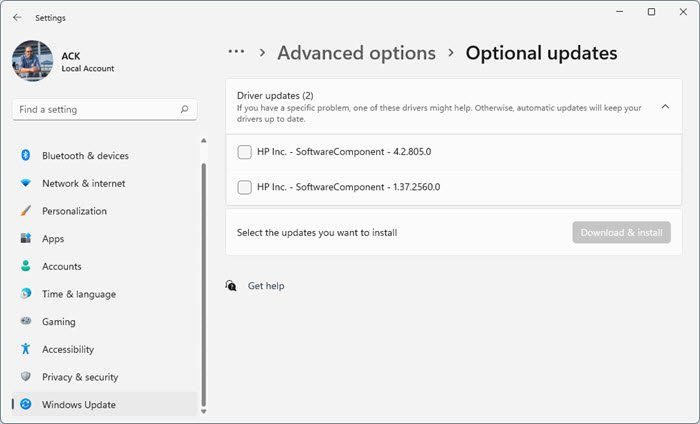
Next, check whether the graphics drivers are up to date. This is because outdated or corrupt drivers often crash games and apps. Here’s how you can update the graphics drivers.
You may want to use free Driver Update software or tools. NV Updater and AMD Driver Autodetect will update the graphics card driver if that’s the case.
6] Close Background Applications
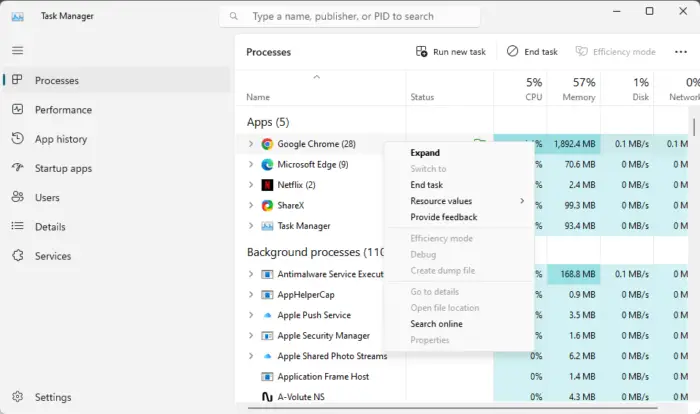
Another reason WWE 2K26 or WWE 2K25 crashes is the need for more memory and system resources. Closing all apps and programs running in the background will free up system resources for the game. Here’s how you can close background applications:
- Press Start, search Task Manager and click on Open.
- Navigate to Processes and see which program is consuming the most memory.
- Right-click on the program and select End task.
7] Run WWE on dedicated GPU
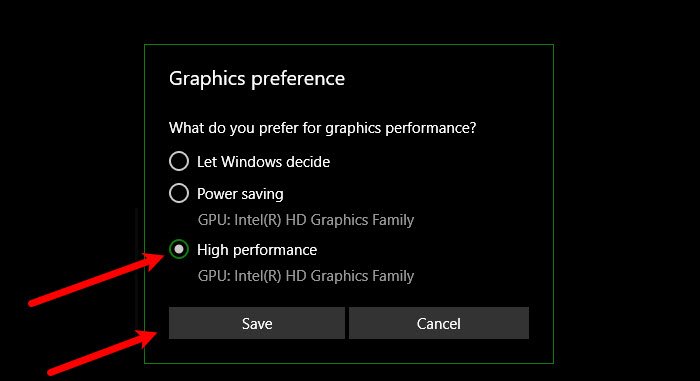
The next thing you can try is to run the game on a dedicated GPU. To do so, follow the below steps.
- Open the Settings window by pressing Windows + I shortcut key.
- Navigate to System > Display > Graphics.
- Locate WWE 2K26, and tap on it.
- Choose Options.
- Select High performance in the following window.
- Click on Save.
Now, check whether the problem is solved.
8] Turn off Steam Overlay
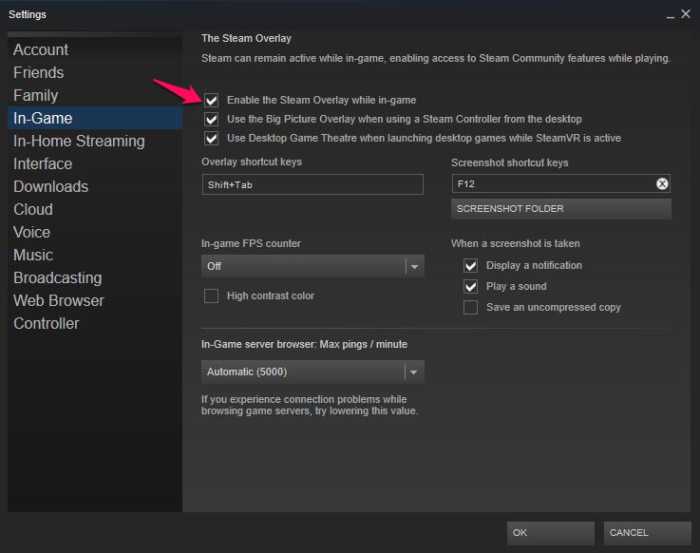
Steam overlay is not a new feature introduced to the gaming platform. And, as reported by users, it is one of the major reasons for crashes in various games, including WWE 2K26. You can disable this feature by following the steps below.
- Open Steam and navigate to the Library option.
- Locate and right-click on WWE 2K26.
- Choose the Properties option.
- From the following window, uncheck the Enable the Steam Overlay while in-game option.
That’s it. Relaunch the game and check if the problem continues.
9] Whitelist WWE from Windows Firewall
The Windows firewall can interfere in the game’s launch and cause the crashing issue. You will have to allow the game from the Windows firewall to solve the problem. Furthermore, you can even temporarily disable any third-party antivirus program installed on your system while running the game.
10] Troubleshoot WWE in Clean Boot Mode
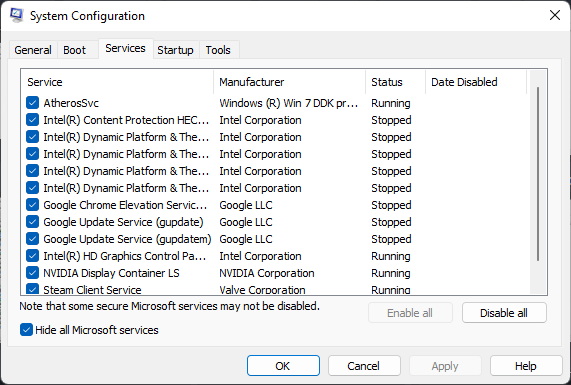
Run WWE 2K26 or WWE 2K25 in clean boot mode if the error isn’t fixed. Performing a Clean Boot will boot Windows with minimal drivers and startup programs, to help determine if a background program is interfering with your game or program. Here’s how you can perform a clean boot.
If the game runs smoothly in clean boot mode, manually enable one process at a time to determine which one is the culprit. Once you’ve identified it, disable or uninstall the software.
11] Reinstall WWE
If none of these suggestions helped you, consider reinstalling WWE 2K26 or WWE 2K25. This has been known to help most users fix the error.
Read: Fix WWE Error Unable to communicate with the server at this time
I hope this helps.
What are the minimum specs for WWE 2K26?
The minimum PC specs for running WWE 2K26 require at least an Intel i7‑4770 or AMD Ryzen 5 1500x CPU, 16 GB of RAM, and a GPU like NVIDIA RTX 2060 or AMD RX 5700 with 6 GB of VRAM, running on Windows 11/10 with 120 GB of free storage.
Why does WWE 2K26 keep crashing PC?
WWE 2K26 or WWE 2K25 may crash on Windows devices if its graphics settings are misconfigured or the game files get corrupted. However, it can also occur if system resources and memory are available but not sufficient to run the game.
