
In this post, we are going to talk about what you can do if you come across the error message that says, “There is a problem with your game’s setup” in NFS Hot Pursuit Remastered.
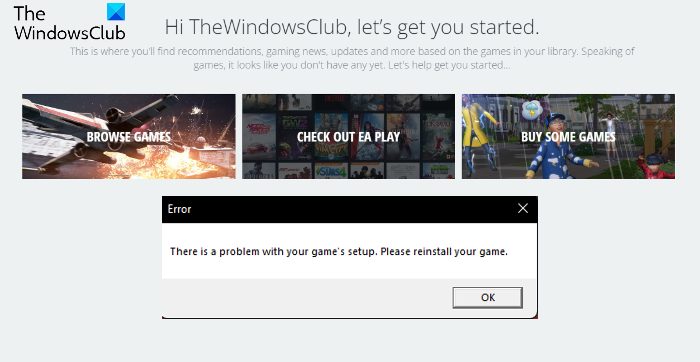
The NFS series is one of the most popular racing series we all grew up playing. To keep up the hype, developers continue to release new editions of the game. NFS Hot Pursuit Remastered is also an example of this type of edition. However, many users have reported seeing an error message indicating an issue with the game’s setup. Please reinstall the game. If you are encountering the same error message, continue with the troubleshooting guide to fix the issue.
There is a problem with your game’s setup: NFS Hot Pursuit Remastered
Here are all the effective workarounds you can try if you face the error – There is a problem with your game’s setup in NFS Hot Pursuit Remastered.
- Launch the Game Launcher in Administrator Mode
- Repair the Game
- Download the Required Visual C++ Dependencies
- Delete the Origin Cache Data
- Download the Latest Windows Update
- Update the Graphics Driver
Now, let’s check out all these solutions in detail.
1] Launch the Game Launcher in Administrator Mode
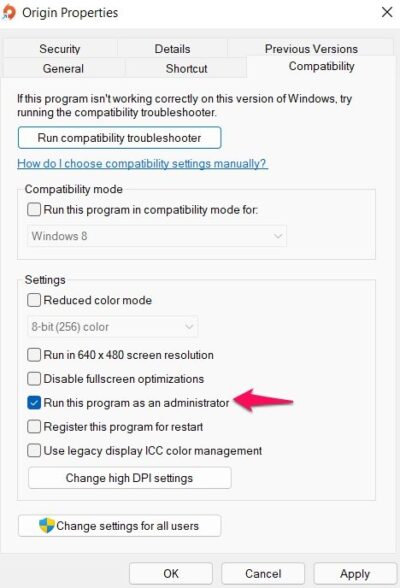
The very first thing you should do is run the NFS Hot Pursuit Remastered game launcher in administrator mode. Sometimes, not having the administrative privileges can cause different issues, including the one you are currently facing. So, grant all administrative rights and check whether it makes any difference. Here are the steps you need to follow.
- To begin with, close the Origin launcher completely from the system. And, make sure it is not running in the background.
- Now, right-click on the Origin shortcut and choose the Properties option.
- Click on the Compatibility tab.
- Checkmark the Run this program as an administrator option.
- Click on Apply > OK.
Now, open the Origin launcher, launch the game and check if the problem continues.
2] Repair the Game
Corrupted game files can also be a major reason you are experiencing the issue mentioned. In such a situation, the best thing you can try is to repair the game. To do that, you can follow the below steps.
- First off, launch the Origin client on your system.
- Tap on the Game Library option present at the left panel of the screen.
- Right-click on NFS Hot Pursuit Remastered and choose to Repair option from the context menu.
- Now, wait for the repair process to complete.
- Once completed, try launching NFS Hot Pursuit Remastered and check whether you’re still seeing the error message.
If the problem persists, try the next workaround.
3] Download the Required Visual C++ Dependencies
If your system doesn’t feature the required Visual C++ dependencies, it’s no surprise you are facing the mentioned error message. Legacy games like NFS Hot Pursuit Remastered require some of the exclusive dependencies that no longer come along with Windows. To be very specific, your system must feature the x86 and x64 versions of Visual Studio 2013.
So, download and install the Microsoft Visual C++ dependencies via visiting the Microsoft Download Center. Just search for the required package using the search bar. Once installed, launch the game and check if the problem is fixed.
4] Delete the Origin Cache Data
Similar to any other application, Origin also stores cache data to offers faster boot time and a smooth experience. However, over time, this cached data consumes a lot of storage space and causes various problems. As a solution, you will need to clear the cache. You can do so by following the steps below.
- First off, close the Origin launcher completely, and make sure it is not even running in the background.
- Now, open the Run dialogue box by pressing the Windows + R hotkeys.
- In the search bar, type %ProgramData%/Origin, and press the enter key.
- Select everything inside the folder except the LocalContent folder and press the delete key.
- Now, press the Windows + R shortcut key again to open the Run dialogue box.
- Type %AppData% and press the enter key.
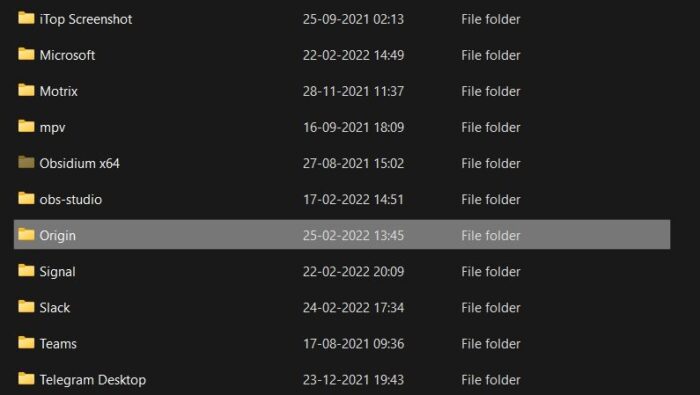
- Locate and open the Origin folder.
- Delete everything inside, and delete the Origin folder as well.
That’s it. Now restart your system, and launch the game. Check if the problem is fixed or not.
5] Download the Latest Windows Update
If you haven’t updated your system in a long time, you should consider doing so to fix the issue. Windows Update brings many improvements, and downloading them is the best way to resolve any problems affecting your system. To do so, follow the steps below.
- Press the Windows + I shortcut key to open the Settings menu.
- Click on the Windows update option present at the left panel of the screen.
- Click on Check for Update options.
- Now, windows will look for any available updates.
- Once found, download and install it on your system.
Now, restart the PC, launch the Origin launcher, and open Need For Speed Hot Pursuit Remastered. Check whether the problem is fixed.
6] Update the Graphics Driver
Outdated graphics drivers can also be a major cause of the problem mentioned. So, update your graphics driver to the latest version to fix the problem. Here are the ways by which you update your system drivers.
- Update the driver to the latest version via visiting the Windows Optional Updates feature.
- You can download the latest graphics card by visiting the manufacturer’s website, downloading the latest version of your graphics card driver, and installing it manually. But before you run the installer file, you may have to uninstall the current version of your graphics card driver from the Device Manager.
Once the system has downloaded and installed the latest driver update, launch the game and check if the problem is fixed.
Is Need For Speed Hot Pursuit Remastered on Steam?
Yes, Need For Speed Hot Pursuit remastered is available on Steam. Just, launch Steam on your system, and search for the game. Click the download icon and enjoy the game once it’s downloaded.
Is NFS Most Wanted Good?
NFS Most Wanted is good, but for its own time. You just can’t compare NFS Heat with NFS Most Wanted, as both are among the best racing games of their own time. Yes, the gameplay and mechanics of NFS Heat are way better than Most Wanted. However, considering the advancement of technology and game engines, the reason is quite understandable.
Read Next: Need for Speed Heat keeps crashing or freezing on PC.
