
I often used to help people in forums, where they mentioned that their hard drive had crashed and that they had lost all their data just because they did not check the health of their hard drive – and nor did they have any backups. We often run Disk Cleanup but seldom run Hard Drive scans to ensure our hard drive is in good health. It is imperative that you keep a watch on your Hard Disk health.
Chkdsk alternative disk error checking software
Although Windows computer systems have a built-in disk error checking scanner, which offers many command-line options to scan the hard drive for Errors and Bad Sectors, you can use a third-party free disk error-checking software to scan hard disks for errors. In this article, I’ll talk about the following CHKDSK alternatives to repair and fix bad sectors on Hard Drive:
- Windows Surface Scanner
- HD Tune
- Macrorit Disk Scanner
- EaseUS Partition Master Free
- AbelsSoft CheckDrive
- HDDScan.
Best free hard drive repair software for Windows PC
1] Windows Surface Scanner
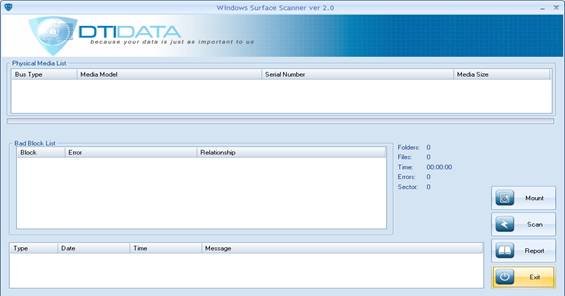
Windows Surface Scanner will scan for bad sectors and generate a report for you. This program will not correct the bad sectors, but it just finds them for you. Once you download it run the setup to install it. When you open the application, you’ll get the end-users agreement. Accept it.
Once you open it, first you will have to mount your Hard drive, and then click on Scan. You can download the Windows Surface Scanner from here.
Read: Bad sectors were encountered during the format
2] HD Tune
HD Tune hard disk utility is a hard disk utility, and a freeware tool for Windows OS, which uses a set of simple steps to check the status of hard drives (internal, external or extractable). Apart from checking the status, the application is measures the drive’s performance, errors during scanning, health status and much more.
Read: Windows is stuck on Repairing disk errors, This might take an hour to complete
3] Macrorit Disk Scanner
Macrorit Disk Scanner can also help you fix bad sectors. The program displays complete statistics on the top panel, which include the selected device, scan speed, number of errors found, scan area, elapsed time, and estimated time remaining to complete the scan.
4] EaseUS Partition Master Free
EaseUS Partition Master Free includes a surface test that can scan for and fix bad sectors.
5] AbelsSoft CheckDrive
AbelsSoft CheckDrive offers you an easy way of checking your PC’s hard drives for errors and fixing them. Even Solid-state drives (SSD) are supported.
6] HDDScan
HDDScan is a freeware utility for hard drive diagnostics (RAID arrays, Flash USB and SSD drives are also supported). The program can test storage devices for errors (Bad Blocks and bad sectors), display S.M.A.R.T. attributes, and modify some HDD parameters, such as AAM and APM.
Fix Hard Drive Bad Sectors
OK, you found a Bad sector – so what next? First, start backing up your data, as there is a good chance your hard drive may fail soon. If your hard drive is still under warranty, return it for repair under the warranty. If not, the next step is to find a way to repair these bad sectors. There are several programs available that claim to repair bad sectors. Each Hard drive manufacturer manufactures its own Hard drive diagnostic tools. Check their website and run a diagnostic just to be sure. I’ll recommend a few programs that may be able to fix bad sectors.
- HDD Bad Sectors Repair is a good program to repair Maxtor hard drives.
- Ultimate Boot CD has a couple of Hard drive repair utilities.
- Windows Surface Scanner discussed above from DTI Data is a Chkdsk alternative to fix Hard Drive Bad Sectors.
- Seagate SeaTools is a powerful diagnostic application that helps you to quickly determine the condition of the disk drive and Hard Disk health of an external hard drive and computer
- Data Lifeguard Diagnostic for Windows PC performs drive identification, diagnostics, and repairs on most Western Digital hard disk drives.
- Hard Disk Validator checks Hard Drive for bad sectors.
If nothing works, consider replacing your hard drive, which is now reasonably priced.
Read next: The disk does not have enough space to replace bad clusters.
