
There have been complaints that .ogg files cause File Explorer to crash on some Windows 11/10 computers. You can sometimes crash Windows Explorer simply by viewing the folder that contains a .ogg file. The same applies to all files in the .ogg format. If you’re in the same boat as others, don’t worry. The issues can be easily resolved by following the simple instructions given below. But first, let’s clear up what an OGG file is since this is why you are here.
What is an OGG file?
Audio files compressed with Ogg Vorbis are known as OGG files. This file type resembles MP3 files in appearance and sound, but offers higher quality and may contain song metadata, including information about the artist and the song’s track. The OGG file format is supported by many audio players, including some portable devices as well.
OGG file not deleting; Crashing Windows Explorer
If you’re experiencing this problem on your device, you can uninstall the Web Media Extensions and see. Several users have reported that they’ve been able to resolve this problem after uninstalling the Web Media Extensions application from their Windows computers. If you experience the same error on your computer, try this solution. Here is how to do it:
Windows 11
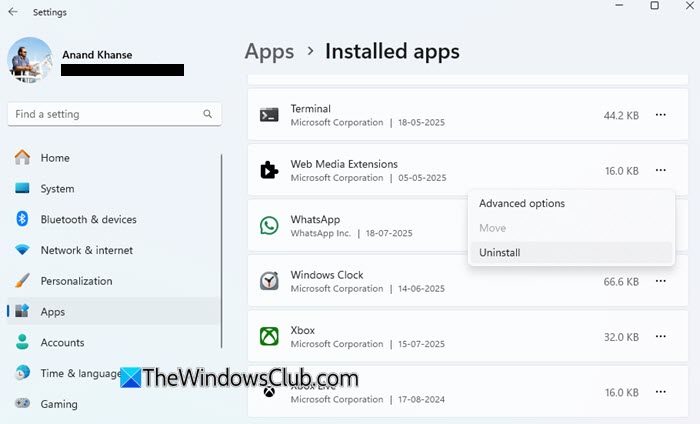
- Open Windows 11 Settings.
- Now go to the Apps category.
- Click on Installed apps.
- Under App list, scroll down and select the Web Media Extensions application.
- Click on the Uninstall button to remove the application.
Windows 10
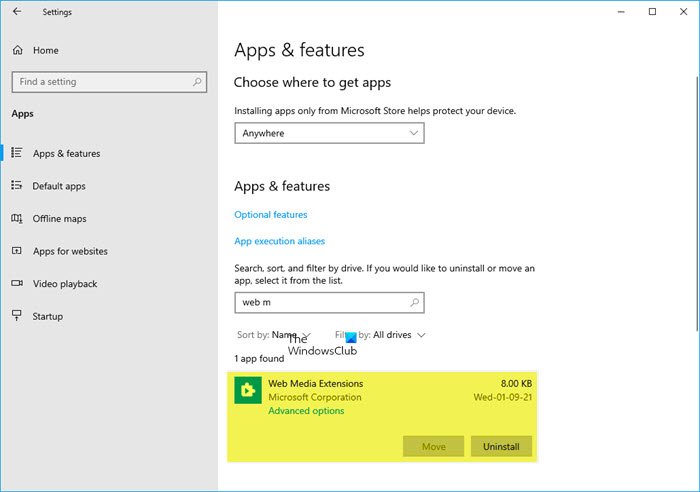
- Open the Windows 10 Settings app.
- Now go to the Apps category.
- Click on Apps & features.
- Under App list, scroll down and select the Web Media Extensions application.
- Click on the Uninstall button to remove the application.
Web Media Extensions allows you to play OGG, Vorbis, Theora coded videos on Windows 11/10. Uninstalling it and then re-installing it from the Microsoft Store has been known to help.
If this does not help then start your Windows in Safe Mode, and see if you can recreate the problem. If the problem has disappeared, then it’s probably some startup program that causing Explorer to crash. Perform a Clean Boot and try to troubleshoot and identify the offending program.
Installed Add-ons are usually the culprit! Check if you have installed any helpers or add-ons to your explorer. Uninstall or disable them. Often, even 3rd-party shell extensions can cause Explorer to crash on particular actions. Several programs add items to the right-click context menu. To see them in detail, you may download the freeware utility ShellExView.
Hope something helps.
How to Convert an OGG File
You can convert an OGG file to MP3 format using free online OGG converters, but File Zig Zag or Zamzar is the best option to accomplish this task.
Related: Windows 11 is very slow to save files; Save As appears late.
