
This post features different solutions you can try to fix League of Legends ping spikes on Windows PC. League of Legends is a popular online multiplayer Battle Royale game. The game is inspired by Defence of the Ancients, a custom map for Warcraft 3. However, like any other Battle Royale game, League of Legends has always found itself surrounded by problems. But among all, the issue troubling users the most is ping fluctuations. Users have reported that the ping suddenly spikes in the game for no reason. Worry not if you face the same problem; we have you covered. Just follow the solutions below to get rid of the issue.

League of Legends ping spikes on Windows PC
Below is a list of effective solutions you can try to fix League of Legends ping spikes on Windows PC.
- Restart the game
- Try a VPN
- Temporarily disable the Firewall
- Download the latest network driver update
- Change the DNS settings
- Temporarily disable other network-connected devices
- Use Hextech Repair Tool
- Clear DNS cache
- Check for ongoing server issue
Now, let’s take a look at all these solutions in detail.
League of Legends has high ping, but the internet is fine
1] Restart the game
Before trying anything technical, go through the restart process. According to many users, the problem is temporary and can be fixed with a simple restart. So, restart the game and check if it makes any difference. If not, continue with the guide.
2] Try a VPN
Using a VPN can be an effective solution to eliminate the ping fluctuation issue in the game. In most cases, a VPN slows down the internet, but it can also solve ping issues. The situation becomes more realistic if there’s a problem with your ISP.
3] Temporarily disable the Firewall
The chances are low, but Windows Firewall can also be the culprit behind the issue. You will have to temporarily disable the Windows Firewall settings to solve the problem. If this solves the case, you need to figure out the rule or any other feature responsible for monitoring web traffic.
See: Fix Game Stuttering with FPS drops in Windows
4] Download the latest network driver update
An outdated network driver can also be the main reason behind the mentioned problem. So, download the latest network driver update to fix the problem.
5] Change the DNS settings
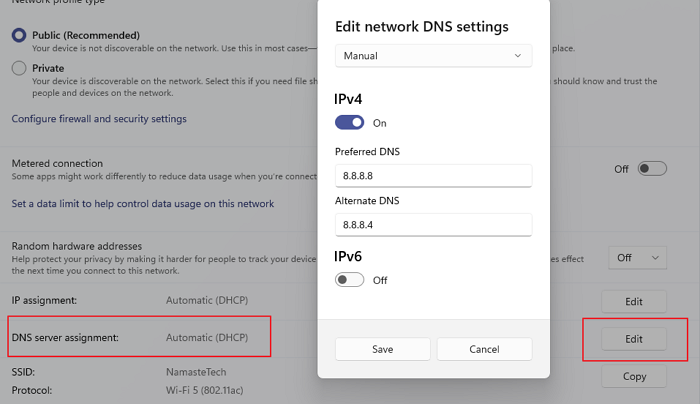
Changing the DNS settings can do wonders in the situation. As it turns out, if you are connected to a weak DNS server, you will face ping fluctuation in different games. Currently, Google DNS is considered best for playing online multiplayer games and regular uses. Below are the steps to follow to switch to Google DNS.
- To begin with, open Settings using the Windows + I shortcut key.
- Click on Network & internet present on the left panel of the screen.
- In the following window, choose Wi-Fi or Ethernet.
- Select the network to which you are connected.
- Click on the Edit option present next to the DNS server assignment.
- In the prompt that pops up, change Automatic to Manual.
- Choose between IPv4 or IPv6.
- To connect to Google DNS, enter 8.8.8.8 in the Preferred section, and 8.8.4.4 in the Alternate section.
- Save the made changes, and that’s it.
Launch the game and check if you are still facing the ping issue.
6] Temporarily disable other network connected devices
While playing online multiplayer games like League of Legends, you should ensure that no other devices are connected to the router. Other devices like tablets, phones, TVs, or other desktops can consume internet bandwidth, which will automatically result in ping fluctuations.
See: Fix High Disk & Memory Usage when playing Games
7] Use Hextech Repair Tool
Hextech Repair Tool is the official troubleshooting application provided by Riot Games. You can use it to eliminate any issues in the game, including ping issues. So, download the tool and use it to solve the problem.
8] Clear DNS cache
League of Legends’ sudden ping spike can be caused by a large amount of DNS cache. Thankfully, you can solve the issue by clearing these unwanted files. So, clear the DNS cache, and check if it makes any difference.
9] Check for ongoing server issue
If the game is under maintenance for some reason, you will face sudden ping spikes. In this situation, you can’t do anything but wait until the developers finish the server maintenance. You can check for anyone going on maintenance by Riot Games’ official Twitter handle.
Read: How to force quit a Full-Screen Program or Game
Why is my ping spiking on my PC?
There can be multiple reasons why ping keeps spiking on your PC. But among all, a slow or unreliable internet connection is considered the main culprit. The issue can also occur due to outdated drivers, network congestion, firewall configurations, and limited bandwidth.
Why does my ping keep spiking in League of Legends?
League of Legends is an online multiplayer game; thus, if many devices are consuming the internet simultaneously, you will see sudden ping spikes in the game. Other than this, Windows firewall settings and outdated network drivers can also be the primary reason.
Read Next: Fix League of Legends Error Code 003 on Windows PC.
