
Here we’ll see what to do if GTA Online is not working or loading on Windows 11/10 PC. GTA 5 is an action-adventure game available for Windows PC. It is one of the most popular GTA games in the whole GTA series. For many users, GTA 6/5 online is not working on their Windows PC. If you are also struggling with the same problem, follow the steps below to resolve the issue.
GTA Online not working or loading on Windows PC
Here are some solutions you can try if the GTA Online mode is not working, showing or loading on your Windows 11/10 PC.
- Check the server status
- Close GTA 5 resources
- Check internet connection
- Download the latest Network Driver update
- Use VPN
- Change DNS server
Now let’s check out all the solutions in detail.
1] Check the server status
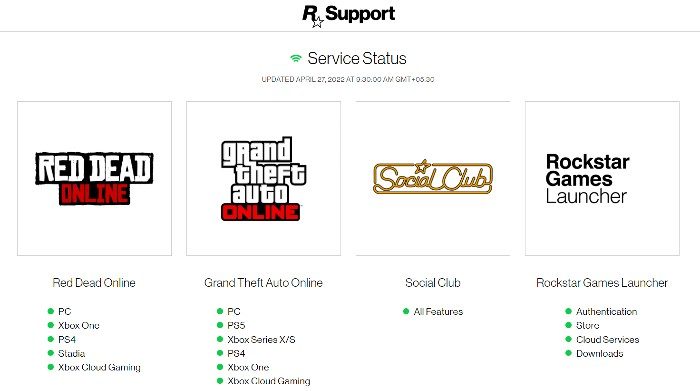
Before trying any of the technical solutions below, check the GTA server status first. If the game servers are currently experiencing downtime, you can’t access the game. You can check the status of GTA Online by visiting the Rockstar Games server status website.
Check the color present before GTA Online PC. If it is Green, the service is currently online. Whereas, if the color is Red, the servers are currently down. In this case, you will have to wait until the developers fix the problem.
2] Close GTA resources
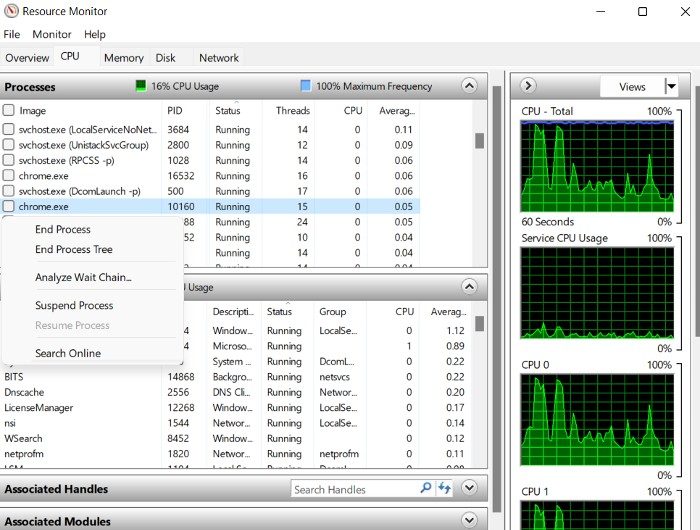
If you notice that the server is in an ideal state and you are still facing the problem, it is likely that the issue is on your end. There’s nothing to worry about, as it happens in all online multiplayer games. You will need to close all GTA related services to fix the problem. Here’s how to do it.
- Open the Task Manager by pressing the Ctrl + Shift + Esc shortcut key.
- Switch to the Performance tab.
- Click on Open Resource Monitor.
- In Resource Monitor, locate gtav.exe and right-click on it.
- From the context menu, choose the Suspend Process option.
- Wait for about a minute, then right-click the process again and select Resume process.
That’s it. Launch the game and check whether the problem is fixed. If yes, you are good to go. But if the issue persists, try the next solution on the list.
See: Fix GTA Error Code 1000.50 on Steam
3] Check the internet connection
The problem in question can also occur due to a weak internet connection. Online multiplayer games, especially GTA, require a stable, strong internet connection. If this isn’t the case, you will always find yourself surrounded by issues like the one discussed in the question.
You can visit any Internet speed-checking website to check your bandwidth. If you get a comparatively lower bandwidth, you can restart your router. But if restarting the router wasn’t helpful, you can contact the ISP and ask them to resolve the issue.
See: Rockstar Games Launcher Error Code 7002.1 with GTA and RDR
4] Download the latest Network Driver update
Sometimes not having the latest network driver update is the primary reason behind the problem. As it turns out, online games like GTA require you to have the latest network driver update installed on your system to run without any issues. If this isn’t the case, you will struggle to access GTA 5 online mode. Below are the steps you need to follow to download the latest network driver update on your system.
- Press Windows + I open the settings menu.
- Tap on the Windows Update option.
- Now, visit Advanced options > Optional updates.
- In the next window, you will see a list of all the available updates for your system, including the network drivers.
You can update the driver using Device Manager and by visiting the manufacturer’s website.
5] Use VPN
The next solution on the list is to use a VPN. Although connecting to a VPN slows down the connection, it can be an effective solution in this situation. So, connect to a VPN server and check if it fixes the issue. If not, try the next solution on the list.
Read: Fix Error Code 134 in GTA on Windows PC
6] Change the DNS server
If you are still struggling with the problem, there is a high possibility of some issue with the DNS server you are connected to. As a solution to it, you will have to switch DNS servers to fix the problem.
Why is GTA Online not working?
If GTA Online is not working on your system, the game is likely experiencing downtime. The problem can also occur if you are connected to a weak internet connection. You will have to switch the connection to resolve the issue.
Can I run GTA 5 on my laptop?
You can run GTA 5 without issues if your system meets the system requirements.
Recommended Requirement
- OS: Windows 11/10 64 Bit
- Processor: Intel Core i5 3470 @ 3.2GHZ (4 CPUs) / AMD X8 FX-8350 @ 4GHZ (8 CPUs)
- RAM: 8GB
- GPU: NVIDIA GTX 660 2GB / AMD HD7870 2GB
- HDD Space: 65GB
That’s it.
Read Next: GTA not launching or running on Windows PC.
