
You can fix Diablo Game Connection Lost errors like Network Disconnect, Lost Connection, Error 1016 or 37, The game connection has been lost, Your client has been disconnected from the server, etc, by following these suggestions.
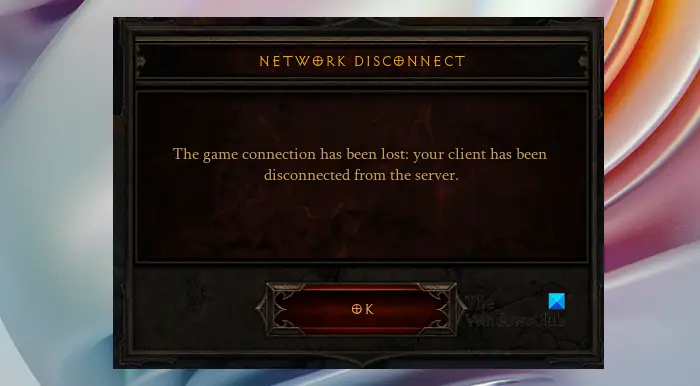
There are many different error messages and error codes that you may see due to a loss of connection, such as:
- Network Disconnect
- Lost Connection (Error Code 1016)
- Lost (Error 37)
- The game connection has been lost
- Your client has been disconnected from the server.
In this article, we will discuss solutions to resolve Diablo Game Connection Lost issues.
What causes Diablo to lose Game Connection?
There are many factors contributing to the issue in question. Ultimately, it is a network issue. However, “Network issues” is a big bracket and there are a lot of variables that come under that bracket. First of all, we need to check if your Internet is slow. Also, there may be a glitch in DNS, Winsock, IP, or other network protocols.
Fix Diablo Game Connection Lost issues
If you want to resolve Connection Lost issues in Diablo, then try the following solutions to resolve the issue.
- Reboot your computer
- Restart Network Devices
- Release and Renew IP and Flush DNS
- Update Network Drivers
- Disable Firewall or allow the game through the firewall
- Troubleshoot in Clean Boot
Let us talk about them in detail.
1] Reboot your computer
Let us start with the most basic solution. We will restart the computer and see if that resolves the issue. It will stop most services that could interfere with your game. So, do that, and see if that works.
2] Restart Network Devices
Next up, we are going to restart the Network Device, i.e; Router and Modem. Follow the given steps and see if that works.
- Turn off Network Devices.
- Unplug Router and Modem.
- Plug them back in and turn on the devices.
Then, connect your computer to the network and see if that works.
3] Release and Renew IP and Flush DNS
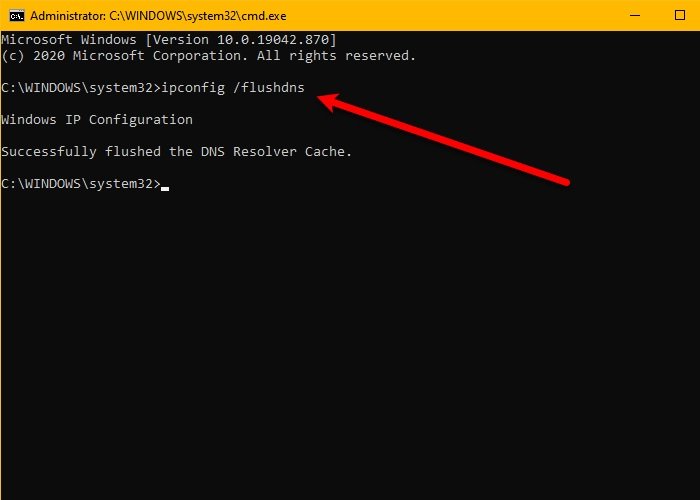
As mentioned earlier, certain protocols can cause the issue. First, we will discuss the Internet Protocol (IP) and the Domain Name System (DNS). You should, release and renew IP via Control Panel and flush DNS and see if it works.
Open Command Prompt as an administrator and execute the following commands.
ipconfig /release

ipconfig /renew
ipconfig /flushdns
Finally, restart your computer and check if the issue persists.
4] Update Network Drivers
You can also see the error messages and codes in question because of outdated Network Drivers. Please update them, and hopefully the issue will be resolved. The following are the methods to update the Network Drivers.
- Update Windows as that will update all the Optional & driver updates too.
- Use freeware to keep your Network drivers updated.
- Install the latest version of the driver from the manufacturer’s website.
- Update Network driver from the Device Manager.
Hopefully, it will resolve the issue for you.
5] Disable Firewall or allow the game through the firewall
Another possible cause of the issue is your antivirus and firewall. If you have a third-party antivirus, then it can stop the game from creating folders on your computer, try disabling the antivirus temporarily, you can also whitelist the game if you don’t want to turn it off. However, if you are like most of us and use Windows Firewall, then try disabling it or allow Diablo through the firewall. The following steps will allow the game through the Windows Firewall.
- Search out “Windows Security” from the Start Menu.
- Go to Firewall & network protection > Allow an app through firewall.
- Click on Change Settings.
- Allow Diablo 3 through both Public and Private networks. If you can’t find the game there, click Allow another app > Browse > go to the location > and add it.
Hopefully, this will resolve the issue for you.
6] Troubleshoot in Clean Boot
Antivirus is not the only app that can the issue. There are some other apps that can interfere with Diablo 3. That is why we would recommend you troubleshoot in Clean Boot and see what’s causing the issue. Once you know that, you can uninstall that program to resolve the issue.
Hopefully, your issue will be resolved.
What does code 1016 mean?
Error code 1016 is accompanied by the following error message.
LOST CONNECTION
There was an error. (Code 1016)
This error code falls under the same category, Network issues, that we discussed earlier. So, all the reasons, such as network glitches, slow Internet connections, etc., are applied here as well. And obviously, the solutions that we are going to present in this article will resolve this issue as well as some other errors that come under this umbrella.
