
CBS All Access Streaming service is one of the best in America. It provides amazing content for the folks living in the US, only in the US. But, there are a lot of issues related to the streaming service that we are going to talk about in this article and resolve CBS All Access Steaming problems with some simple solutions.
Is there an issue with CBS right now?
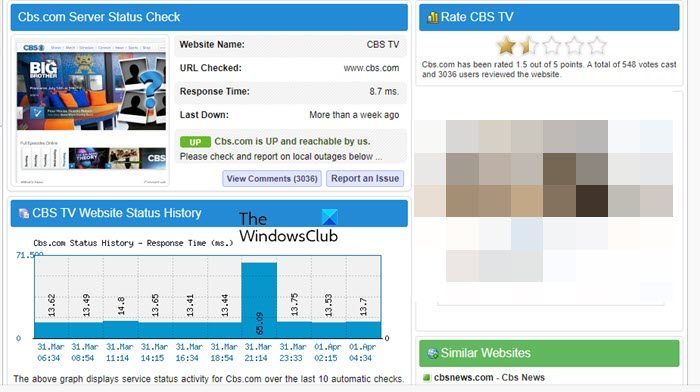
If you want to know whether the CBS website is down or up, you should visit the down detector and find out for yourself. If you are seeing an issue because the site is down, there is nothing you can do but wait for the engineers to resolve it.
Resolve CBS All Access Streaming problems
The following are the CBS All Access Streaming error codes and issues you can fix with the helpof our suggestions:
- Error Code 1001
- Error Code 110
- CBS All Access Buffering
- CBS All Access not working on Roku
- CBS All Access Freezing
- CBS All Access other issues
Let us talk about them in detail.
1] CBS Error Code 1001
You may see Error Code 1001 because of an ad-blocker. So, go ahead and remove the ad-blocker app and you will be able to enjoy CBS All Access afterwards.
2] CBS Error Code 110
If you are using a privacy extension on your browser then chances are you will see the error code in question. To resolve the issue, you need to either remove or disable the extension. After removing the extension, restart your computer and check if the issue persists.
3] CBS All Access Buffering
This is probably the most common issue that thousands of users face daily. In this section, we are going to give a detailed guide to resolve this issue.
Fix Internet Connection
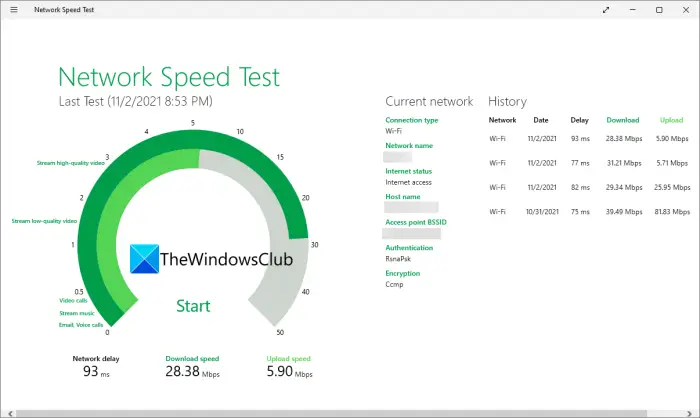
If CBS All Access is buffering a lot then an obvious reason is a slow Internet connection. So, you should start troubleshooting by checking your Internet speed. You can use any of the mentioned Internet Speed testers to check your bandwidth. If you conclude that the bandwidth is low, you need to restart your network devices. To restart your network devices, follow the given steps.
- Turn off Router
- Unplug the cables and wait for a while.
- Plug the cables back in.
- Turn the Router on and check if the issue persists.
If you are still seeing slow Internet, contact your ISP and ask them to fix the line. However, if yours is the only device seeing low bandwidth, then fix the slow Internet.
Use Ethernet Connection
If you are on WiFi then chances are you are not getting all the bandwidth assigned to you, also, your Internet is fluctuating, even if you are not noticing it, these two things are happening in the background. That’s why we recommend using an Ethernet cable while streaming. This is a perfect solution if CBS All Access is buffering.
Update Network Driver
You can also try updating your network drivers to see if that works. The following are some of the methods to update the driver; you can pick one of them and get on with it.
- Update your computer to update the drivers.
- Install the latest version of the driver from the manufacturer’s website.
- Get a driver update software.
- Go to Device Manager to update the drivers.
After updating the driver, reopen the streaming service and see if it’s still buffering.
4] CBS All Access not working on Roku
If CBS All Access is not working on Roku, then you should first check the Internet connection and if that is to no avail, then try the solutions mentioned below to resolve the issue.
Restart Roku
The first and most obvious solution is to restart Roku. This will resolve the issue if it is because of a glitch.
Used Wired Network
As we explained earlier, if you are experiencing issues with the streaming service, your network is likely unstable. Use an Ethernet connection to ensure a reliable network.
Update Roku
If Roku is outdated, CBS may not work due to compatibility issues. That’s why you should update your Roku and see if that works.
Reset CBS on Roku
Resetting the channel will clear any glitches on your device. To reset CBS on Roku, follow the given steps.
- Go to CBS on Roku.
- Click on the asterisks symbol (*) on your remote.
- Select Remove Channels > Settings.
- Go to the System category and click System Restart.
Once, you have restarted your computer, your channel will be removed, add it back and your issue will be resolved.
5] This device doesn’t support a subscription to CBS All Access
There are certain devices on which CBS All Access will not work. So, you should search if your device is supported on the Internet. However, many users who previously used the service are now unable to access it due to the error message. That’s because your app is not updated, which can cause compatibility and syncing issues. You need to update your device. If you are still seeing the issue, contact CBS support and ask them to resolve it.
6] CBS All Access Freezing
The reason CBS All Access is freezing on your computer or the device you are streaming on is unclear. The error has a very wide spectrum, and no one can say why it is happening. That’s why we recommend that you go through all the solutions mentioned above and try some of the fixes below.
Check your Browser
If you are streaming on a browser and the service starts freezing, then there is a lot that you can do. First of all, restart your browser. This is a perfect solution that works in most scenarios. Kill the task from the Task Manager, to do that, open Task Manager, right-click on your browser and click End Task.
If restarting doesn’t work, then clear the cache. Be it Chrome, Firefox, or Edge, all of them allow the user to clear cache and browsing data. So, do that and see if the issue persists. You should also try another browser and wait for the developer to release an update that fixes the issue.
Reinstall CBS App
If you have the CBS app, it may stutter due to a corrupted or missing file. You should uninstall the app and install a fresh copy to get it working. Hopefully, this will resolve the issue.
7] CBS All Access other issues
There are some other error codes and messages related to CBS All Access such as 3002, 3200, etc. You should try all the solutions mentioned above to resolve the issue, hopefully, they will work for you.
Hopefully, you can stream smoothly after applying the solutions.
Why does my CBS All Access keep buffering?
The main cause of buffering issues on CBS All Access is the poor internet connection. If you want to enjoy a smooth streaming experience on streaming platforms, like CBS All Access, you should have a high-speed internet connection. Hence, if CBS All Access is buffering, check your internet connection. In most cases, restarting the router fixes the issue.
Also check: Media streaming not working or turned on in Windows.
