
Many gamers are seeing a Prediction Error in Apex Legends. The error appears when a gamer is in the match and signifies something is wrong with their network. The issue is pretty common, and we have a remedy. In this post, we will discuss this issue and see what you can do if the game is unplayable.
Why do I keep getting Prediction errors in Apex Legends?
You may encounter this error if you have high latency or a server-related issue. The server’s inability to connect or a bad Internet connection can also cause prediction errors in Apex Legends. It means there is no one-stop solution, but instead you need to check on multiple aspects to figure out a solution.
In this post, wewill cover solutions for all the possible causes.
Fix Apex Legends Prediction Error
If you see a Prediction error in Apex Legends, follow these steps to resolve it.
- Check the server status
- Check the Internet connection
- Restart your Router
- Use a VPN client
- Replace your modem
- Allow Apex Legend through Firewall
- Try High-Performance Mode
Let’s start with the first solution.
1] Check the server status
Check the server status first when dealing with Prediction errors in Apex Legends. This is a great way to determine whether the issue is server-side or client-side. If that’s the case, all we can do is wait for the developers to address the problem. To know the server status, use any of the services on this list.
2] Check the Internet connection
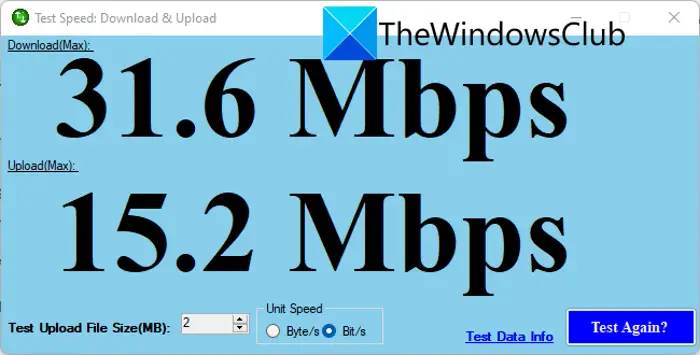
Also, make sure Apex Legends has a steady network connection, as a weak connection can prevent you from connecting to the server and cause this error. To check the Internet bandwidth, you can use the Internet Speed Tester and ensure that’s not the cause of the error.
In case, your computer is not getting abundant bandwidth, run the same tool on another system connected to the same network and check how well it responds. If the issue is exclusive to your system only, check this post to fix the slow Internet. If it’s a network problem, restart your router (steps mentioned after this), and if that doesn’t work, contact your ISP.
3] Restart your Router
You may resolve the network issue by restarting as it can help fix your Internet. To restart your Router, follow the instruction provided.
- Turn off your Router.
- Now, remove the power cord and wait for a minute.
- Connect all the cables.
- Restart your Router and launch the game to see whether the issue persists or not.
If you still see the error message, try the next solution.
4] Use a VPN Client
Use a VPN client to see whether you can connect to the server easily. It is recommended as utilizing a secure VPN seems to correct the error message by improving the connection. There are various VPN apps, we would recommend you try the free ones first, and if it worked for you, you can invest in some paid VPNs.
5] Replace your modem
An old or malfunctioning router can also cause the Prediction error message in your game. If so, the only solution is to replace your router with a new one. Hopefully, this will solve the issue, but if it doesn’t, try the next solution.
6] Allow Apex Legends through Firewall
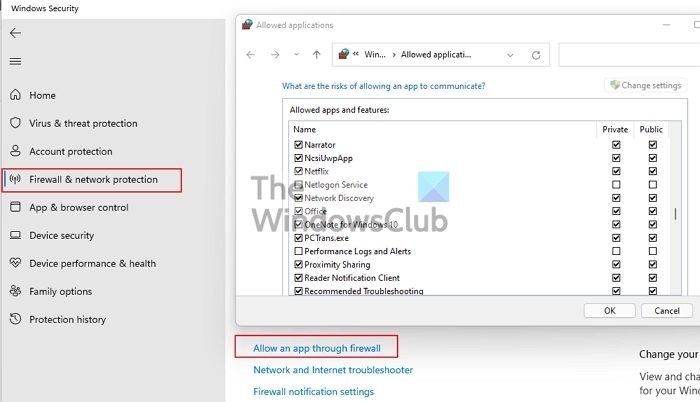
If none of the above approaches work, try allowing Apex Legends through your firewall. To allow Apex Legends through the firewall, follow these steps.
- Open Windows security and click on Firewall and Network Protection tab.
- Select Allow an app through firewall.
- Click on the Change Settings button and allow Apex Legends through both public and private networks.
- If you can’t find the app on the list, Allow another app > Browse, go to the location where you installed the app, which usually is “C:\Program Files (x86)\Apex Legends\Launcher\Portal\Binaries\Win32″, and add its exe file.
- Allow it through both networks.
Open Apex Legends and try playing. Fingers crossed you won’t see the error message this time. If you have a third-party antivirus, make to whitelist Apex Legends.
7] Try High-Performance Mode
For some users, switching to High-Performance Mode has worked. As the name suggests, High-Performance Mode is better for a demanding game like this. Just switch to High or Ultimate Performance Mode and see if it helps.
Hopefully, these solutions resolve the issue.
Read: Fix Apex Legends Out of sync with server
How do I fix Packet loss in Apex Legends?
Packet Loss is a network issue; restart your computer, console, and Internet, as packet loss in Apex Legends is mainly caused by malfunctioning network gear, a clogged internet connection, or server problems. You can also reset your network and switch to a different server.
Also Read: Fix Apex Legends won’t open on PC.
