
While using the latest version of Google Chrome browser on my Windows PC recently, I received a Chrome.exe Bad Image error message. Chrome just wouldn’t load, and I was wondering what had happened and what needed to be done now, apart from uninstalling and reinstalling.
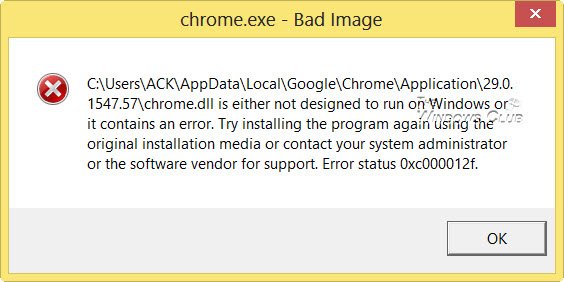
Fix Chrome.exe Bad Image, Error status 0xc000012f
A particular file is either not designed to run on Windows or it contains an error. Error status 0xc000012f.
This post will tell you what you can do if you get such an error message.
For your information, 0xC000012F means STATUS_INVALID_IMAGE_NOT_MZ.
Reset Chrome
First, I recommend trying to reset your Chrome using the newly introduced Reset Chrome feature.
Rename old_chrome.exe
If this doesn’t help, you could try this approach instead. It helped me and I am sure that it will help you too.
Navigate to the following folder:
C:\Users\Username\AppData\Local\Google\Chrome\Application
Here you will see files. One chrome.exe and the other old_chrome.exe. Delete chrome.exe and rename old_chrome.exe to chrome.exe.
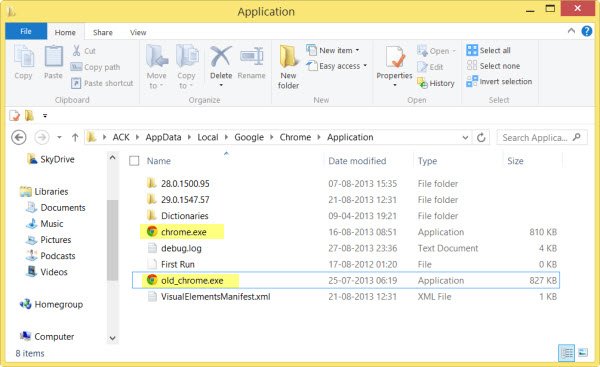
Now, see if you can open your Chrome. If you can, great.
Update Chrome
However, if you look now, under ‘About Google Chrome’, you will see it displaying an earlier version. Click on the Update button to update your Chrome to the latest version and you are all set to go.
Reinstall Chrome
If nothing helps, you may need to consider uninstalling Chrome and performing a fresh installation.
How to fix an EXE Bad Image?
To resolve an ‘exe Bad Image’ error on Windows 11/10, follow these steps: Update Windows, run a virus scan, reinstall the problematic program, check for disk errors using the Command Prompt, and perform a system file check.
How to fix Bad Image error 0xc0000020?
To fix the Bad Image error 0xc0000020, start by scanning your computer with updated antivirus software to remove any malware. Then, use the System File Checker by running “sfc /scannow” in Command Prompt. Restart your PC to apply changes.
If you are a Chrome user, some of these links may interest you:
- How To Speed Up Google Chrome
- Fix: Google Chrome Freezing or Crashing on Windows computer
- Your profile could not be opened correctly in Google Chrome.
