
In today’s post, we will explain what the HPAudioswitchLC.vbs script or HP Audio Switch is and then how to fix its errors and remove it if necessary. You may see an error message Cannot find script file HPAudioswitchLC.vbs at startup in Windows 11/10.
What is HP Audio Switch?
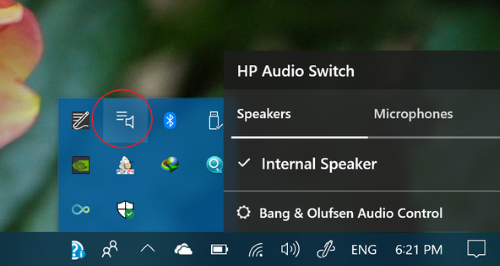
HP Audio Switch is a utility preinstalled on many HP laptops and desktops that lets you easily manage and switch between audio output devices (such as speakers, headphones, or external monitors with sound). It provides a simple interface to control which device is active without digging into Windows sound settings. HPAudioSwitchLC.vbs is located in:
C:\Program Files (x86)\HP\HPAudioSwitch.
The file size is 249 bytes.  The application has a visible window and can be closed by clicking the red ‘x’ button. There is no description of the program. The process starts upon Windows startup via the Registry key HKLM\User Shell Folders. It is not a Windows system file.
Furthermore, HPAudioSwitchLC.vbs appears to be a file that was compressed by an EXE-Packer. This technique is often used by trojans to keep the file size small and also hamper debugging efforts. However, this in itself is not a sufficient reason to presume malicious intent, since even well-intentioned, professional software producers take advantage of compressed files. For this reason, 66% of experts consider this file a potential threat. The probability that it can cause harm is high.
If you see this file on your hard drive or in Windows Task Manager, please make sure that it is not a malicious variant. Run a full in-depth antivirus scan. It’s a fact that many trojans try to cloak their true identity by calling themselves HPAudioSwitchLC.vbs.
Cannot find script file HPAudioswitchLC.vbs at startup
When you start up your Windows 10 PC, you might encounter this Cannot find script file issue. An obsolete or defective version of HPAudioSwitchLC.vbs can cause problems for your computer that can range from slowness to error messages such as these:
HPAudioSwitchLC.vbs has stopped working. Windows is checking for a solution to the problem.
HPAudioSwitchLC.vbs has stopped working. A problem caused the program to stop working correctly. Windows will close the program and notify you if a solution is available.
HPAudioSwitchLC.vbs has encountered a problem and needs to close.
Access violation at address FFFFFFFF in module HPAudioSwitchLC.vbs. Read of address 00000000.
How to fix HP Audio Switch errors?
If you’re experiencing this issue, you can try our recommended solutions listed below in no particular order.
- Run an antivirus scan
- Run Disk Cleanup
- Uninstall the program.
Now, let’s take a look at the brief description of these solutions.
1] Run an antivirus scan
To be on the safe side, since the HPAudioSwitchLC.vbs file can be exploited or masked to be a virus, we suggest you run a full system AV scan with Windows Defender or any reputable third-party AV product.
2] Run Disk Cleanup
A clean and tidy computer is the key requirement for avoiding problems with HPAudioSwitchLC. This means cleaning your hard drive using the Windows 10 in-built Disk Cleanup utility or a third-party tool like CCleaner.
3] Uninstall the program
Uninstalling programs that you no longer need, checking for autostart programs using msconfig could resolve this issue.
It should be noted that the HPAudioSwitchLC.vbs process is also known as HPAudioSwitchLC.vbs and is a part of HP Audio Switch. This software is produced by ‘Unknown’. You should try uninstalling HP Audio Switch.
After uninstalling, restart your computer.
Then launch File Explorer and check whether there is still a folder named after the software in C:\Program Files. Delete it if you see it.
Be sure to check the Registry as well for remnants of HPAudioSwitchLC.vbs. To do this, run Regedit, then look under HMLM\User Shell Folders for ‘HPAudioSwitchLC’ and delete these entries.
Is HP Audio Switch needed?
HPAudioSwitchLC.vbs is an HP Audio Switch file and is not essential for Windows. You can use it if you want quick, simple control over audio devices without navigating Windows menus. But if you prefer using Windows’ built-in sound settings, you can remove it.
Related read: Can not find script file run.vbs error at logon.
