
When the keyboard was first designed, the intention was to keep every key in the right position as per its estimated usage. However, that was in the typewriter era. The common uses have changed with time, and every profession has its own specifications. Thus, modification of functions of keyboard keys is a good idea. In this article, we have listed the best free Key Mapping software for Windows 11/10 PC.
Keymapping is the procedure of assigning different functions to existing keys on the keyboard. As an example, you can assign the function of the Forward key to the W key. Keymapping is often done by gamers to make gaming easier. Furthermore, it is a very effective tool for the case when some keys of a keyboard cease to work.
Best free Key Mapping software for Windows PC
Here are some of the best free key mapping software available for your Windows 11/10 PC:
- PowerToys
- KeyTweak
- Sharpkeys
- Microsoft Keyboard Layout Creator
- Key Remapper
- AutoHotkey.
1] PowerToys
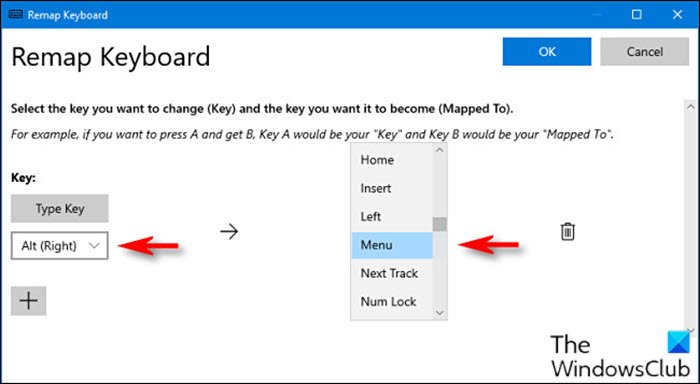
You can remap Keyboard Shortcuts using PowerToys. To map the Menu key to any key on the keyboard, do the following:
- First, download and install the PowerToys utility if you haven’t already.
- After the installation, launch the utility.
- Select Keyboard Manager in the left pane.
- Next, click Remap a key on the right pane.
- In the Remap Keyboard window that appears, click the plus sign (+) under Key heading to add a new key mapping.
2] KeyTweak
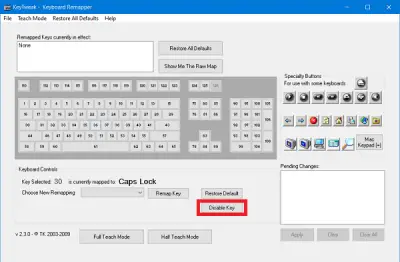
If you seek an easy-to-use keyboard mapping software for your computer, then KeyTweak is the product for you. The tool uses a virtual keyboard, so you know exactly what you are mapping. You can also check the keys being interchanged in the description section. Once you are done with the remapping part, you can check all the changes with the click of a button. Lastly, if the changes are not up to your satisfaction, then simply restore all the defaults.
3] Sharpkeys
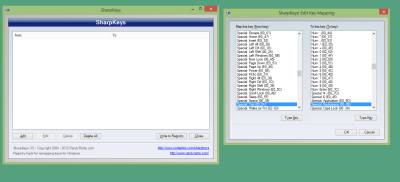
The Sharpkeys software is a very easy tool for remapping keys. While it lacks a virtual keyboard, it lets you change keys smoothly. You can also check the changes simultaneously in an editor window. You can change the keymapping as many times as needed. To restore defaults, simply select Delete all.
3] Microsoft Keyboard Layout Creator
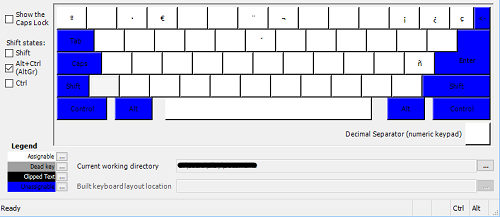
While the typical free software by Microsoft for keyboard remapping is not available anymore, Microsoft Keyboard Layout Creator will still be quite helpful. It allows you to create a new layout for your keyboard from scratch. You can download it from microsoft.com.
4] Key Remapper
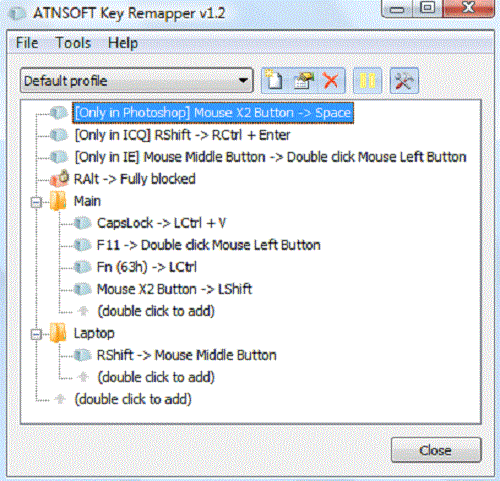
The Key Remapper tool is an excellent one to remap keys on your keyboard. While the functions are basic, a few of them are additional. You can create key combination actions by using one key only. Other than this, you can block certain keys on the keyboard. It also allows you to replace mouse clicks with keys. This excellent tool is available on atnsoft.com. This tool has both free and paid versions. The free one is sufficient for our use.
5] AutoHotkey
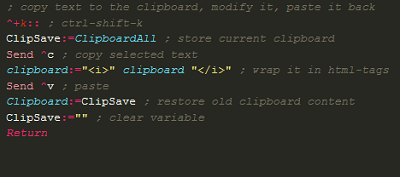
AutoHotkey is an extensive tool for remapping keys. It uses scripts so you would have to learn a little coding. However, it will be much more powerful than other options with reduced functionality. No other free software has the same outcome. You can download it from autohotkey.com.
Similar tools that may interest you:
Mouse Manager | KatMouse | KeyTweak.
Can you reassign a keyboard key?
Yes, it is possible to reassign a keyboard key. Ideally, Microsoft provided its own tool for the same, but it is absent from the download page. The Microsoft Mouse and Keyboard Center won’t do the job either. However, this is where third-party software products come in. You can use any software mentioned in this list for keyboard mapping.
Read: How to reset Keyboard settings to default in Windows 11
How can I remap keys without software?
If you wish to remap keys on your computer without using software, the procedure would be through the Registry Editor tool. While it is possible to remap keys without using software, the procedure is tedious. Even more, you will have to revert all the changes individually later. With software, the job wouldn’t need more than a click.
