
Windows User Account Control (UAC) allows you to set up Windows for alerting you when you or any program makes certain changes to the computer. It is a very useful security feature; but more than often, it is irritating when you are working towards something and the screen freezes with a warning from User Account Control (UAC). You need to stop working and go to the UAC message to allow the changes. WinPatrol is a freeware that WinPatrol monitors system changes.
No matter how often you use your computer system or which operating system you are using, your PC must always be protected against malicious programs. Hijackers today have too many ideas to take control over your computer and thus it becomes even more important to keep your computer system protected. It is almost impossible to check for all sorts of intruding malware in your computer system, so the only feasible alternative is to, apart from your antivirus software, get some special software that helps you monitor every change occurring in your computer. This is where WinPatrol comes into use.
How to use WinPatrol
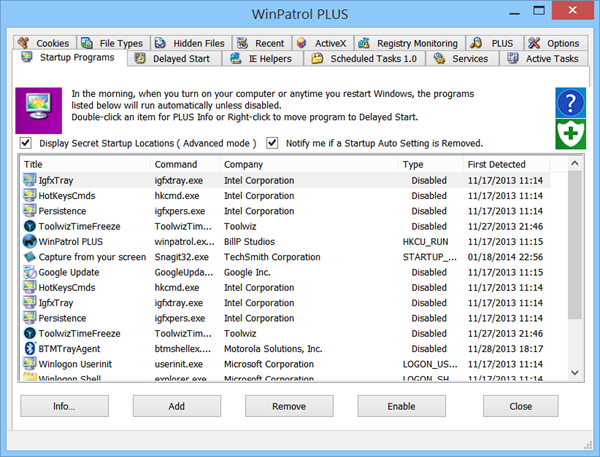
By default, Windows 10/8/7 alerts you when some program makes changes to the Windows registry or start-up program list. You won’t be notified when you make changes to the computer settings. In certain cases, you may unknowingly change something and miss out on the alert. For example, you may have been working on Internet Explorer settings and clicked “Default” under IE Home Page Settings by mistake. What are your chances of being notified by Windows, which, obviously presumes you changed it knowingly? None!
Case For Using WinPatrol
I am using this freeware program – WinPatrol – for the past many years – as much as seven years or even longer. My settings for Windows UAC is “Never Notify”. The reason for this setting is obvious. Although I am aware of Secure Desktop, I don’t like Windows dimming and freezing the screen for each notification from the User Account Control. Also, I want to know if I change any setting on the computer unknowingly; even the setting where I dissociate some file type from some program and associate it with another program while installing.
For some of the programs we install, simply go-ahead to change the file type associations. Not only that, they go ahead and add their own toolbars and IE Helpers to the browsers. How many of you have installed programs like Zone Alarm or Nero to find unnecessary startup programs, changed home pages and unwanted Internet Explorer accelerators?
Such changes are never notified by Windows UAC even if you set up Windows 7 to Always Alert. While Windows does not miss out on the changes, but it fails to alert you on the cases mentioned above. This is where WinPatrol comes in handy.
Set Up WinPatrol
When you install WinPatrol, it takes stock of current settings and alerts you when changes according to the following:
- Change of Internet Explorer Home Page
- Startup Programs
- Internet Explorer Helpers (Accelerators, Toolbars and other add-ons)
- Windows Services
- Windows Registry Strings (Startup, RunOnce and File Associations)
WinPatrol also offers you with the facility to look up startup programs and services that you do not understand. For example, you want to reduce the startup time. You can look up the services on the Internet and decide the ones to keep and the ones to discard. In addition, you can delay Startup Programs for quicker access to the Windows desktop. You can also disable startup programs when Windows boots, using WinPatrol.
WinPatrolToGo
This portable version is a single executable file that you can carry on your SD card or portable USB device without leaving any leftover files or registry entries on the computer being managed. You just need to plug in your portable USB and run the WinPatrolToGo executable file.
Features of WinPatrolToGo Portable Version
- Analyzes each program installed and running on your computer
- Remove and manage Startup programs
- Disable unwanted Windows Services or set them to Start Delayed
- Remove Toolbars and BHO’s.
- Create Reports that provide a snapshot of potential problems Disable ActiveX Controls & MORE!
WinPatrol is a freeware, but there is also a Pro Version available which provides extra security to your system. the free version does not have access to WinPatrol PLUS knowledgebase and real-time infiltration detection. The bottom line is that WinPatrol is an all-in-one protection tool for your computer system providing smooth functionality – and if you are one who loves to help your friend with their computer problems, WinPatrolToGo would make a useful tool to have on your USB.
Monitor critical Windows Registry settings using WinPatrol PLUS
WinPatrol is a favorite among many Windows users. It helps you monitor changes to your computer by keeping a watch on all the critical parameters. If some program tries to add a startup entry – or remove it, or if some software tries to change your default search or browser settings, it will immediately bark and alert you. That is why it is the first program I install after a fresh Windows install. Not only does it let you delay startup programs, but it also lets you control their order of starting up. It is pretty useful as a Crapware Removal Software too.
Malware, more often than not, will try to manipulate your Windows Registry settings. For instance, it could disable the system restore function or your firewall or your security center. It thus becomes imperative, in today’s changing times, to be extra alert and even monitor such critical registry locations. WinPatrol Plus will let you do so easily. Registry Monitoring is one of the lesser-known, and lesser-used features of this software.
Monitor Windows Registry settings
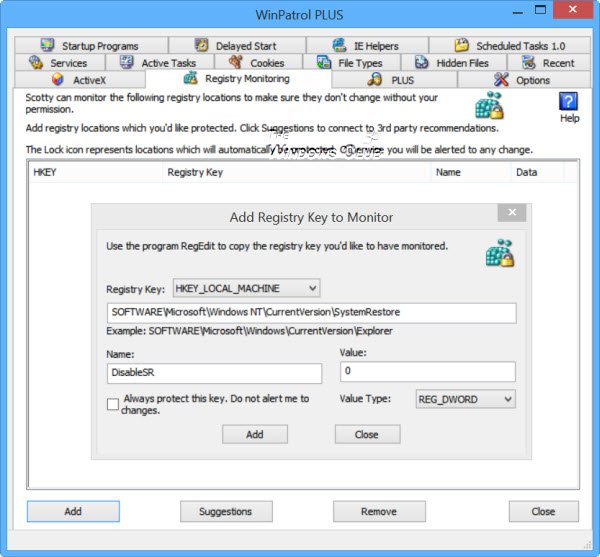
Open WinPatrol Plus and click on the Registry Monitoring tab. Here you can add any registry location/s that you want to be monitored. WinPatrol will ensure that these registry settings do not change without your permission. You can set WinPatrol to alert you should anyone try to change them or you can set it to outright reject any changes made.
Let us say, you would like to protect your System Restore function and would like to be informed if anyone tries to make changes to it. To prevent any change to its status, click on Add. In the box which opens, copy-paste the following key in the field specified.
HKEY_LOCAL_MACHINE\SOFTWARE\Microsoft\Windows NT\CurrentVersion\SystemRestore
Also, enter the following information in the fields given:
- Name: DisableSR
- Value: 0
- Value Type: REG_DWORD
If you wish to outright reject any changes made to this key, check the Always protect this key option. If not, you will be alerted if any changes are made. Once this is done, click on the Add button.
Similarly, to protect your Security Center settings, you can use the following values:
- Registry key: HKEY_LOCAL_MACHINE\ SOFTWARE\ Microsoft\ Security Center
- Value Type: REG_DWORD
Now add each of the following values one after the other and click the Add button,
- Name: AntiVirusDisableNotify
- Value: 0
And then,
- Name: FirewallDisableNotify
- Value: 0
If the keys are not present, they will be created for you.
To make things easier for you, the good folks over at WinPatrol have made available a registry file for download, that will allow you to safely add registry values in WinPatrol without having to be an expert. It will help you keep protected against changes being made to certain file types, checking of signatures, disabling of registry editing tools, and so on.
This registry monitoring and locking feature are pretty unique, and hence we decided to cover it – although it is available only in WinPatrol PLUS, which is shareware. While WinPatrol is free, WinPatrol Plus is not. Incidentally, WinPatrol also comes with a portable version, called WinPatrolToGo, which is again a freeware.
These may also interest you:
- Tools to Monitor Changes To Registry
- How To Back Up, Restore, Maintain Windows Registry.
- How To Restrict Access to Registry Editor, etc.
- How to open multiple instances of the Registry.
WinPatrol free download
You get all these features in the free version of WinPatrol, which you can download at winpatrol.com. A portable version named WinPatrolToGo is also available, which does not need to be installed. This portable version is a single executable file that you can carry on your SD card or portable USB device without leaving any left over files or registry entries on the computer being managed.
UPDATE: WinPatrol has been shut down but you can get its last version from filehippo.com.
Notes:
- You may want to turn off UAC after installing WinPatrol else you will receive two alerts in some cases: one from Windows UAC and the other from WinPatrol.
- As a general rule, it is not advisable to turn off the UAC. But the above post is based on my own personal preferences and experience with the product. Your opinions may differ as the needs differ from user to user.
