
The Windows Desktop, File Explorer window, or folder will automatically refresh itself when you change its contents. This could be creating a new shortcut, creating or saving a new file or folder, and so on. But at times, you may find that the desktop or the window may not auto-refresh, and to see the changes, you have to manually Refresh it, either by pressing F5 or via the context menu.
Desktop, Folder or Explorer does not refresh automatically
If the Windows desktop is not refreshing automatically or auto-refresh does not work, and you need to refresh it manually, then you can follow these steps to try and fix the problem.
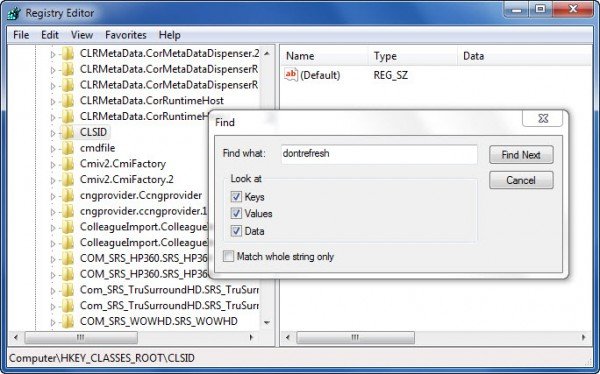
Open Registry Editor and navigate to the following registry key:
32-bit users have to look here:
HKEY_CLASSES_ROOT\CLSID
64-bit users have to look in:
HKCR\Wow6432Node\CLSID\
Here right-click on CLSID and select Find to search for dontrefresh.
If you find it, and if it has a value set to 1, change its value to 0.
You will probably find it at one of these locations, depending on whether your Windows is 32-bit or Windows 64-bit:
HKEY_CLASSES_ROOT\CLSID\{BDEADE7F-C265-11D0-BCED-00A0C90AB50F}\Instance
HKEY_CLASSES_ROOT\Wow6432Node\CLSID\{BDEADE7F-C265-11D0-BCED-00A0C90AB50F}\Instance
If you do not see it, you will have to create the path
{BDEADE7F-C265-11D0-BCED-00A0C90AB50F}\Instance\dontrefresh
by right-clicking and selecting New > DWORD at each level as follows:
- Right-click > New > Key > Name it
{BDEADE7F-C265-11D0-BCED-00A0C90AB50F} - Right-click > New > Key > Name it Instance
- Right-click Instance > New > DWORD for 32-bit systems -OR- QWORD for 64-bit systems.
- Then again right-click this WORD, rename it to dontrefresh and give it a value 0.
This is known to have helped fix the problem in most cases.
Read:
- Desktop Refresh option not working in Windows 11
- F5 Refresh key not working in Windows
- What does Refresh Desktop or Refresh Explorer window actually do?
If it does not help, here are a few other suggestions:
1] Use ShellExView from Nirsoft and disable third-party shell extensions which may be obstructing the smooth functioning of Windows Explorer. This may be a trial-and-error method.
2] From the Task Manager, kill the explorer.exe process and then restart it again. Also, restore the default Explorer Settings. To do so, open Folder Options and under the General tab, press Restore Defaults. Click Apply and Exit.
3] Some have found that deleting the thumbnail cache and rebuilding the icon cache has helped them resolve the issue.
4] Reboot in Clean Boot State and try to troubleshoot the issue.
This problem appears to be quite common – so much so that there is even an acronym made for it: WEDR – Windows Explorer Doesn’t Refresh!
Read:
- Part of PC Screen not refreshing
- Desktop Not responding or Frozen
- Desktop and Taskbar keeps refreshing constantly
Microsoft has released some hotfixes to resolve such issues at KB960954 and KB823291. Please check IF they apply to your operating system and situation before you decide to download and apply them.
See this post if your Desktop icons load slowly at startup in Windows 11.
UPDATE: Please also see the comment by tralala/Truth101/Guest below.
TIP: Check this post if you find that your Recycle Bin does not refresh correctly.
