
A few fraudulent anti-virus and tech-support companies have been trying to present legitimate processes in the Windows Task Manager as viruses or malware to fool customers into buying their products or services. One such case is with the process ctfmon.exe or CTF Loader. Here CTF stands for Collaborative Translation Framework.
What is ctfmon.exe or CTF Loader
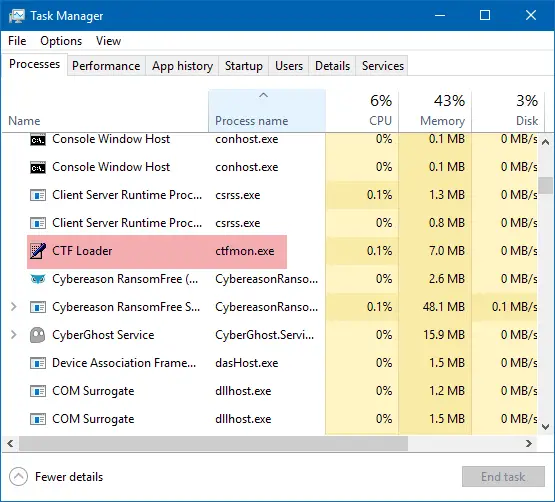
The ctfmon process is used by Microsoft Office to activate the Alternative User Input Text Input Processor and the Microsoft Language Bar. Ideally, it runs in the background and doesn’t interfere with the normal functioning of your system.
The process is usually triggered when you start using the recommended functionality on Microsoft Office. At times, it doesn’t end automatically when all Microsoft Office applications are closed, and at times, it triggers at startup itself.
Is ctfmon.exe a virus
Cftmon.exe as explained earlier is a genuine file needed by Microsoft Office. However, many users have reported a virus with the same name. The original file is located in C:\Windows\System32. If a similarly named file is found outside that folder, it could well be a virus or malware.
To check whether the file is a virus or a genuine file, right-click the process in Task Manager and select Open location. If the location is the original System32 folder, the file is legit and genuine. If not, then you need to run a full system anti-virus scan right away.
Related: Fix CTF Loader High CPU, Memory or Disk usage
Can I disable ctfmon.exe on Windows 11?
The possibility that cftmon.exe could be a virus isn’t the only problem with the process. Users have reported many more annoyances with it.
While we do not recommend that you disable it, if you wish to disable it and prevent ctfmon.exe from running at startup, you can do so.
If you do not want this process to run, try using the regsvr32 tool. The Regsvr32 tool is a command-line utility that can be used to register and unregister OLE controls as DLL and ActiveX (OCX) controls in the Windows operating system.
Press Win+R to open the Run window. Type the following commands one by one to unregister the DLL files, and press Enter after each of them:
regsvr32.exe /u msimtf.dll
regsvr32.exe /u msctf.dll
Restart the system once the commands have been executed, and the ctfmon.exe process will have been disabled.
What happens if I delete Ctfmon exe?
As explained earlier in this article, Ctfmon.exe is a background process on Windows 11/10 that Microsoft Office uses. Hence, deleting it permanently from your system may cause issues with Microsoft Office applications. Therefore, we do not recommend that you delete it.
Hope this clarifies the matter!
See this post if you see CTF Loader has stopped working error box.
Want to know about these processes, files, or file types?
Windows.edb files |csrss.exe | Thumbs.db files | TrustedInstaller.exe | StorDiag.exe | MOM.exe | Host Process for Windows Tasks | ApplicationFrameHost.exe | winlogon.exe | atieclxx.exe.
