
The older Secure Boot Certificates are expiring in June and October 2026. Microsoft has shared a timeline on its official websites showing which certificates are expiring in June and October 2026. The new certificates are also being installed on users’ systems through Windows Updates. Some users’ systems are not getting the Secure Boot Certificate update. This usually happens to the older PCs. In this article, we will talk about what issues you may face when the Secure Boot Certificates expire.
What are the Secure Boot Certificates?
Secure Boot Certificates are the digital security certificates stored inside your computer’s UEFI firmware. Secure Boot requires these certificates to function properly. Secure Boot is a security feature created by the PC industry to ensure that a computer starts only with trusted software approved by the device manufacturer (OEM). When the PC turns on, the firmware checks the digital signatures of all boot-related software, such as UEFI drivers, boot applications, and the operating system. If everything is verified as trusted, the system continues booting and loads the operating system.
The Microsoft Secure Boot Certificates issued in 2011 will expire in June 2026. Some of these certificates will expire in October 2026. After the Secure Boot Certificates expire, the Secure Boot will not function properly, making the affected devices vulnerable to boot-level threats.
What happens to the older devices when the Secure Boot Certificates expire?
If your device reaches the Secure Boot Certificate expiration date and does not receive the new certificates, it will usually continue to start and work normally. The device will continue to receive the normal Windows Updates. However, it will no longer be able to receive new security protections for the early boot process. This includes critical updates for components such as the Windows Boot Manager, Secure Boot databases, and certificate revocation lists, as well as security fixes to patch newly discovered vulnerabilities in the boot chain.
While older devices will continue to boot into Windows normally, the absence of the latest Secure Boot Certificates poses a serious security risk. As cyber threats continue to evolve, older devices running on expired Secure Boot certificates will gradually become less secure. This happens because such devices cannot apply newer boot-level security updates. This will create favorable conditions for attackers to exploit vulnerabilities before the operating system fully loads. Moreover, the security features in Windows that depend on the Secure Boot trust will also be affected. For example, security features like BitLocker encryption hardening, boot level code integrity, and third-party bootloaders may not work properly if they require the latest Secure Boot Certificates.
What will work and what will not?
Here is a quick summary of what will continue to work and what will no longer work. The features that will continue working on older computer systems include:
- Older devices with expired Secure Boot Certificates will continue to start normally. Users will be able to boot into Windows and use their devices as before.
- Windows Updates will also continue to install, except for updates required for boot-related security components. This is because such updates require the updated Secure Boot Certificates and won’t continue with the expired ones.
- Every day app use, networking, web browsing, and most OS features will remain unchanged.
The features that will no longer work after the expiration of the Secure Boot Certificates are:
- New Secure Boot and Windows Boot Manager security protections will no longer apply to older devices.
- Vulnerability fixes for the early boot environment – such as BitLocker bypass mitigations or Secure Boot revocations – will not be available.
- Some third-party components, such as drivers or firmware modules that depend on Microsoft Secure Boot trust, may fail to receive updates if they require newer certificate entries.
Older devices with the older certificates may gradually become more vulnerable to newly discovered boot-level attacks after the Secure Boot Certificates expire. This will happen because the security features that rely on the updated Secure Boot trust verification will stop functioning properly over time, reducing the overall system’s boot-level security.
What should users with older PCs do?
Most personal Windows devices receive the new Secure Boot Certificates through Microsoft-managed Windows Updates. The following are the basic requirements disclosed by Microsoft to get the new certificates through Windows Updates:
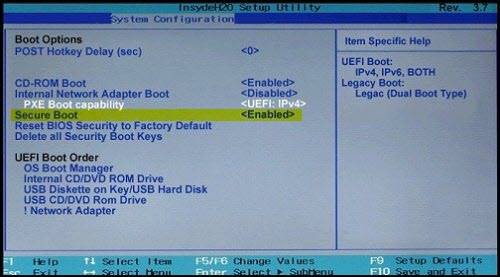
- The Secure Boot should be enabled
- Your device should be sending the required diagnostic data to Microsoft
- Windows 10 users must enroll in the ESU program
If you are a Windows 10 user and cannot enroll in the ESU program, the only way to get the new certificates is by upgrading your device to Windows 11.
The Secure Boot Certificate Update Status is also reflected in Windows Security. If your device is not getting the Secure Boot Certificates through Windows Updates, check the error message displayed in Windows Security. The steps for this are as follows:
- Launch Windows Security
- Navigate to the Device Security tab
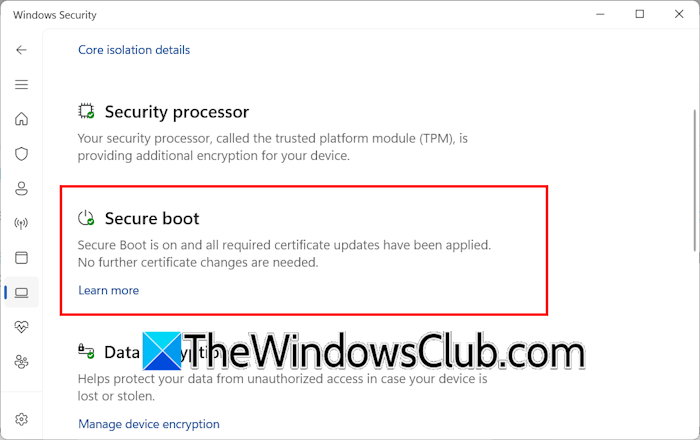
Read the message under the Secure Boot section. If the message says “Secure Boot is on and all required certificate updates have been applied. No further certificate changes are needed,” your device has the latest Secure Certificates installed, and you do not need to worry. Additionally, you will see a green checkmark icon on the Secure Boot in Windows Security. If Windows Security shows a yellow warning symbol or a red cross icon, you need to take action.
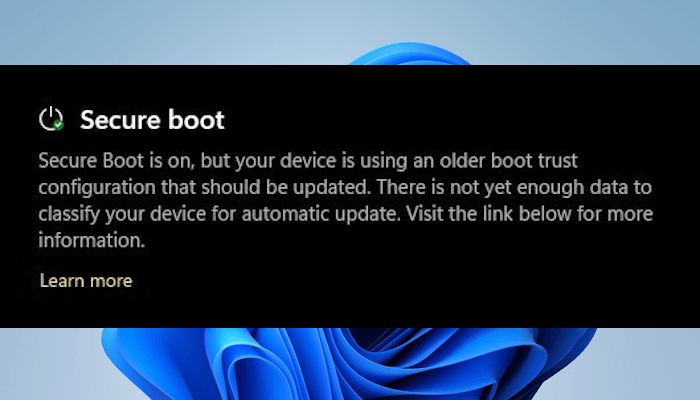
A yellow warning sign on Secure Boot in Windows Security means that the certificates have not been updated yet. In this case, check the Event ID 1808 in Event Viewer. If this Event ID is available in Event Viewer, you need to install all Windows Updates regularly to get the certificates installed automatically. A red icon indicates something that needs your immediate attention. For example, the Red Cross sign, along with the message “Secure Boot is on, but this device can no longer receive required updates for the Windows boot experience,” indicates that your device firmware or hardware no longer supports the new certificates. In this case, you need to contact your device manufacturer.
That’s it. I hope this helps.
Read: Secure boot is on, but your device is using an older boot trust configuration that should be updated.
Will Windows 11 still work if I disable Secure Boot?
Yes, Windows 11 will continue to work even if you disable Secure Boot. This action does not stop your system from booting into Windows, and you can continue using your PC normally for everyday tasks. However, turning off Secure Boot removes an important layer of startup security and makes your device vulnerable to boot-level attacks.
Read: UEFI2023Status stuck at In Progress or Not Started
What steps do I need to take before the Windows Secure Boot Certificate expiration?
Before older Secure Boot Certificates expire, you need to prepare your device to receive new certificates through Windows Update. For this, your device should be sending the optional diagnostic data to Microsoft, and Secure Boot should be enabled. If you are a Windows 10 user, you must have enrolled in the ESU program.
