
Microsoft is building Windows to support AI agents that can perform tasks across applications and system capabilities. This is part of a broader shift toward agentic AI, where systems move beyond generating responses and can take actions to accomplish a goal. In this post, we’ll look at the future of Windows AI agents, what can change, and how.
For years, the Windows experience was straightforward: you opened an application, navigated menus, found the right setting, and performed the task yourself. Then came Microsoft Copilot, which brought conversational AI to Windows and Microsoft 365, allowing users to ask questions and get help with tasks without having to search through menus. Copilot+ PCs took this a step further by adding dedicated NPUs (Neural Processing Units) for on-device AI processing. Now, Microsoft is taking the next step by integrating AI agents into Windows.
What is a Windows AI agent?
A Windows AI agent is more than a chatbot built into Windows. A traditional AI assistant mainly responds to questions or generates content. An agent works toward a goal. It can understand a request, use tools, access information, interact with applications, and perform multiple steps to complete a task. Microsoft describes Windows agents as task-oriented and action-capable systems that can maintain context and interact with applications.
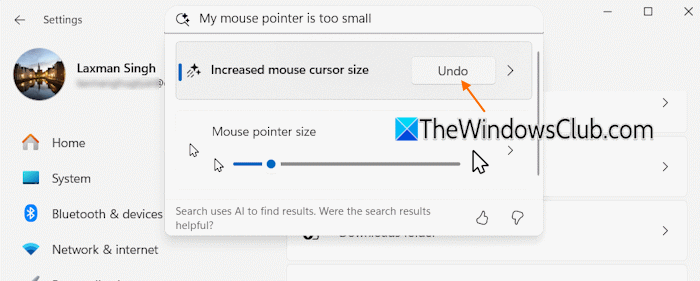
For example, if you ask an AI assistant, “How do I increase the mouse pointer size in Windows?“, it can explain the steps. An agent could potentially understand a request such as “Make my mouse pointer easier to see” and guide you through it, or, on supported systems, perform the required setting change with your permission.
The Future of Windows AI Agents: What can change, and How
In its recent Build 2026 conference, Microsoft announced a range of new technologies aimed at making Windows a platform for AI agents. These announcements made one thing clear: the company is no longer treating AI agents as simply another feature of Windows. It is building Windows itself as a platform for developing and running agents.
Windows is already becoming an agent platform
Microsoft has been adding AI capabilities directly into Windows and building developer technologies that allow applications to expose AI functionality to the operating system.
One example is Agent in Settings. On supported Windows 11 Copilot+ PCs, users can describe what they want to change using natural language. The agent can identify relevant settings and, with the user’s permission, automate supported changes. Microsoft says the feature uses an on-device model called Settings MU.
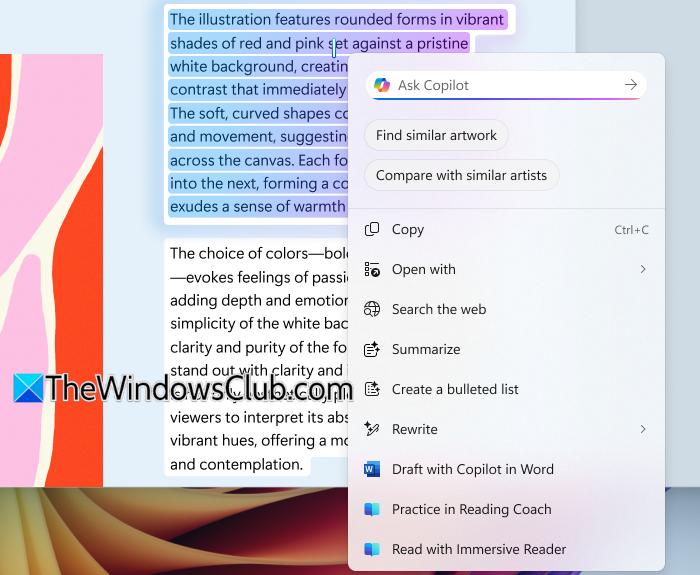
Click to Do is another example of Windows moving from simply showing information to helping users act on it. It can recognize content on the screen and offer relevant actions, such as transforming selected information into an Excel spreadsheet or working with text and images.
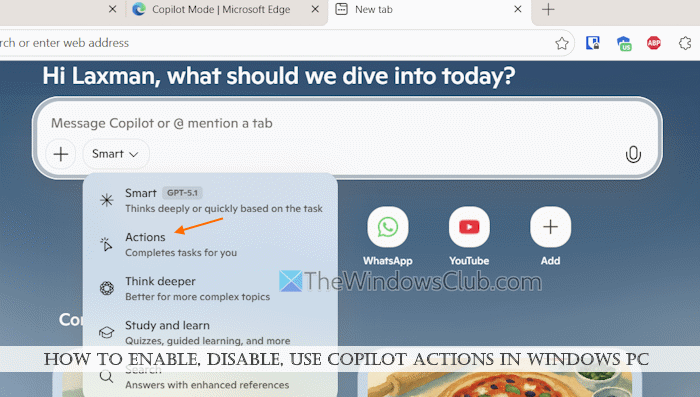
Microsoft has also experimented with Copilot Actions, where agents can perform multi-step tasks involving applications and local files.
Read: Windows AI Agent Installation errors and their solutions
What can change, and how?
Microsoft’s Build announcements give us a clearer picture of how Windows could change as AI agents become more capable. The focus is no longer just on adding AI features, but on building the infrastructure agents need to actually perform tasks.
- Connecting AI agents to apps and data: Microsoft is adding Model Context Protocol (MCP) support and Windows connectors to allow compatible AI agents to access approved tools, applications, files, and other data sources. This means an agent doesn’t have to be limited to generating instructions; it can use the capabilities exposed by Windows and connected applications to perform a task.
- Windows Search could become more than search: Today, Search helps you find applications, files, settings, and other information. With agentic capabilities, the experience could move beyond simply finding something to understanding what you want to do with it. For example, instead of searching for a project document and opening it yourself, you could ask Windows to find the latest version and summarize the key changes. Microsoft is already expanding AI-powered search and agent-related capabilities across Windows, although the more advanced vision of Search becoming a task-oriented interface is still developing.
- Dedicated environments for AI agents: Microsoft is creating dedicated Windows environments where AI agents can perform computer-based tasks without operating directly inside a user’s personal Windows session. Windows 365 for Agents provides Cloud PCs specifically for this purpose. When an agent needs to perform a task, it can check out an available Cloud PC, open applications, interact with their interfaces, and complete the workflow. Once the task is finished, the Cloud PC can be checked back in and made available for another task. This gives agents a controlled Windows environment while allowing organizations to manage resources and costs.
- AI agents enter Windows development: Microsoft is also bringing agents into the process of building Windows applications. Windows Development Skills, now generally available, give agents structured knowledge for the native Windows development lifecycle, covering tasks such as scaffolding, design, building, testing, packaging, and shipping WinUI 3 applications. Microsoft has also introduced the experimental Intelligent Terminal, an experimental, open-source version of Windows Terminal with automatic error detection and a built-in agent pane that acts as a pair-programming assistant directly in the shell.
- More AI on the PC: Microsoft’s work on local AI models and NPUs could allow some agent tasks to run directly on supported devices, while more demanding work continues to use cloud AI. This points to a hybrid local-and-cloud approach.
- More control over agents: As agents become capable of taking actions, security becomes critical. Microsoft is building isolated execution environments, agent identities, permissions, and management controls so agents can work without unrestricted access to the PC.
What does this mean for Windows users?
The future of Windows AI agents has already begun, but it is arriving in stages. Some capabilities are available today, while others are limited to Copilot+ PCs, previews, or controlled rollouts. Microsoft is also building the underlying infrastructure rather than treating AI as just another Windows feature. The most important change, therefore, may not be the arrival of another Copilot button, but the possibility that Windows itself becomes an environment in which AI agents can operate.
The technology is promising, but today’s agents are not autonomous replacements for human judgment. For now, they are better viewed as capable assistants that can increasingly move from explaining how to do something to actually doing the work. If Microsoft can make them reliable, secure, and unobtrusive enough to earn users’ trust, the transition from chatbot to assistant to agent could become one of the biggest changes to the Windows experience in years.
That’s all! I hope you find this useful.
Read: Microsoft is transforming every Windows 11 PC into an AI PC.
What is the name of the AI agent in Windows?
Windows does not have one single AI agent with a universal name. Microsoft Copilot is the main AI assistant in Windows, while newer agentic experiences such as Agent in Settings and Copilot Actions are designed to perform tasks rather than simply answer questions.
Read Next: How to Install Microsoft Scout Agent.
