
As every company is implementing AI into everything they make and use, Microsoft is no different. The company is releasing a lot of AI tools that help Microsoft 365 users optimize workflows. They have all gone a step further and started releasing autopilot tools backed by AI. The autopilot tools do not need user intervention to achieve preset tasks. A user can define tasks for autopilot AI tools, and they achieve them as per the schedule. Microsoft has released its first Autopilot agent, Microsoft Scout, for Microsoft 365 Business users. In this guide, we show you how to install the Microsoft Scout Agent.
What is Microsoft Scout?
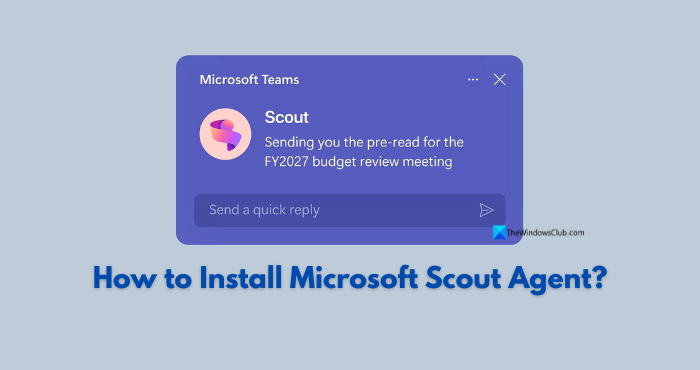
Microsoft Scout is the first Autopilot agent from Microsoft. It is integrated with all Microsoft 365 apps. It comes as a desktop application that you can install on Windows and macOS. It can read and write files, run shell commands, control a browser, work with your Microsoft 365 data, and complete tasks you ask it to do in the background, autonomously.
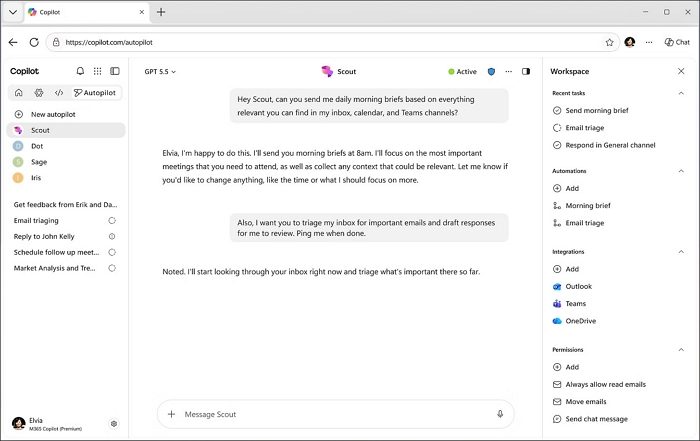
Microsoft Scout is like a digital team working for you. All you have to do is ask via the chat interface. The interface may feel similar to Copilot, as Microsoft Scout is a part of Autopilots in Copilot. You do not need to worry that it may mess with critical tasks or sensitive actions. Before carrying out any sensitive actions that may affect your organization and its data, it asks for your approval. You may choose to approve or disapprove.
Some of the use cases of Microsoft Scout are as follows:
- Create, edit, and search your workspace documents, including Word, Excel, PowerPoint, and code files.
- Run and execute shell commands.
- Navigate web pages, fill forms, and interact with web applications.
- Connect to Microsoft 365 to manage your emails, calendar, Teams conversations, OneDrive files, meetings, etc.
- Works autonomously in the background according to scheduled timelines.
- Launches dedicated sub-agents to delegate complex tasks and complete tasks with perfection through research and code review.
When you describe your task in natural language in the Microsoft Scout chat interface, it selects tools, works out the steps that are needed to achieve your task, and progresses. If a task is sensitive, such as sending an email, it asks for your approval before proceeding. You can see the results in the chat conversation or through files saved on your workspace. Let’s see how to install Microsoft Scout.
How to install Microsoft Scout Agent?
Microsoft Scout Agent is easy to install if you meet the prerequisites. Here are the prerequisites and the process to install Microsoft Scout.
- Prerequisites for Microsoft Scout
- Install Microsoft Scout on Windows
Here’s the detailed process.
1] Prerequisites for Microsoft Scout
Microsoft Scout is not available to install and use. Microsoft has laid out a few prerequisites that are mandatory to install and use Scout agents. They are:
- Windows 11 Operating System or macOS 12
- Microsoft 365 work or school account registered with your organization
- Access to Microsoft 365 Copilot
- Latest Microsoft Visual C++ redistributable library
- Administrator permissions on Windows 11, including an Intune-enabled account
- GitHub Copilot Business or Enterprise license
For accounts organized by an IT admin, they need to complete the Microsoft Scout access setup.
Read: Microsoft Scout vs. Copilot vs. Cowork: Which AI Tool Do You Need?
2] Install Microsoft Scout on Windows
To get started with the installation of Microsoft Scout on Windows, you need to visit the Microsoft website to download Microsoft Scout (Frontier).
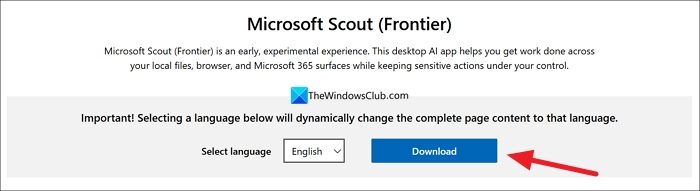
Run the Microsoft Scout (Frontier) installer and install it on your Windows 11. After successful installation, launch it. Then, click Sign in to Microsoft 365. Use your Microsoft 365 credentials to sign in and authenticate. Remember, your personal account will not work. Only work or school accounts with access to Microsoft 365 Copilot will work.
After successful sign-in, Microsoft Scout will ask for certain permissions via prompts. Grant them as you have administrator access. Then, select Sign in to GitHub. Use the credentials of the GitHub account that has a Business or Enterprise GitHub Copilot license.
You need to set up a workspace directory for Microsoft Scout. It is important to set it up, as it is the folder where Microsoft Scout reads and writes files in your local environment. Choose a directory when prompted to set it up.
Read: Ultimate Admin Guide to Deploying Microsoft Scout via Intune
How to enable Microsoft Scout?
To enable Microsoft Scout, your organization must be a part of the Frontier preview program. Along with it, there are a few prerequisites that your account must meet. Then, you can sign up to get early access to Microsoft Scout and install it on Windows 11 or macOS devices managed by your organization.
Related read: Microsoft Scout for Developers: Automating GIT and Shell commands.
