
Microsoft Scout is Microsoft’s latest agentic tool, offering an always-on way to automate workflows across Microsoft 365 and your local environment. However, when signing in to this tool, several users have reported the “GitHub code expired” sign-in loop error. Since Microsoft Scout requires a GitHub Copilot Business or Enterprise license linked to your account, this error becomes a roadblock for many users trying to access it.

GitHub Code Expired Sign-In Loop in Microsoft Scout
These are a handful of ways to fix the GitHub Code Expired Sign-In Loop error in Microsoft Scout:
- Verify your GitHub Copilot license
- Check your AI credit balance
- Re-authenticate your accounts
- Confirm your admin has completed Frontier setup
1] Verify your GitHub Copilot license
First, make sure your active GitHub account has a valid Copilot Business or Enterprise subscription assigned to it. You can check this from your GitHub Billing and licensing settings to confirm the subscription is active.
2] Check your AI credit balance
GitHub Copilot usage inside Scout is billed through AI Credits. If your organization’s credit pool has run dry, token access gets cut off, which can trigger sign-in failures. Head into your GitHub Billing settings and check whether you’ve hit your usage or credit limits.
3] Re-authenticate your accounts
If your subscription and credits are both fine, try re-authenticating. Scout requires you to sign in to your Microsoft 365 work account first, then your GitHub account. Sign out of both, sign back in, and attempt access again.
4] Confirm your admin has completed Frontier setup
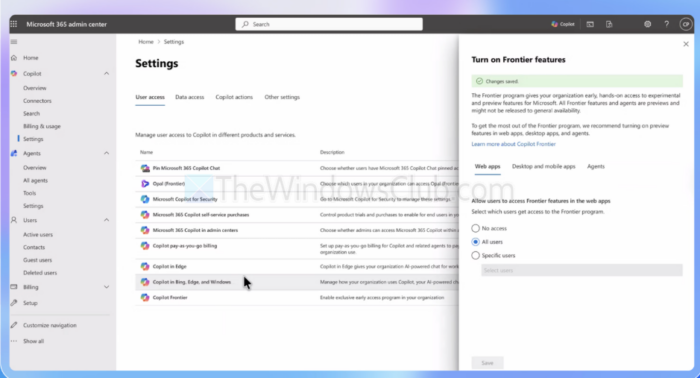
Scout access isn’t just about your license — it also depends on your IT admin completing two setup gates: enabling Copilot Frontier for your organization in the Microsoft 365 admin center, and configuring the Scout Intune policy on your device. If either gate is incomplete, sign-in will fail regardless of your GitHub license status. Check with your admin if the above steps don’t resolve it.
So those were a few straightforward ways to fix the Microsoft Scout GitHub code expired issue. In most cases, it comes down to a licensing gap, an authentication hiccup, or an incomplete admin setup on the Frontier side. So make sure all three are in order before trying again.
Does the GitHub code expired error mean my account has been compromised?
No, this error is not a security or compromise issue. It simply means the device authorization code used to link your GitHub account to Scout timed out before the sign-in flow completed, which commonly happens if there’s a delay between generating the code and entering it, or if the browser session used for authentication was closed too early.
Can I use a personal GitHub account instead of a work GitHub account to sign in to Scout?
No. Microsoft Scout requires a GitHub account that has an active Copilot Business or Enterprise license tied to your organization. A personal GitHub account with an individual Copilot subscription won’t satisfy the licensing check, and you’ll keep hitting sign-in errors even if the account itself authenticates successfully.
