
Microsoft has released many AI tools for Business and Enterprise users. They call them “AI experiences” dearly. As new AI experiences are released for general use, the confusion about how each tool is useful is a fairly common dilemma. It is almost impossible to track all the changes, new releases, and updates, especially with AI products and services. You might have heard of AI experiences like Microsoft Copilot, Copilot Cowork and Microsoft Scout. If you are confused about their usability, follow this guide. We explain to you the differences between Microsoft Scout, Copilot, and Copilot Cowork.
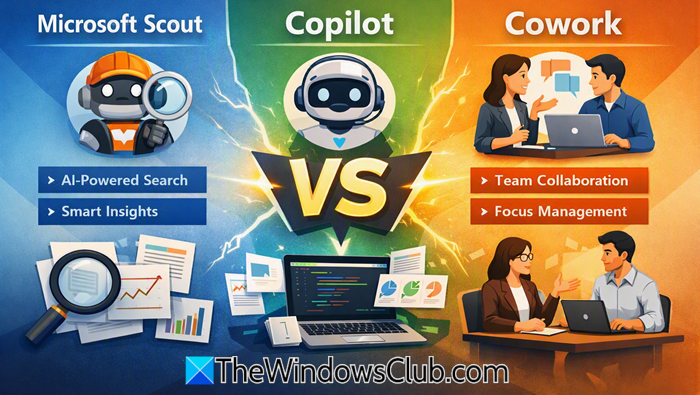
Microsoft Scout vs. Copilot vs. Cowork: Which AI Tool Do You Need?
Microsoft Scout, Microsoft 365 Copilot, and Copilot Cowork are three different AI tools from Microsoft released for Business and Enterprise users. Here’s what each tool can do and who can use it.
How Microsoft Scout works
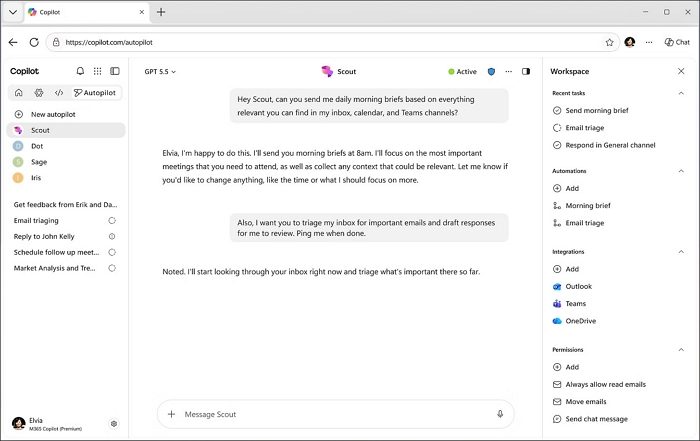
Microsoft has recently introduced a new category of agents called Autopilots. These Autopilots run continuously and autonomously on your device, carrying out your tasks on your behalf. They stay active in the background even when they are not doing any task. Microsoft Scout is the first Autopilot agent released by Microsoft for Windows 11 and macOS.
Microsoft Scout integrates with Microsoft 365 apps you use every day. It connects to Teams, Outlook, OneDrive, SharePoint, and all the data that makes your day better at work. That includes emails, chats, calendar and contacts, and it operates across cloud, desktop, and web. Over time, it gathers enough knowledge about your work and creates context powered by Work IQ, and becomes more helpful in your work.
It is based on the OpenClaw open-source tool and is built with enterprise-grade security and controls so that you can rely on it.
To put it simply, Microsoft Scout is an assistant that gathers information, schedules meetings, reminds you of important meetings, coordinates with people across time zones, researches and prepares meeting materials, identifies upcoming deliverables, and blocks time on your calendar to help you stay on track with commitments.
How Microsoft 365 Copilot works
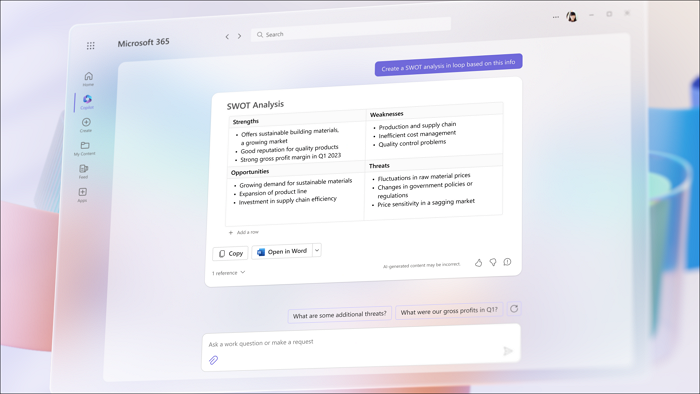
Microsoft 365 Copilot is an advanced edition of Microsoft Copilot. The normal Copilot does not have access to your work data. Microsoft 365 Copilot gives answers that include content from the internet and your work content that you have given access to.
Apps we use every day at work, like Word, Excel, PowerPoint, Outlook, and Teams, all have Microsoft 365 Copilot. You can create documents in Word, get guidance on formulas in Excel, summarize email threads in Outlook, and transcribe or summarize meetings in Teams.
Unlike Microsoft Scout, Microsoft 365 Copilot does not stay active and running in the background all the time. It starts when you enter a query and delivers results based on your needs. To personalize responses based on your work, it uses Microsoft Graph content like work emails, chats, and documents. The responses shown are limited to the access levels of a user in the organization.
To summarize, Microsoft 365 Copilot is an answer engine that gives you personalized answers for your queries based on your work data and internet knowledge. You can use it to draft emails, create responses, rough pitches, etc.
How Copilot Cowork works
Copilot is for knowledge. Copilot Cowork is for action. The intent you get from Copilot is turned into reality across Microsoft 365 with Cowork. The action, or turning into reality, is the act of achieving tasks, running workflows, and doing work on your behalf.
Copilot Cowork enables Copilot to take action instead of just responding to queries. When you describe the work outcome you want, Cowork turns it into reality with Copilot using data from emails, meetings, messages, files, and other work data. To not miss a touch at work, Copilot Cowork is powered by Work IQ to learn your personality across platforms like Outlook, Teams, Excel, and other Microsoft 365 products, so it can act and work similarly to you.
Cowork can help you clean up your calendar by rescheduling meetings, protecting focus time, preparing meeting packets, generating decks, documents, and follow-up. It also compiles company data based on the access you give, and packages results so you can go into meetings with a clear idea. It can build competitive intel, create a launch plan, and shareable assets.
Copilot Cowork and Microsoft Scout may sound similar at first, but Microsoft Scout works in the background anonymously all the time, as it is an autopilot agent. Cowork, on the other hand, works only when you enter a query on Copilot and need something. Your demand is its command.
Comparison
| Feature | Microsoft Scout | Microsoft 365 Copilot | Copilot Cowork |
|---|---|---|---|
| Primary Function | Autonomous AI agent that operates across local systems, desktop, browser, and Microsoft 365 | AI assistant embedded in Microsoft 365 apps for content creation and analysis | Agentic AI that executes multi-step tasks across Microsoft 365 cloud apps |
| Execution Mode | Autonomous — continuously monitors and acts within defined controls | Reactive — responds to user prompts | Delegated — plans and executes tasks based on desired outcomes |
| Scope of Operation | Local machine + Microsoft 365 + browser + GitHub + MCP servers | Inside Microsoft 365 apps (Word, Excel, Outlook, Teams, PowerPoint) | Cloud-based across Microsoft 365 services (Teams, Outlook, SharePoint, OneDrive) |
| Use When… | You need local machine access or automation (e.g., file management, PowerShell commands, browser automation) | You need help writing, summarizing, analyzing, or creating content | You want to delegate complex, multi-step workflows (e.g., preparing reports, scheduling meetings) |
| Typical Tasks | – Find and compare local files – Run scripts – Automate browser tasks – Monitor system activity | – Draft emails and reports – Summarize meetings – Create presentations – Analyze data trends | – Gather files and briefings – Manage inbox/calendar – Create and distribute updates – Run recurring workflows |
| Integration Level | Deep integration with local environment and Microsoft 365 | Deep integration with Microsoft 365 apps | Deep integration with Microsoft 365 cloud services |
| Autonomy Level | High — acts proactively without prompts | Low — requires user input | Medium — executes delegated tasks with user approval |
| Governance & Control | Operates within defined system controls; can extend via MCP servers | Fully governed by Microsoft 365 data policies | Requires user approval for sensitive actions; governed by Copilot credits |
| Best For | Developers, IT admins, and power users needing automation and local control | Knowledge workers creating or analyzing content | Managers and teams coordinating multi-step workflows |
| Example Scenario | Automatically check GitHub repos, run tests, and prepare PR updates | Summarize a Teams meeting and draft follow-up emails | Prepare a meeting package and distribute stakeholder updates |
| Key Advantage | Always-on automation across local and cloud environments | Fast, low-friction productivity boost | End-to-end workflow execution and coordination |
| Limitation | Requires setup and permissions for local access | Limited to single-app tasks; reactive | Needs approval for actions; more complex governance |
Is Microsoft Scout an advanced version of Copilot Cowork?
No. There is no similarity between Copilot Cowork and Microsoft Scout, as they do different tasks. Copilot Cowork runs when required or prompted. Microsoft Scout runs in the background autonomously and improves itself in achieving your tasks with each passing day.
Can we use Microsoft Scout, Microsoft 365 Copilot, and Copilot Cowork for free?
Microsoft Scout, Microsoft 365 Copilot, and Copilot Cowork are only available for Business and Enterprise users. They are set up and managed by organizations for their members through monthly subscriptions, Copilot Credits, and usage-based billing with restrictions based on user role.
Read: How to optimize Workflow with Scheduled Copilot Cowork Tasks.
