
Ransomware is putting the entire Internet at risk, and the worst part is that many users still don’t deem it necessary to protect themselves from it. For instance, despite being online for my work the entire day, I was surprised to find that Ransomware could take my entire computer hostage despite using an Antivirus software. Last year itself the Ransomware industry was pegged at a whopping $1-Billion, and the amount is only increasing.
If you are still oblivious to what Ransomware is, let us explain it to you.Ransomware is malware that takes control of your system, encrypts files, and then demands a ransom to provide the decryption key. The perfect analogy for this would be the typical example of how Terrorists negotiate with the Government after taking the civilians as hostages. The situation is so bad that on the Dark Web, Ransomware is being offered as a Service, meaning anyone could rent a Ransomware and make money from the hostages.
While some pf us may take the proper steps to prevent ransomware and even install anti-ransomware software, how would we know if we are properly protected? This is where a ransomware simulator software like RanSim can help you. RanSim Ransomware Simulator checks your Windows systems preparedness for a Ransomware attack by simulating different types of attacks & informing you which files are vulnerable.
RanSim ransomware simulator software
Ransomware Simulator, RanSim, is one of the best bets for checking whether you are protected from ransomware, as it simulates an actual ransomware attack and checks your file system for vulnerabilities. RanSim simulates multiple types of ransomware attacks to ensure your system is safe. The best part is that all of this is done without actually harming your data and the real strain test is carried out on all of the files and file systems on your PC.
RanSim simulates multiple types of Ransomware attacks to warn you about the state of security on your computer system. The best part is that all of this is done without actually harming your data and the real strain test is carried out on all of the files and file systems on your computer.
The tool tests your PC for the following ransomware attacks – InsideCryptor, LockyVariant, Mover, Replacer, Streamer, StrongCryptor, StrongCryptorFast, StrongCrytptorNet, ThorVariant, WeakCryptor ransomware currently.
To be able to install RanSim, you may need to temporarily turn off your antivirus program, though I didn’t have any problem with Windows Defender – the only security software I have installed – but some antivirus programs might block the installation.
Once installed, reactivate your antivirus software if you had disabled it, then click the Check now button. The tool will scan your computer and highlight any unsafe files and folders. I was personally surprised and equally taken aback when I saw that all my files were vulnerable to a handful of Ransomware.
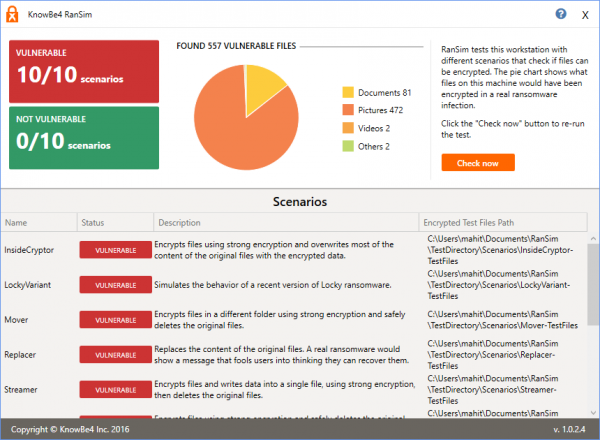
RanSim also goes a step further by showing which file types are more vulnerable via a pie chart. Also, the dashboard displays a list of Ransomware that can successfully attack your system and the disk partition they will affect most.

The free program has been developed by knowbe4.com but to download it, you have to fill in all your details like name, address, email ID, etc.
Let us know how your Windows system performed.
How do you know if your computer has ransomware?
It is pretty easy to tell if your computer has ransomware because the ransomware itself appears on your screen frequently, letting you know it’s there. However, you may not know if you do not open certain files or folders on your computer. On the other hand, your security shield can also help you know about ransomware.
Does ransomware lock your computer?
Yes, the primary intention of most ransomware is to lock your data so that you don’t get an option to unlock files other than paying the ransom. Ransomware demands money in exchange for the decryption key. The bottom line is that, in most cases, ransomware locks down your content, not the entire computer.
