
If you’ve been using Windows OS for a long time, you may have come across a file with the name NTUSER.DAT. It is a user-specific file that stores user configuration data, which is read when you log in to your computer. Imagine it as a file from which Windows retrieves user settings and uses them to prepare your login.
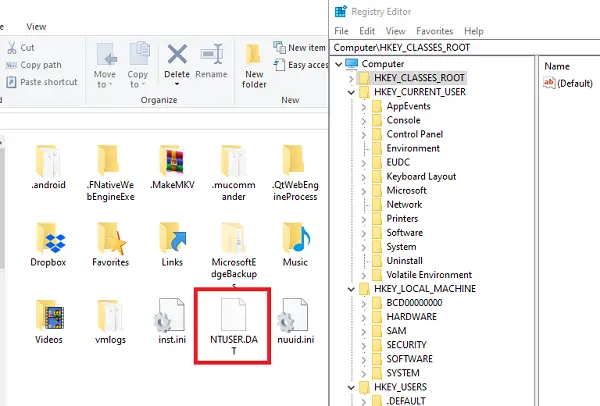
What is NTUSER.DAT file in Windows 11
If you are wondering why the file has ‘NT’ in its name, it’s because this DAT file dates back to Windows NT. It was the first operating system to support multiple user profiles. Windows 98/95 did not support multiple user profiles. Windows now generates this file for every new user profile that is created on the system.
In this post, we will cover the following topics:
- Location of NTUSER.DAT file
- Why does Windows 10 use a data file to store information
- How does the NTUSER.DAT file work
- Can you delete the NTUSER.DAT file?
Location of NTUSER.DAT file
- Set Windows to show Hidden files
- Open the Run prompt
- Type %userprofile% and hit Enter
- The User Profile folder will open
- You should see the NTUSER.DAT file here.
If NTUSER.DAT appears outside C:\Users\<UserName>\, it could be malware disguised as the file. Run a full antivirus scan in that case.
Why does Windows use a data file to store information
You would be surprised to know that it is a file which carries all registry entries related with users. Windows saves every configuration detail into Windows Registry, which also includes User configuration and preferences data. If you have ever opened a Registry hive, you must have seen a folder with key names:
- HKEY_USERS
- HKEY_CURRENT_USER
While the former stores’ standard configuration, the later is user-specific.
Windows creates an NTUSER.DAT file for every user.
Here is the list of files and their Registry counterparts.
| Registry hive | Supporting files |
|---|---|
| HKEY_CURRENT_CONFIG | System, System.alt, System.log, System.sav |
| HKEY_CURRENT_USER | NTUSER.DAT, NTUSER.dat.log |
| HKEY_LOCAL_MACHINE\SAM | Sam, Sam.log, Sam.sav |
| HKEY_LOCAL_MACHINE\Security | Security, Security.log, Security.sav |
| HKEY_LOCAL_MACHINE\Software | Software, Software.log, Software.sav |
| HKEY_LOCAL_MACHINE\System | System, System.alt, System.log, System.sav |
| HKEY_USERS\.DEFAULT | Default, Default.log, Default.sav |
How does the NTUSER.DAT file work
When you make any change in the user configuration, it is saved into the Registry. During the logout process, this changed setting is saved into the NTUSER.DAT file. The next time you log in to the computer, it loads all the information from the same NTUSER.DAT file.
Read: How to open a DAT file?
Can you delete the NTUSER.DAT file?
You should not try and delete the NTUSER.DAT file. It is essential for Windows to load your customized environment (desktop, apps, registry settings) each time you sign in. If you delete it, you will lose all your personal settings and configurations. The user account could even get corrupted and stop working.
We hope that this information about the NTUSER.DAT file was clear.
Looking to learn more about other processes, files, file types or formats in Windows? Check these links:
Desktop.ini file | Windows.edb files | Thumbs.db files | DLL and OCX files | NFO and DIZ files | Swapfile.sys, Hiberfil.sys & Pagefile.sys | Index.dat file | Desktop.ini file | Svchost.exe | WinSxS | RuntimeBroker.exe | StorDiag.exe | nvxdsync.exe | Shellexperiencehost.exe | Hosts file |WaitList.dat file.
