
Windows Malicious Software Removal Tool is a security tool developed and released by Microsoft for Windows PCs. It reverses any infection caused by viruses or malicious software on Windows PCs. Microsoft updates it regularly and sends updates to every Windows user, which get installed with Windows updates. Some users are reporting that the Windows Malicious Software Removal Tool is not downloading, installing, updating or working on their PC. This guide will help you fix it.
Malicious Software Removal Tool not installing, updating, downloading, working
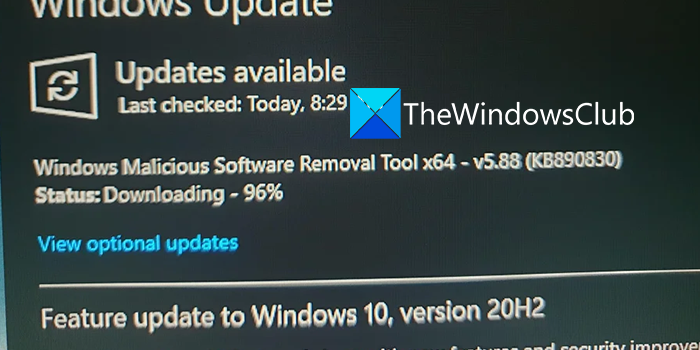
If the Windows Malicious Software Removal Tool is not downloading, installing, updating or working on your Windows 11/10 PC, you can use the following methods to fix the issue easily. Before going into the fixes below, restart your PC and see if it has made any change. If not, try the following.
- Check Internet Connection
- Clear SoftwareDistribution folder contents
- Check for updates manually in Virus & threat protection
- Run Windows Update Troubleshooter
- Install in Safe Mode
- Manually download and install MRT.
Before you begin, run a full antivirus scan in Safe Mode with your preferred security software and restart your PC. You should also know that MRT does not update on its own. While Windows Update will automatically download the new version and replace the old one, if you want to download it, you will have to download the tool every time a new version is available.
1] Check Internet Connection
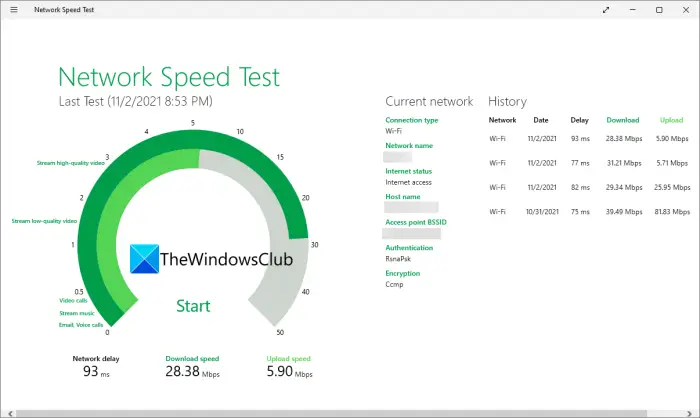
For the Windows Malicious Software Removal Tool to download, you need to have a good internet connection. It fails to download when your internet connection is not working properly. Do run speed tests and check if the speeds are good. Check for any connection issues and contact your internet service provider to fix any service-related issues.
Read: Fix Network & Internet connection problems in Windows
2] Clear SoftwareDistribution folder contents
Clear the contents of the SoftwareDistribution folder and then try again and see if that works.
3] Check for updates manually in Virus & threat protection
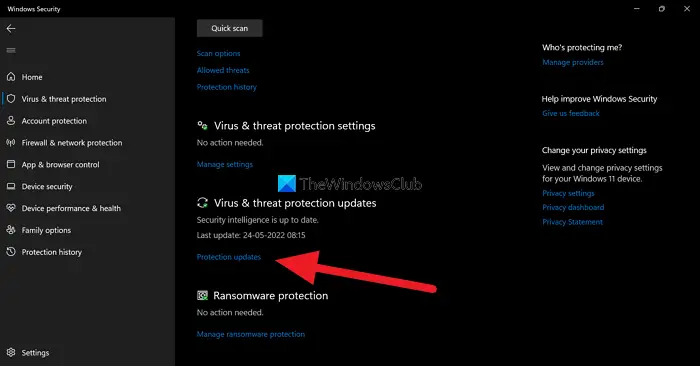
If the download or installation of the Windows Malicious Software Removal Tool is stuck or the tool is not working, you need to check the updates manually.
To check for updates manually,
- Click on the Start menu and search for Windows Security
- Open Windows Security from the results
- Then, click on Virus & threat protection on the left side panel
- Scroll down to Virus & threat protection updates and click on Protection updates
- It will take you to the Protection updates page. Click on Check for updates button
- It will automatically check and install the available updates
4] Run Windows Update Troubleshooter
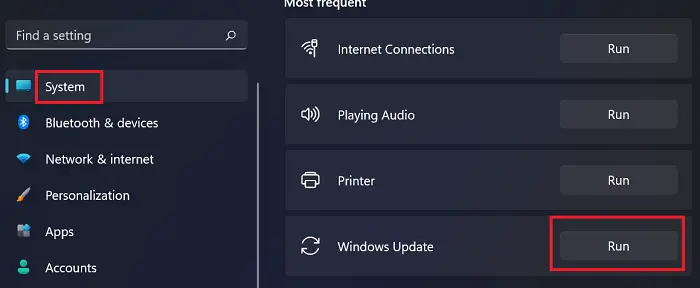
The other way to fix the issues with Windows Malicious Software Removal Tool is to run Windows Update Troubleshooter as they get installed with Windows updates. If there are any issues with the Windows and related updates, running the Windows update troubleshooter will fix it.
To run Windows Update Troubleshooter,
- Open the Settings app
- Scroll down in the System tab to Troubleshoot tile and click on it
- Then, click on Other troubleshooters
- Find Windows Update and click Run beside it.
It will fix the problems related to Windows updates.
5] Install in Safe Mode or in Clean Boot State
If you are still facing issues with the Windows Malicious Software Removal Tool, you need to install it in Safe Mode with Networking or in Clean Boot State. In these modes, only Windows and its related programs work, which makes it hard for the interfering programs to mess with the Windows Malicious Software Removal Tool.
Read: How to Install & Uninstall programs in Safe Mode in Windows
6] Manually download and install MRT.exe
If none of the above solutions helped you fix the issue, you need to install the Windows Malicious Software Removal Tool manually. You can download it from the Microsoft website and run it.
These are the different ways you can use to fix the issues with the Windows Malicious Software Removal Tool on Windows 11/10.
Does the Windows Malicious Software Removal Tool?
Yes, it works well in reversing infection and removing malicious software. But it is not an alternative to antivirus software, as confirmed by Microsoft. You still need to have a third-party antivirus to protect your PC fully.
How long does it take to install Windows Malicious Software Removal Tool?
It does not take much time to install the Windows Malicious Software Removal Tool. It can be installed within 30 minutes after starting the download. If it fails to install, you can use the above methods to fix and install it.
