
Are you encountering the Error Code 25 when launching the Battlefield 2042 game on Windows PC? Here is a complete guide to fix error code 25 on Battlefield 2042.
Battlefield 2042 is a multiplayer-focused first-person shooter game that was released as an addition to the Battlefield series. It has already gained popularity among gaming enthusiasts worldwide. While most of the time you get a hassle-free gaming experience, it is not uncommon to encounter errors or problems when playing or launching the game. One such error is launch error code 25, which you get when trying to open Battlefield 2042.
When triggered, you will see the following error message along with error code 25:
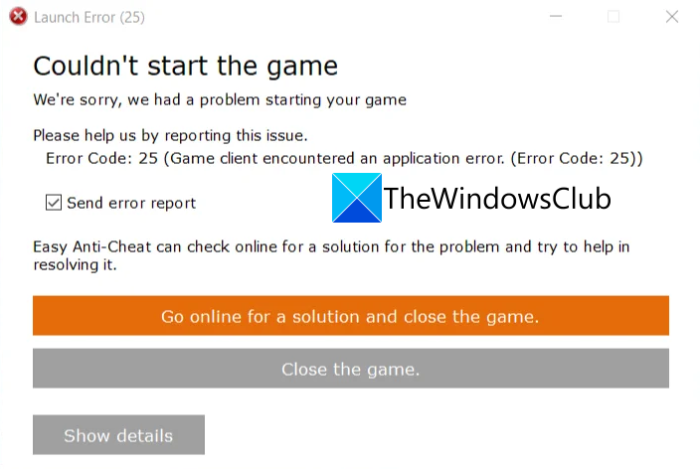
Launch Error (25)
Couldn’t start the game
We’re sorry, we had a problem starting your gamePlease help us by reporting the issue.
Error Code: 25 (Game client encountered an application error. Error Code: 25))
Now, if you are also encountering the same error code, no need to worry. You have landed on the correct page. In this guide, we will share several working fixes to help you easily get rid of the error.
Before getting to the fixes, let us try to understand what might cause the error code 25 on Battlefield 2042.
What causes error code 25 on Battlefield 2042?
Several reasons might trigger the error code 25 on Battlefield 2042, which are as follow:
- It can be caused due to glitches with the EasyAnticheat service that is used by Battlefield 2042. If the scenario is applicable, you can try manually starting the EasyAnticheat service on your system to fix the error.
- An outdated or faulty GPU card driver can also cause the same error. Hence, you should always make sure that you have the latest graphics drivers installed on your PC.
- If you have enabled overclocking on your system, it can also cause the same error. So, in that case, you can try closing the apps that are using overclocking on your system.
- It can also be caused due to application or software conflicts on your PC. Hence, try performing a clean boot to see if the error is resolved.
Now that you know the scenarios that might trigger the error code 25 on Battlefield 2042, you can try a suitable fix to get rid of the error.
Read: Fix Epic Games Launcher Installer error 2503 & 2502 on Windows.
How to Fix Battlefield 2042 Error Code 25 on PC
Here are the solutions that you can try to fix error code 25 on Battlefield 2042:
- Start EasyAnticheat Service.
- Make sure your graphics drivers are up-to-date.
- Download the latest Battlefield 2042 Patch.
- Repair EasyAnticheat.
- Disable Overclocking.
- Troubleshoot in a clean boot state.
Let us now discuss the above solutions in detail!
1] Start EasyAnticheat Service
When you encounter this error code, the first thing you should do is to start the EasyAnticheat service on your PC. This error may occur if the EasyAnticheat service is not running properly. So, manually start the EasyAnticheat service, then check whether the error is fixed. Here is how you can do that:
- Firstly, launch the Services window. For that, open the Run dialog box and then enter services.msc in it.
- Now, in the Services window, locate the EasyAnticheat service from the list of available services.
- Next, right-click on the EasyAnticheat service and then press the Start button to start this service.
- After that, try launching Battlefield 2042 and see if the error is fixed.
In case you still receive the same error when trying to launch the game, there might be some other reason causing the error. Hence, try the next potential fix to resolve the error.
See: Rockstar Games Launcher Error Code 7002.1 with GTA 5 and RDR 2.
2] Make sure your graphics drivers are up-to-date
Graphics drivers play a vital role in the smooth performance of CPU-intensive video games like Battlefield 2042. In case you have out-of-date or corrupted graphics drivers on your system, it can cause launch error 25 on Battlefield 2042. So, you must ensure you have the proper and up-to-date GPU drivers on your system. If you haven’t updated your graphics drivers in a while. Consider updating them.
There are multiple ways to update graphics drivers on Windows PC which are as follows:
- Manually update graphics drivers using the Optional Updates feature that you can find inside the Settings app > Windows Update > Advanced options section.
- You can also go to the official website of your device manufacturer and get the latest graphics card drivers. Then, install the drivers on your system by running the installer for graphics drivers.
- Another conventional method is to use Device Manager to update your graphics drivers.
- You can also try using a free third-party driver updater to automatically update all your drivers including graphics drivers.
After updating your graphics drivers, try relaunching the game to see if the error is fixed. If you still get the same error, go ahead and try the next potential fix.
Read: Rockstar Games Launcher: Unable to launch game.
3] Download Latest Battlefield 2042 Patch
This error might be due to a bug in the game. Fortunately, the developers of Battlefield 2042 keep releasing patches with new updates and bug fixes. So, make sure you have installed all the latest game updates. You can open Steam and check if there are updates available for Battlefield 2042. If there is an update, install it, then try launching the game. See if this fixes the error for you. However, if the error persists, try the next solution.
4] Repair EasyAnticheat
In a few instances, this error can result from corrupted installation files associated with the EasyAnticheat app. If any files are damaged or corrupted, it can prevent the game from launching and trigger error code 25.
To repair EasyAnticheat, follow the below steps:
- Firstly, open File Explorer by pressing Win+E and then go to the Battlefield 2042 installation directory.
- Now, open the Easy Anti-cheat folder and find the EasyAntiCheat_Setup.exe file.
- After that, right-click on the EasyAntiCheat_Setup.exe file and press the Run as administrator option.
- Next, you can now choose the Repair option to repair the installation of Easy Anti-cheat.
- When the repair process is complete, try relaunching the game and check whether the error is fixed.
Hopefully, this method will fix the error for you. If not, try the next potential method to resolve the error.
See: Fix Epic Games error code LS-0003 on Windows.
5] Disable Overclocking
If none of the above fixes work for you, try disabling overclocking and see if the error is resolved. You might be seeing this error code because the overclocking feature is enabled on your PC. Hence, removing overclocking might fix the error for you. You can try closing any app that uses overclocking to see if the error is fixed.
6] Troubleshoot in a clean boot state
You can also try performing a clean boot to fix the error. In some instances, the error might be caused by interference or conflicts caused by a third-party app running in the background. So, restart Windows in a clean boot state, then check whether the error is fixed.
Here are the steps to perform a clean boot on Windows 11/10:
- First, evoke the Run dialog box by pressing Win+R and then enter msconfig in it to open up the System Configuration window.
- Now, navigate to the Services tab and enable the checkbox associated with the Hide all Microsoft services option.
- Next, click on the Disable all button and hit the Apply button.
- After that, move to the Startup tab and tap on the Open Task Manager option.
- In Task Manager, simply disable all the startup programs that run on Windows startup.
- Finally, restart your Windows and then try to open the game to check whether or not the error is fixed.
That’s it! Hope this article helps you get rid of the error.
Read: Fix Steam Error Code 51, Game Launch Failed.
Are Battlefield 2042 servers down?
If you are unable to connect to your account or online services on Battlefield 2042, the servers are most likely down. To check if the Battlefield 2042 servers are down or not, you can use a free server status checker tool like DownForEveryoneOrJustMe.com, DownDetector.com, DownOrIsItJustMe.com, etc. These websites will show you the current server status of Battlefield 2042 and let you know whether the servers are down or not.
Now read: Battlefield FPS Drops and Stuttering Issues on PC.
