
The Touchpad driver is what allows your Operating System to communicate with the touchpad. They are usually pre-installed on your computer, but if you have uninstalled them or they were removed, you need to manually download the driver from the manufacturer’s official website. In this article, we will see how to download Touchpad drivers for Lenovo, HP, Dell, Asus, Acer, Microsoft Surface, and more. Windows 11/10 laptops.
Download Touchpad drivers for Windows 11/10
We are going to download Touchpad drivers from the following manufacturers. Make sure that you are using an external mouse if your Touchpad is not working.
- Lenovo
- HP
- Dell
- Asus
- Acer
- Microsoft Surface
Let us talk about them in detail.
1] Lenovo
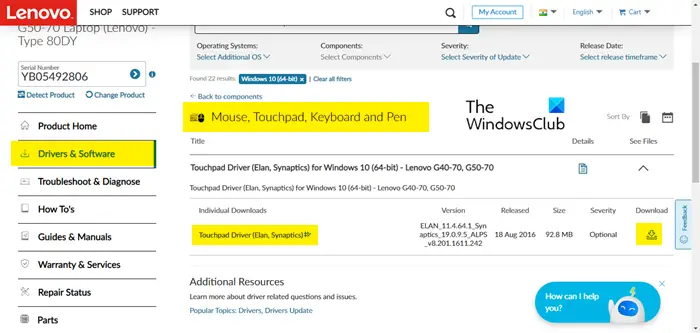
Lenovo users should follow the prescribed steps to download the Touchpad driver for their Laptop.
- Go to pcsupport.lenovo.com.
- Click on Detect Product or enter the serial number mentioned on your computer. You may be asked to download Lenovo Service Bridge if you opt for automatic detection.
- Click on Driver & Software > Manual Update.
- Go to Mouse, Touchpad, Keyboard and Pen, expand the driver menu by clicking on the drop-down option and download the driver.
After downloading, just install the driver, and you will be good to go.
2] HP
The following steps show how HP users can download the Touchpad driver for their laptops.
- Visit support.hp.com.
- Enter the serial number and click Submit.
- Go to All drivers > Driver-Network.
- Download the Touchpad driver.
Hopefully, this will allow you to download the required driver.
3] Dell
If you are on a Dell computer, follow the instructions to download the Bluetooth Driver.
- Go to dell.com.
- Enter your serial number in the given field or click Browse all products and select your system.
- You will be redirected to the Drivers & Download tab of that product.
- Expand Manually find a specific driver for your <laptop> by clicking on the Find driver’s drop-down menu.
- Look for Touchpad Driver and click on the Download button associated with it.
The driver will be downloaded to your system.
4] ASUS
If you have the privilege of getting an ASUS computer, here is how to download the Touchpad Drivers.
- Go to asus.com.
- Use your serial number to search for your device or select your product from the drop-down menu.
- You will go to the Driver & Utility page
- Select your OS from the drop-down menu.
- Navigate to Touchpad and click on Download.
After downloading the driver, double-click on it and follow the on-screen instructions to install it.
5] Acer
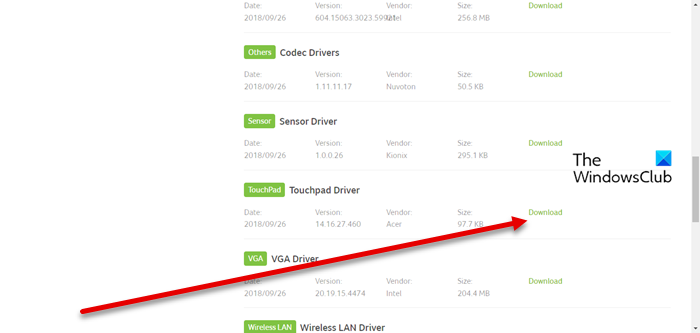
The following steps show how Acer users can download the Touchpad driver for their computer.
- Navigate to acer.com.
- Enter your Serial number or select your device.
- Select your Operating System.
- Expand Drivers and download Touchpad Driver.
After that, you can install the driver and you will be good to go.
6] Microsoft Surface
Downloading drivers for the Microsoft Surface series is a bit different. You need to visit support.microsoft.com, scroll down to reach, and Manually update Surface driver and firmware. now, select the model name from the drop-down menu, and then click on the link associated with your device. You will see a Download button, just click on it and firmware will be downloaded. You need to run that app and download missing drivers.
That’s it!
Read:
How do I install touchpad drivers in Windows 11?
Once you have downloaded the driver from the manufacturer’s website, installing it is easy. Open File Explorer and go to the Download folder. You will see the downloaded driver there. If it’s a ZIP file, you need to extract it first, but, if it’s an .EXE file, just double-click on it, follow the on-screen instructions and carry out the installation. This will do the trick for you.
Read: Where to download drivers for Windows 11
How do I manually install touchpad drivers in Windows 11?
As you did with the Touchpad driver on your Windows 11 computer, the driver can be installed on Windows 10. You just need to go to the Download folder, double-click on the setup and follow the on-screen instructions to complete the download. This way, you can install the driver.
How to update Touchpad drivers on Windows 11?
There are various ways to update your Touchpad drivers on a Windows computer. The following are some of them, so, you can choose the best for yourself.
- Install Optional and Driver update from Windows Settings.
- Download the driver from the manufacturer’s website (mentioned above). Once the driver is downloaded, just install it, restart your system and the driver will be updated.
- Use free driver update software.
- Update your Touchpad driver from Device Manager.
These methods will do the trick for you.
Also Check:
- TouchPad not working on Windows
- How to enable or disable Touchpad in Windows
- Touchpad getting disabled automatically in Windows.
