
Are you getting Dev Error 6039 in Call of Duty Warzone? Here is a complete guide to fixing the Dev Error 6039 on Warzone. Warzone is a popular game from the Call of Duty franchise. While millions of gamers love playing it, there are some errors and bugs that keep you from playing and enjoying the game. One of such errors is Dev Error 6039. Many users have encountered this error when trying to launch the game.
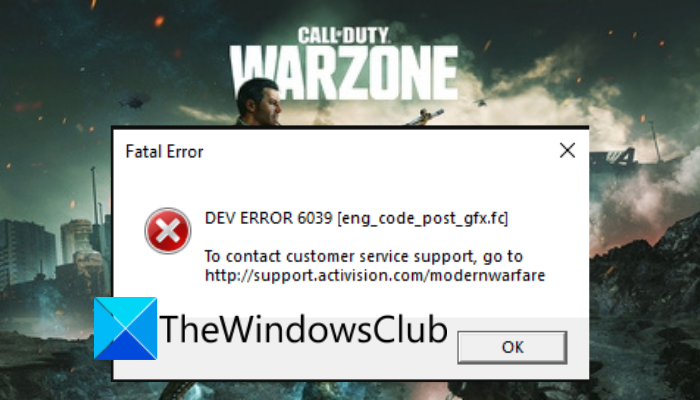
Now, if you are encountering the same error when launching Warzone, this guide will help you out. In this post, we will be mentioning fixes that you can use to get rid of dev error 6039 on Warzone.
What is Dev error 6039 Modern Warfare 2?
Dev error 6039 is a fatal error that may appear when you try to launch Call of Duty HQ in Modern Warfare 2. It may also appear in between a match and a black screen is visible along with this error code.
Before we list fixes, let’s try and understand what could be the potential culprit of the error at hand.
What causes Warzone Dev Error 6039?
Here are the potential causes of Warzone Dev Error 6039:
- It could be caused due to non-optimal graphics settings for Warzone on your system. If the scenario is applicable, you can try optimizing the graphics settings for Warzone to fix the error.
- Another reason for the same error could be corrupted or missing game files. Hence, to fix the error, you can try verifying the integrity of the game files of Warzone using the Scan and Repair feature on Battle.net.
- If you have a corrupted graphics driver on your PC, it can trigger the error at hand. In that case, you can try reinstalling your graphics driver.
- Your antivirus and firewall could also be interfering with the game and causing the error. So, disable your antivirus and firewall to fix the error.
- Software conflicts can also be one of the reasons causing dev error 6039 in Call of Duty: Warzone. To counter that, you can troubleshoot the error in a clean boot state.
- One more reason for the error can be the fact that the installation of Warzone is gone corrupted. If the scenario applies, you can reinstall the game to fix the error.
Based on the above scenarios, you can try a suitable fix to get rid of Warzone Dev Error 6039.
Fix Warzone Dev Error 6039 on Windows PC
Here are the methods that you can try to fix Dev Error 6039 in Call of Duty: Warzone:
- Optimize the graphics settings of Warzone.
- Scan and Repair the game files.
- Reinstall your graphics drivers.
- Disable your antivirus and firewall.
- Troubleshoot in a clean boot state.
- Reinstall Warzone.
1] Optimize the graphics settings of Warzone
The error could be triggered by your graphics settings in Warzone. Hence, the first thing you should try to fix the error is to optimize Warzone’s graphics settings. If you have a GeForce GTX graphics card, you can try the steps below to optimize graphics settings for Warzone:
- Firstly, exit the game, the launcher application, and related processes using Task Manager.
- Now, start GeForce Experience and navigate to its Games tab.
- From the Games tab, choose the Warzone game.
- After that, from the right-side panel, click on the Optimize button to optimize the graphics configurations for the chosen game.
- Once the optimization process is complete, relaunch the game and see if the error is now resolved.
In case this doesn’t work for you, try the next potential fix to resolve the error.
Read: Fix Memory Error 13-71 in Call of Duty Modern Warfare and WarZone
2] Scan and Repair the game files
One possible cause of this error is corrupted or broken game files. You are likely to get this error if you are dealing with corrupted, faulty, broken, or missing game files of Call of Duty: Warzone. If applicable, you can try scanning and repairing the game files to fix the error. Here are the steps to do so:
- Firstly, launch the Battle.net application and click on the Call of Duty: Warzone game from the games section.
- Now, there is a gear/settings icon next to the play button; tap it.
- Next, click the Scan and Repair option, and let the launcher verify and fix Warzone’s game files.
- Once the process is finished, try relaunching the game and see if the error still appears.
If the Dev Error 6039 in Call of Duty: Warzone still persists, you can try the next potential fix to get rid of the error.
3] Reinstall your graphics drivers
The error might also be triggered due to corrupted graphics drivers on your PC. Hence, to fix the error in that case, you will have to uninstall your graphics drivers and then reinstall them to remove any corruption causing the error. So, try reinstalling graphics drivers and then check if it fixes the error for you or not. If not, you can try the next solution to fix the error.
See: Fix Warzone Error code 6 Diver on PC.
4] Disable your antivirus and firewall
The next solution you can try to get rid of the error is to disable your antivirus and firewall. This error could be caused by your antivirus interfering with the game modules and their operation. Hence, if the scenario is applicable, you should be able to fix the error by disabling your antivirus and firewall.
If you stop receiving the dev error 6039 in Call of Duty: Warzone after disabling your antivirus and firewall, you can be sure that the main culprit was your antivirus suite. Now, we don’t recommend you keep your antivirus disabled all this time as it can invite threats and viruses to your system. So, you can add the Battle.net game launcher and the Call of Duty: Warzone executable to the exception or exclusion list of your antivirus. Similarly, you can whitelist the game launcher and the game through your firewall.
In case you still get the same error code on Warzone, move on to the next potential fix to resolve it.
Read: COD Warzone Lagging or having FPS Drops on Windows.
5] Troubleshoot in a clean boot state
You might be getting this error code due to a third-party application or software conflict with the Warzone game. If the scenario applies, the conflicts can be avoided by performing a clean boot. You can follow the below steps to do that:
- Firstly, hit the Windows + R hotkey to evoke the Run dialog box and type msconfig in it.
- Now, press Enter to open up the System Configuration window.
- In the System Configuration window, navigate to the Services tab.
- Then, enable the checkbox associated with the Hide all Microsoft services option. This is to ensure that no essential Windows service is disabled.
- After that, disable all services except those associated with your hardware manufacturers, such as Intel, Realtek, AMD and NVIDIA.
- Next, move to the Startup tab, press the Open Task Manager button, and disable all the startup programs.
- Now, return to the System Configuration window and click Apply > OK.
- Lastly, restart your system and launch the game to check whether the error occurs.
- If the error does not occur, you need to manually identify the offending process and eliminate it.
If you are still unable to fix the error, there is one more fix that you can try. So, move on to the next potential solution to resolve the error.
Read: Fix Modern Warfare Warzone’s High CPU Usage on PC.
6] Reinstall Warzone
If nothing else worked for you, the last resort to resolve the error is to reinstall Warzone. If you are dealing with a corrupted installation of the game, this method should fix the error for you. Hence, try uninstalling and then reinstalling the game using the following steps:
- Firstly, start the Battle.net app and click on the Warzone game.
- Now, press the Gear icon that is available besides the Play icon.
- Next, click on the Uninstall option and follow the prompted instruction to uninstall the game.
- When the uninstallation is done, restart your PC.
- Finally, launch Battle.net and then reinstall the Warzone game.
Hopefully, you won’t receive dev error 6039 in Call of Duty: Warzone after reinstalling the game.
How do I fix Developer Error 6039 on PS5?
To fix Developer Error 6039 on your PS5 console, try performing a power cycle. Simply turn off the console, switch it off, unplug its power cord, and wait at least a minute. After that, plug the console back into the switchboard and restart it. Hopefully, after restarting your console, you won’t receive the error. You may also update the game (if an update is available) and reinstall the game language to fix it.
Now read: BLZBNTBNA00000012 Error has occurred while launching Call of Duty Warzone Pacific.
