
This post features different solutions to fix the Final Fantasy FPS drop and Stuttering on PC. Developed and published by Square Enix, Final Fantasy is a popular action role-playing series of games. The game is available for PlayStation and Microsoft Windows. However, it’s almost impossible to find a game nowadays without issues. There have been a lot of reports of low FPS on Final Fantasy. If you are also facing a similar problem, try the solutions below to avoid the issue.
Fix Final Fantasy FPS drop and Stuttering on PC
Below is a list of effective solutions to fix FPS drops and stuttering in the Final Fantasy game on Windows 11/10 PCs.
- Ensure the PC meets the System Requirements
- Close the background applications
- Change the in-game Settings
- Enable Game Mode
- Run the Game in the Best Performance Mode
- Update Graphics Driver
Now, let’s take a look at all the solutions in detail.
1] Ensure the PC meets the System Requirements
Final Fantasy is one of the latest video games in the industry, and it’s almost impossible to find a competitor when it comes to the graphics it offers. However, as a graphics-intensive game, you must have a high-spec PC to run it without issues.
To run Final Fantasy XVI smoothly on PC, you’ll need at least Windows 11/10, a Ryzen 7 5700X or Intel i7-10700 processor, 16 GB RAM, and a GPU like the Radeon RX 6700 XT or NVIDIA GeForce RTX 2080 with 8 GB VRAM, plus 170 GB of SSD storage. This setup ensures stable performance at 1080p and 60 FPS.
If your system doesn’t match the recommended requirements, you will face a FPS drop in the game. Thankfully, you can make some in-game changes to resolve the FPS problem.
2] Close the background applications
Multiple applications running in the background will constantly consume system resources. In doing so, Final Fantasy will be left with limited system resources, automatically resulting in low FPS. You will have to close all the unnecessary background applications to fix the problem. Here’s how.
- Open the Task Manager on your Windows PC.
- Right-click on all the unnecessary applications and choose End task from the context menu.
Launch the game and check if there’s any change in the FPS.
See: Total War Warhammer FPS drop, Lag and Stuttering on PC
3] Change the in-game Settings
To get rid of the FPS drop in Final Fantasy, you must play with the game video settings. If the system features a 1080p display, ensure you are not running the game above 1920x1080p. You can even lower the resolution to solve the FPS problem.
In addition, change the Rendering quality to medium or high if you have a high-end device. You can change the quality to low or medium on a low-end system.
Coming to MSAA, if this feature is enabled in a low-end device, you will face the FPS drop problem. We recommend disabling this feature; if you want to play the game with it enabled, you can set it to 2x. By default, MSAA is set to 4x in Final Fantasy 7 Remake Integrade.
See: COD Warzone Lagging or having FPS Drops on PC
4] Enable Game Mode
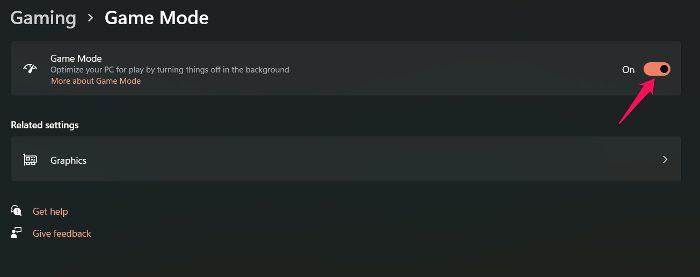
Windows 11/10 comes with a dedicated gaming mode feature. You can use it to greatly enhance the gaming experience. It will also help to boost the FPS. So, enable the Game Mode on your system and check if it fixes the problem.
5] Run the Game in the Best Performance Mode
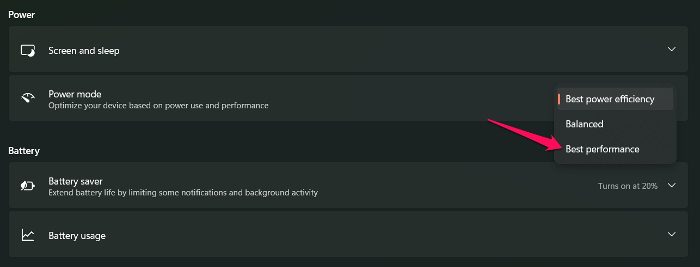
Windows lets you choose the Power mode as per the task you are about to perform. To play heavy games like Final Fantasy 7 Remake Integrade, changing the Power mode to Best Performance is recommended. You can do it by following the steps below.
- Open Settings by pressing Windows + I shortcut key.
- Go to System > Power & Battery.
- Click on the drop-down icon present next to Power mode.
- Choose the Best/ Ultimate performance option.
Launch the game and check if the problem continues.
6] Update Graphics Driver
The problem in the question can result from an outdated graphics driver. Games like Final Fantasy game require the latest graphics driver update to run without issues. If this isn’t the case, you will most likely face the problem. So, download the latest graphics driver update to fix the issue.
Read: Rainbow Six Extraction FPS Drops and Stuttering Issues
How do you fix stuttering in FFXVI remake PC?
The stuttering issue in FFXIV, FFXV and FFXVI is mainly due to unnecessary applications consuming system resources in the background. You will have to clear all such applications to fix the problem. Additionally, you can download the latest graphics driver update to resolve stuttering.
How to run Final Fantasy on DirectX 11?
It’s very easy to run Final Fantasy on DirectX 11. To do so, open your profile on Epic Launcher and click on this Settings option. Choose Final Fantasy 7 from the list of installed games, and check the Command Line Argument box. In the space underneath, type -dx11.
Read Next: Dying Light FPS Drops and Stuttering on Windows PC.
