<?xml version="1.0" encoding="UTF-8"?>
<rss version="2.0"
	xmlns:content="http://purl.org/rss/1.0/modules/content/"
	xmlns:wfw="http://wellformedweb.org/CommentAPI/"
	xmlns:dc="http://purl.org/dc/elements/1.1/"
	xmlns:atom="http://www.w3.org/2005/Atom"
	xmlns:sy="http://purl.org/rss/1.0/modules/syndication/"
	xmlns:slash="http://purl.org/rss/1.0/modules/slash/"
	>

<channel>
	<title>The Windows Club &#187; Pointer</title>
	<atom:link href="http://www.thewindowsclub.com/tag/pointer/feed" rel="self" type="application/rss+xml" />
	<link>http://www.thewindowsclub.com</link>
	<description>The Windows Club is  created by Anand Khanse, a Microsoft MVP and is primarily targeted at the Windows 7, 8 &#38; Vista user and will address and cover issues in relation to Microsoft and Windows OS.</description>
	<lastBuildDate>Thu, 09 Feb 2012 03:47:25 +0000</lastBuildDate>
	<language>en</language>
	<sy:updatePeriod>hourly</sy:updatePeriod>
	<sy:updateFrequency>1</sy:updateFrequency>
	<generator>http://wordpress.org/?v=3.3.1</generator>
<xhtml:meta xmlns:xhtml="http://www.w3.org/1999/xhtml" name="robots" content="noindex" />
		<item>
		<title>How to change double click to single click, to open files, folders in Windows</title>
		<link>http://www.thewindowsclub.com/how-to-change-double-click-to-single-click-to-open-files-folders-in-windows?utm_source=rss&#038;utm_medium=rss&#038;utm_campaign=how-to-change-double-click-to-single-click-to-open-files-folders-in-windows</link>
		<comments>http://www.thewindowsclub.com/how-to-change-double-click-to-single-click-to-open-files-folders-in-windows#comments</comments>
		<pubDate>Thu, 03 Feb 2011 16:35:06 +0000</pubDate>
		<dc:creator>AnandK@TWC</dc:creator>
				<category><![CDATA[Windows]]></category>
		<category><![CDATA[Files]]></category>
		<category><![CDATA[Folder]]></category>
		<category><![CDATA[Mouse]]></category>
		<category><![CDATA[Pointer]]></category>

		<guid isPermaLink="false">http://www.thewindowsclub.com/?p=23539</guid>
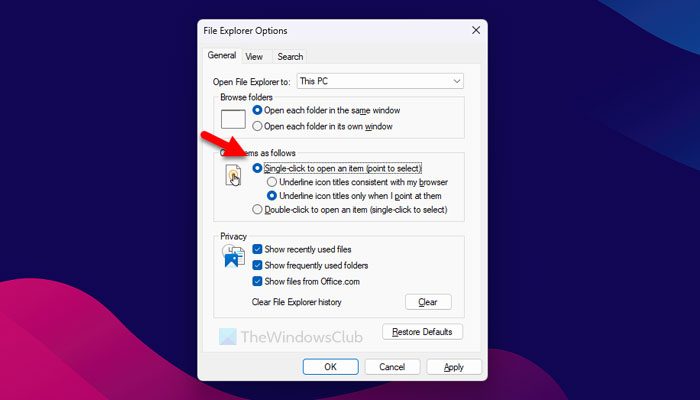
		<description><![CDATA[<div style=" float: left; padding: 4px; margin: 0 10px 5px 0; width: 75px; height: 75px;"><img style=" float: left; padding: 4px; margin: 0 10px 5px 0;" width="75" height="75" src="http://www.thewindowsclub.com/wp-content/themes/Twc/scripts/thumb.php?src=http://www.thewindowsclub.com/wp-content/uploads/2011/02/folder-options-single-click.jpg&amp;w=75&amp;h=75&amp;zc=1"/></div>Sometimes I wonder, why click twice, when clicking once can do the job!? One of the first things I do after a fresh Windows install, is to change the double-click to open files setting to single-click. To effect this change, <span><a class="more-link" href="http://www.thewindowsclub.com/how-to-change-double-click-to-single-click-to-open-files-folders-in-windows">...more &#62;&#62;&#62;</a></span>]]></description>
		<wfw:commentRss>http://www.thewindowsclub.com/how-to-change-double-click-to-single-click-to-open-files-folders-in-windows/feed</wfw:commentRss>
		<slash:comments>2</slash:comments>
		</item>
		<item>
		<title>Make your 8 most favorite shortcuts fly out of your mouse pointer with PointNLaunch</title>
		<link>http://www.thewindowsclub.com/make-your-8-most-favorite-shortcuts-fly-out-of-your-mouse-pointer-with-pointnlaunch?utm_source=rss&#038;utm_medium=rss&#038;utm_campaign=make-your-8-most-favorite-shortcuts-fly-out-of-your-mouse-pointer-with-pointnlaunch</link>
		<comments>http://www.thewindowsclub.com/make-your-8-most-favorite-shortcuts-fly-out-of-your-mouse-pointer-with-pointnlaunch#comments</comments>
		<pubDate>Wed, 11 Aug 2010 19:59:56 +0000</pubDate>
		<dc:creator>AnandK@TWC</dc:creator>
				<category><![CDATA[Downloads]]></category>
		<category><![CDATA[Desktop]]></category>
		<category><![CDATA[Pointer]]></category>

		<guid isPermaLink="false">http://www.thewindowsclub.com/?p=14813</guid>
		<description><![CDATA[<div style=" float: left; padding: 4px; margin: 0 10px 5px 0; width: 75px; height: 75px;"><img style=" float: left; padding: 4px; margin: 0 10px 5px 0;" width="75" height="75" src="http://www.thewindowsclub.com/wp-content/themes/Twc/scripts/thumb.php?src=http://www.thewindowsclub.com/wp-content/uploads/2010/08/point-n-launch.png&amp;w=75&amp;h=75&amp;zc=1"/></div>Most people have a few programs and websites that they use all the time. PointNLaunch is a convenient way to keep your favorite programs, websites, and even files just a click away. Your eight favorite &#8220;apps&#8221; fly out of your <span><a class="more-link" href="http://www.thewindowsclub.com/make-your-8-most-favorite-shortcuts-fly-out-of-your-mouse-pointer-with-pointnlaunch">...more &#62;&#62;&#62;</a></span>]]></description>
		<wfw:commentRss>http://www.thewindowsclub.com/make-your-8-most-favorite-shortcuts-fly-out-of-your-mouse-pointer-with-pointnlaunch/feed</wfw:commentRss>
		<slash:comments>7</slash:comments>
		</item>
		<item>
		<title>Track your mouse pointer in Windows 7</title>
		<link>http://www.thewindowsclub.com/track-your-mouse-pointer-in-windows-7?utm_source=rss&#038;utm_medium=rss&#038;utm_campaign=track-your-mouse-pointer-in-windows-7</link>
		<comments>http://www.thewindowsclub.com/track-your-mouse-pointer-in-windows-7#comments</comments>
		<pubDate>Fri, 04 Jun 2010 15:19:37 +0000</pubDate>
		<dc:creator>AnandK@TWC</dc:creator>
				<category><![CDATA[Downloads]]></category>
		<category><![CDATA[Mouse]]></category>
		<category><![CDATA[Pointer]]></category>

		<guid isPermaLink="false">http://www.thewindowsclub.com/?p=9603</guid>
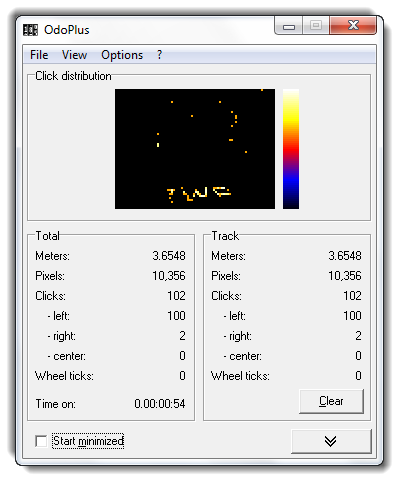
		<description><![CDATA[<div style=" float: left; padding: 4px; margin: 0 10px 5px 0; width: 75px; height: 75px;"><img style=" float: left; padding: 4px; margin: 0 10px 5px 0;" width="75" height="75" src="http://www.thewindowsclub.com/wp-content/themes/Twc/scripts/thumb.php?src=http://www.thewindowsclub.com/wp-content/uploads/2010/05/track-mouse.png&amp;w=75&amp;h=75&amp;zc=1"/></div>OdoPlus tracks the distance your mouse pointer travels on the screen. It also keeps a record of how often you clicked each mouse button and in which part of the desktop. Features: Tracks overall and intermediate distance Click counts for <span><a class="more-link" href="http://www.thewindowsclub.com/track-your-mouse-pointer-in-windows-7">...more &#62;&#62;&#62;</a></span>]]></description>
		<wfw:commentRss>http://www.thewindowsclub.com/track-your-mouse-pointer-in-windows-7/feed</wfw:commentRss>
		<slash:comments>0</slash:comments>
		</item>
		<item>
		<title>Automatically move the mouse pointer to the dialog box in Windows</title>
		<link>http://www.thewindowsclub.com/automatically-move-the-mouse-pointer-to-the-dialog-box-in-windows?utm_source=rss&#038;utm_medium=rss&#038;utm_campaign=automatically-move-the-mouse-pointer-to-the-dialog-box-in-windows</link>
		<comments>http://www.thewindowsclub.com/automatically-move-the-mouse-pointer-to-the-dialog-box-in-windows#comments</comments>
		<pubDate>Sun, 07 Mar 2010 03:57:30 +0000</pubDate>
		<dc:creator>AnandK@TWC</dc:creator>
				<category><![CDATA[Windows]]></category>
		<category><![CDATA[Mouse]]></category>
		<category><![CDATA[Pointer]]></category>
		<category><![CDATA[Tips]]></category>

		<guid isPermaLink="false">http://www.thewindowsclub.com/?p=7216</guid>
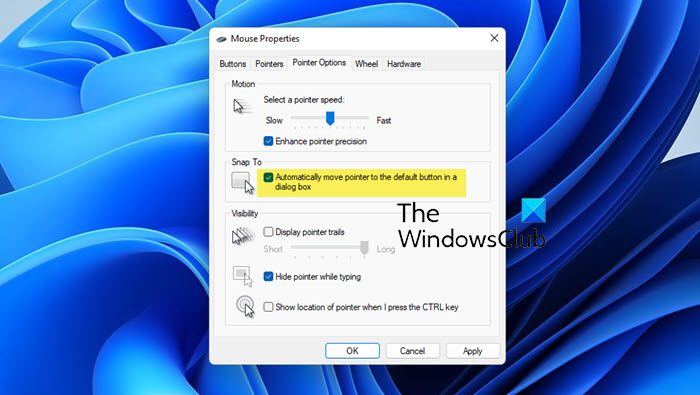
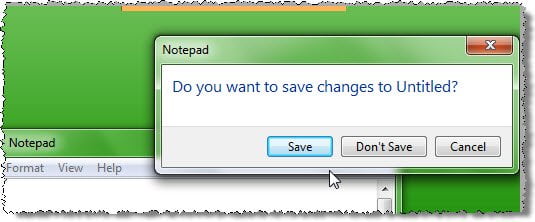
		<description><![CDATA[<div style=" float: left; padding: 4px; margin: 0 10px 5px 0; width: 75px; height: 75px;"><img style=" float: left; padding: 4px; margin: 0 10px 5px 0;" width="75" height="75" src="http://www.thewindowsclub.com/wp-content/themes/Twc/scripts/thumb.php?src=http://www.thewindowsclub.com/wp-content/uploads/2010/03/customize-cursor-m1.png&amp;w=75&amp;h=75&amp;zc=1"/></div>We have seen how you can make the confirmatory dialog window appear near your mouse pointer. Here is a small tip on how you can automatically move the mouse pointer to the dialog box in Windows 7 or Vista ! <span><a class="more-link" href="http://www.thewindowsclub.com/automatically-move-the-mouse-pointer-to-the-dialog-box-in-windows">...more &#62;&#62;&#62;</a></span>]]></description>
		<wfw:commentRss>http://www.thewindowsclub.com/automatically-move-the-mouse-pointer-to-the-dialog-box-in-windows/feed</wfw:commentRss>
		<slash:comments>8</slash:comments>
		</item>
		<item>
		<title>Windows 7 Pointers &amp; Mouse Settings for left-handed people</title>
		<link>http://www.thewindowsclub.com/windows-7-pointers-mouse-settings-for-left-handed-people?utm_source=rss&#038;utm_medium=rss&#038;utm_campaign=windows-7-pointers-mouse-settings-for-left-handed-people</link>
		<comments>http://www.thewindowsclub.com/windows-7-pointers-mouse-settings-for-left-handed-people#comments</comments>
		<pubDate>Sun, 15 Nov 2009 06:24:42 +0000</pubDate>
		<dc:creator>AnandK@TWC</dc:creator>
				<category><![CDATA[Windows]]></category>
		<category><![CDATA[Cursor]]></category>
		<category><![CDATA[Mouse]]></category>
		<category><![CDATA[Pointer]]></category>
		<category><![CDATA[Tips]]></category>

		<guid isPermaLink="false">http://www.thewindowsclub.com/?p=4668</guid>
		<description><![CDATA[<div style=" float: left; padding: 4px; margin: 0 10px 5px 0; width: 75px; height: 75px;"><img style=" float: left; padding: 4px; margin: 0 10px 5px 0;" width="75" height="75" src="http://www.thewindowsclub.com/wp-content/themes/Twc/scripts/thumb.php?src=http://www.thewindowsclub.com/wp-content/uploads/2009/11/leftcursor.png&amp;w=75&amp;h=75&amp;zc=1"/></div>Left-handed people are sometimes placed at a slight disadvantage by the prevalence of right-handed tools, since most of them are designed to be comfortably used with the right hand. This may apply in the case of Windows too! This tip <span><a class="more-link" href="http://www.thewindowsclub.com/windows-7-pointers-mouse-settings-for-left-handed-people">...more &#62;&#62;&#62;</a></span>]]></description>
		<wfw:commentRss>http://www.thewindowsclub.com/windows-7-pointers-mouse-settings-for-left-handed-people/feed</wfw:commentRss>
		<slash:comments>1</slash:comments>
		</item>
		<item>
		<title>Make confirmatory dialog windows appear near mouse cursor.</title>
		<link>http://www.thewindowsclub.com/make-confirmatory-dialog-windows-appear-near-mouse-cursor?utm_source=rss&#038;utm_medium=rss&#038;utm_campaign=make-confirmatory-dialog-windows-appear-near-mouse-cursor</link>
		<comments>http://www.thewindowsclub.com/make-confirmatory-dialog-windows-appear-near-mouse-cursor#comments</comments>
		<pubDate>Sun, 30 Aug 2009 07:24:21 +0000</pubDate>
		<dc:creator>AnandK@TWC</dc:creator>
				<category><![CDATA[Downloads]]></category>
		<category><![CDATA[Cursor]]></category>
		<category><![CDATA[Mouse]]></category>
		<category><![CDATA[Pointer]]></category>

		<guid isPermaLink="false">http://www.thewindowsclub.com/?p=3127</guid>
		<description><![CDATA[<div style=" float: left; padding: 4px; margin: 0 10px 5px 0; width: 75px; height: 75px;"><img style=" float: left; padding: 4px; margin: 0 10px 5px 0;" width="75" height="75" src="http://www.thewindowsclub.com/wp-content/themes/Twc/scripts/thumb.php?src=http://www.thewindowsclub.com/wp-content/uploads/2009/08/movedialog.jpg&amp;w=75&amp;h=75&amp;zc=1"/></div>If you have a large monitor, and you always get  irritated when you have to keep moving your mouse pointer to the center of the screen to acknowledge small dialog boxes that appear, and if you&#8217;d rather prefer, that the small <span><a class="more-link" href="http://www.thewindowsclub.com/make-confirmatory-dialog-windows-appear-near-mouse-cursor">...more &#62;&#62;&#62;</a></span>]]></description>
		<wfw:commentRss>http://www.thewindowsclub.com/make-confirmatory-dialog-windows-appear-near-mouse-cursor/feed</wfw:commentRss>
		<slash:comments>0</slash:comments>
		</item>
		<item>
		<title>Keep track of your Mouse Pointer in Windows 7</title>
		<link>http://www.thewindowsclub.com/keep-track-of-your-mouse-pointer-in-windows-7?utm_source=rss&#038;utm_medium=rss&#038;utm_campaign=keep-track-of-your-mouse-pointer-in-windows-7</link>
		<comments>http://www.thewindowsclub.com/keep-track-of-your-mouse-pointer-in-windows-7#comments</comments>
		<pubDate>Wed, 22 Apr 2009 12:43:28 +0000</pubDate>
		<dc:creator>AnandK@TWC</dc:creator>
				<category><![CDATA[Windows]]></category>
		<category><![CDATA[Mouse]]></category>
		<category><![CDATA[Pointer]]></category>
		<category><![CDATA[Tips]]></category>

		<guid isPermaLink="false">http://www.thewindowsclub.com/?p=797</guid>
		<description><![CDATA[<div style=" float: left; padding: 4px; margin: 0 10px 5px 0; width: 75px; height: 75px;"><img style=" float: left; padding: 4px; margin: 0 10px 5px 0;" width="75" height="75" src="http://www.thewindowsclub.com/wp-content/themes/Twc/scripts/thumb.php?src=http://www.thewindowsclub.com/wp-content/uploads/2009/04/lost-cursor.jpg&amp;w=75&amp;h=75&amp;zc=1"/></div>If at times you are unable to trace your mouse pointer easily or you find that you cant find it, what do you do? Move your mouse vigorously? Well, here is a small tip on how you can keep track <span><a class="more-link" href="http://www.thewindowsclub.com/keep-track-of-your-mouse-pointer-in-windows-7">...more &#62;&#62;&#62;</a></span>]]></description>
		<wfw:commentRss>http://www.thewindowsclub.com/keep-track-of-your-mouse-pointer-in-windows-7/feed</wfw:commentRss>
		<slash:comments>0</slash:comments>
		</item>
	</channel>
</rss>