
Macrorit Disk Scanner is a freeware hard drive disk scanner for Windows, that lets you scan your hard drive for Bad Sectors, issues, problems & errors.
What do you do when your Windows computer system starts showing error messages frequently? Where do you typically start when looking for a problem? Let me tell you, a Windows disk scanner is the place to start. Scanning your hard drive can help to detect and even correct the most common hard drive errors.
Although Windows computer systems come with a built-in disk error checking scanner that offers a lot of command-line options to scan the hard drive for Errors and Bad Sectors, I always prefer using a third-party tool for that. I believe that a third-party tool may offer you better options and features.
Scan Hard Disk for Bad Sectors
Returning to Macrorit Disk Scanner, it is a reliable and helpful tool for scanning the ‘bad sectors’ of a system. The hard disk in our system has some “Bad Sectors” which are actually clusters of data that cannot be read. These ‘bad sectors’ bring up various functionality errors and slow down the system speed significantly. It also occasionally displays blue screen errors.
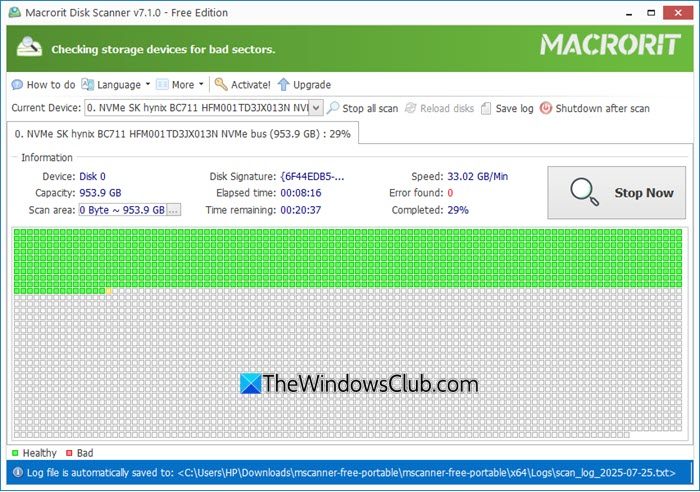
Macrorit Disk Scanner is a free and very easy-to-use third-party hard drive scanner for Windows PC. It is very handy to scan the whole disk or a partition. You can further speed up the scan by limiting the scan area. It runs faster than the Windows native disk scanner. It marks the damage with a red mark and highlights the healthy sectors with green color.
The program displays complete statistics on the top panel, which include the selected device, scan speed, number of errors found, scan area, elapsed time, and estimated time remaining to complete the scan. This way, you know how many errors have been found and how much time the program will take to scan your device completely. It also saves the scan log on your system, allowing you to access it at any time. Macrorit is a handy and powerful error-diagnosing tool, but unfortunately, it can’t fix any bad sectors.
The scan may, however, significantly slow down your computer system’s speed. On the other hand, closing all running applications may speed up the scan.
Macrorit Disk Scanner free download
In a nutshell, if you are looking for a flexible error diagnostic tool for your Windows 11/10 computer system, Macroritis is worth trying. You can download it here.
TIP:
- Check out Macrorit Disk Partition Expert from this developer.
- Windows Surface Scanner may also interest you.
