
Macrorit Disk Partition Expert is a powerful disk management software that offers numerous options. Like any other Disk management software, Macrorit Disk Partition Expert also can extend partitions, especially for the system drive. The primary reason for extending the partition is to prevent a low disk space issue. While many may prefer to use the in-built Disk Management Tool, some may want to use a third-party disk management software offering more features. Macrorit Disk Partition Expert is the new kid on the block!
Macrorit Disk Partition Expert Disk Management Software
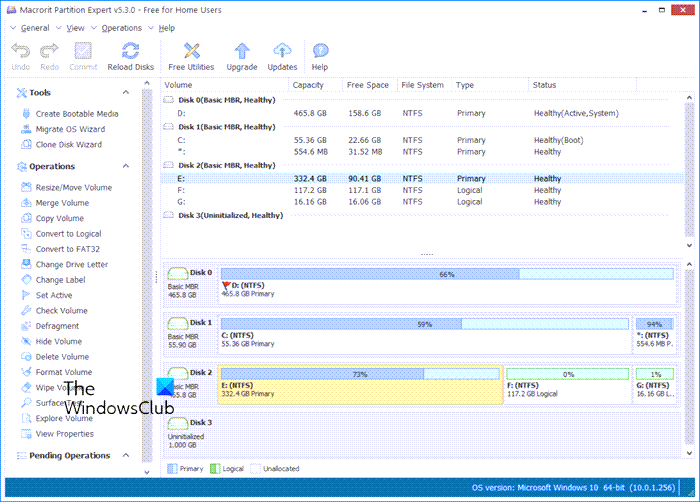
Macrorit Partition Expert Free Edition is a powerful, free partitioning program that enables you to extend, create, and format partitions, resolve low disk space issues, and manage disk space easily on MBR and GPT (GUID Partition Table) disks.
Some of the main features of Macrorit Disk Partition Expert are: Resize/Move, Create, Delete, Format, Set Active, Hide/Unhide, Change Label, Change Drive Letter, Explore, View Props, Check, Defragment, wipe, Surface test. Macrorit Disk Partition Expert also claims to have an unprecedented fast working speed. It claims to have the best data moving algorithm which is 300% faster than other partition software with the least CPU resources.
With Macrorit Disk Partition Expert you can delete, move or shrink the partition without losing any data. It’s very easy to do it. First, select the drive you want to resize and right-click, then select ‘Move/Resize’. Once you do that, you’ll get a pop-up window with options to resize the drive. It’s pretty neat and easy to do.
Once you have manipulated the drive space, click OK, and then click the Apply button.
Macrorit Disk Partition Expert has the option to check for bad sectors also. If you need to scan your disk with a custom check range, click the button “Scan area” to choose the check range. Then, click Start now to begin the scan. You also have the option to Automatic shutdown after the scan which is the recommended way if you are running it overnight.
Then another option is called Wipe Disk where you can wipe the whole drive with a variety of options such as :
- Full sectors with zero
- Full sectors with one
- Full sectors with zero&one
- DoD 5220.22-M
- DoD 5220.28-STD
In this, the Full sector with zero is the fastest option and DoD 5220.28-STD is the slowest since it will run 7 passes to make sure it’s a complete and proper wipe. Another feature of this tool is the ability to change the status to either Offline or Online.
Macrorit Disk Partition Expert can also Convert GPT disk to MBR disk without data loss and vice versa, but remember it can’t do it for the system drive. It also supports a disk larger than 2TB, supports 1024 sector size.
It is different from the other disk management software as it includes the following features:
- Fast working speed: Obtain the best data moving algorithm, 300% faster than other partition software with the least CPU resource.
- Flexible task process control: Any operation can be canceled anytime under the Windows platform.
- Power-off data protection: Protect your most important enterprise or personal data all the time even in a power shortage situation.
- Zero fragmentations guaranteed: Maximum OS performance based on the automatic disk fragmentations during the resize and move partition process.
To conclude, Macrorit Disk Partition Expert offers numerous options. It is easy to use, and you don’t need to be an IT professional to manage the drive. Best of all, the whole program setup is less than 4MB, and it installs very fast. If you are looking for a free partition manager for Windows, consider Macrorit Disk Partition Expert.
Here is the direct download link from the macrorit.com website.
TIP: Also check out Macrorit Disk Scanner.
