
Windows OS introduces a new feature that automatically reduces the speaker volume when any communications activity is detected. Windows 11/10 will adjust the volume of different sounds when you use your PC to place or receive telephone calls. Some online games allow you to use a microphone to talk to teammates during online play. In this and similar cases, Windows OS automatically decreases the speaker volume.
Enable or Disable Low Volume feature in Windows 11/10
However, if you don’t like this feature, and you wish to stop Windows from automatically lowering the volume, you can disable this Low Volume feature in Windows as follows:
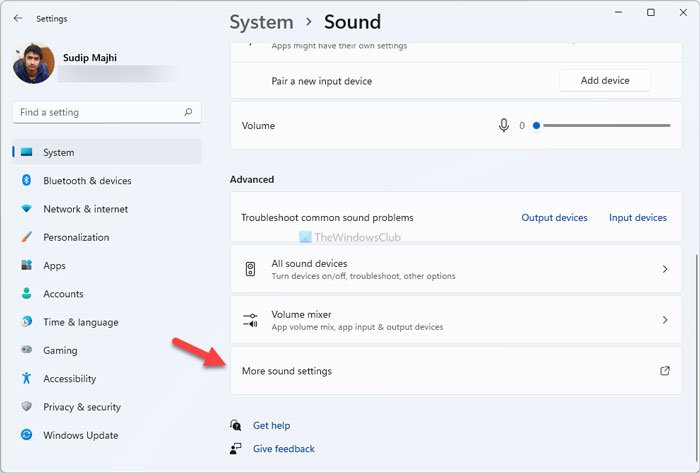
Open Control Panel > Hardware and Sound > Sound > Audio properties page > Communications tab. You can also open the Sound settings via Settings > System > Sound > More sound settings.
The options available are:
- Mute all other sounds
- Reduce the volume of other sounds by 80%
- Reduce the volume of other sounds by 50%
- Do nothing.
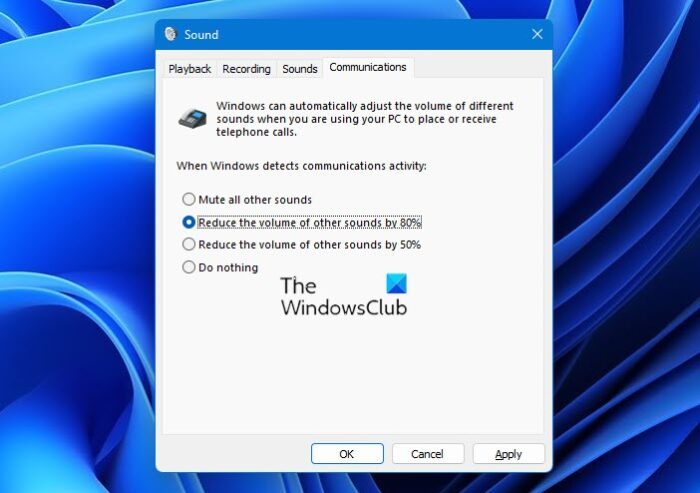
Select Do Nothing from the available options, click Apply/OK and exit.
That’s it. You will have disabled this feature.
Related reads:
- Computer sound volume too low
- Computer volume increases or decreases automatically
- Computer volume too loud on the lowest setting.
