
If you are unable to install or uninstall a program, software, or app in Windows 11/10, then this post offers suggestions to help you. Corrupted operating system files or configuration, or interference by third-party software can make this issue occur. If you face this issue, read on.
Cannot install or uninstall programs in Windows 11/10
If programs won’t install or uninstall on your Windows 11/10 computer, try our suggestions and see if any of them help you.
- Restart the PC and try again
- Check whether your account has administrator rights
- Run Program Install and Uninstall Troubleshooter
- Install or Uninstall in Safe Mode
- Check whether the Windows Installer engine is working
- Check the status of Windows Installer service
- Re-register Windows installer engine
- Uninstall a program via Registry
- Check log files
- Use third-party uninstaller software.
1] Restart the PC and try again
Restart your Windows computer and see if you can carry out the operation. This simple step has been known to help in many cases.
2] Check whether your account has administrator rights
You need to ensure that you are signed in as an admin and that your account has administrator rights to install or uninstall software and apps.
3] Run Program Install and Uninstall Troubleshooter
Microsoft has released a Program Install and Uninstall Troubleshooter that will automatically diagnose any problems that you may be facing while installing or uninstalling programs or software in Windows 11/10/8/7. This tool will help you fix problems that block programs from being installed or removed. You can uninstall programs on Windows 1/110 that cannot be uninstalled. Using this Program Install and Uninstall Troubleshooter, if you find that you are unable to install or uninstall a program via your Control Panel.
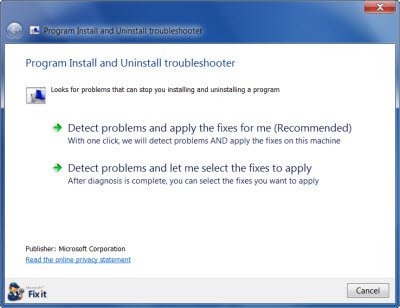
Once you download and run it, it will ask you if you would like it to only detect the problem and let you select what to fix, or if you would like it to detect and fix the issues directly.
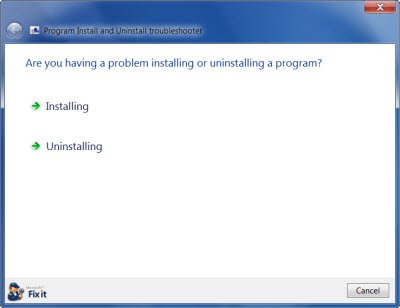
Next, it will ask you if you are facing problems while installing the program or uninstalling the programs.
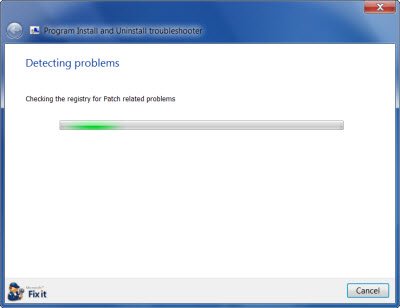
Finally, it will check the registry and the system for any problems and then present you with options or fix them directly as the case may be.
This Program Install and Uninstall Troubleshooter will help fix:
- Corrupted registry keys on 64-bit operating systems
- Corrupted registry keys that control the update data
- Problems that prevent new programs from being installed
- Problems that prevent existing programs from being completely uninstalled or updated
- Problems that block you from uninstalling a program through Add or Remove Programs (or Programs and Features) in Control Panel.
You may be aware that the Windows Installer Cleanup utility (MSICUU2.exe) has been retired. While the Windows Installer Cleanup utility resolved some installation problems, it sometimes damaged other components installed on the computer. Because of this, the tool has been removed from the Microsoft Download Center.
You can get the troubleshooter from its download page. It works on Windows 11, Windows 10, Windows 8.1, Windows 8 and Windows 7.
4] Install or Uninstall in Safe Mode
You might want to consider performing Clean Boot and then try to install or uninstall the software. Alternatively, you could boot Windows in Safe Mode and then try to carry out the operation. This post will show you how to uninstall programs in Safe Mode,
5] Check whether the Windows Installer engine is working
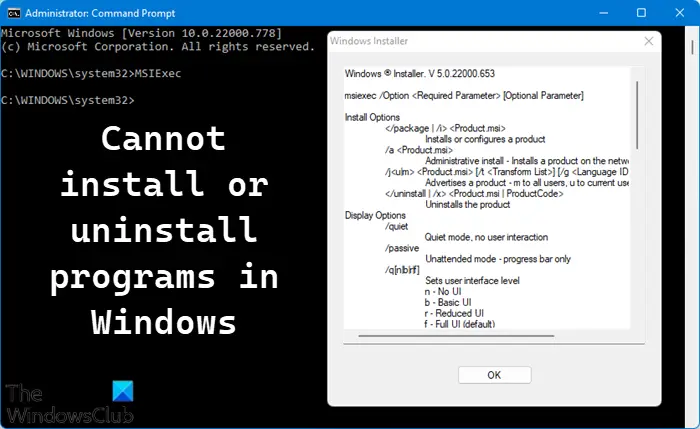
At the command prompt, type MSIExec, and then press Enter.
If the MSI engine is working, you will see a Windows Installer popup; else you will see an error message.
6] Check the status of the Windows Installer service
Open Services Manager and make sure that the Windows Installer service is not set to Disabled.
If the Startup type box is set to Disabled, change it to Manual.
Also right-click the Windows Installer service, and then click Start If the Service is stopped.
Try to install or uninstall the program again.
7] Re-register the Windows installer engine
At the command prompt, type the following, and then press Enter after each line:
MSIExec /unregister
MSIExec /regserver
8] Uninstall a program via Registry
If the program’s entry is missing in the Control Panel, Settings or the Uninstaller is not available, or these ways do not work for some reason, you can also use the Windows Registry. This post will show you how to uninstall programs using Registry
9] Check log files
You can use the Wilogutl.exe tool to analyze log files from a Windows Installer installation. This tool may suggest solutions to errors that are found in a log file. It is available in the latest Windows Software Development Kit. Enable Windows Installer logging and then read the .msi verbose files for suggestions on how to resolve the issue.
10] Use third-party uninstaller software
If nothing helps, you may use a free Uninstaller software for Windows.
How to force uninstall a program that won’t uninstall
- At the command prompt type the following –
wmic. You will get the name of various programs installed on your system. Note down the name of the program you wish to remove. Next type the following, replace XYZ with the program name you noted down & hit Enter to start the process –product where name="XYZ" call uninstall. - You can also try to uninstall or install an app in the Safe Mode or use the Registry to uninstall programs as mentioned above in this post.
- Free Uninstaller software like Revo or IObit also have an option to force-uninstall programs that you can use.
Why can’t I uninstall programs on Windows 11/10?
Corrupted operating system files or configuration, or interference by third-party software can make this issue occur. You can also try to uninstall or install an app in the Safe Mode or Clean Boot State to uninstall programs as mentioned above in this post.
Further reading:
- Uninstall apps with greyed out Uninstall button in Settings.
- Please wait until the current program is finished uninstalling or being changed
- There is a problem with this Windows Installer package
- The feature you are trying to use is on a network resource that is unavailable
- Another installation is already in progress
- Access is Denied error while installing software.

