
A Virtual Private Network or VPN is used to make protected connections. These are often used on the Internet to provide a safer browsing experience. Such connections are known as VPN tunnels, which are established between a local client and a remote server.
Setting up and running a VPN is often a difficult and challenging task that requires specialized knowledge and technology. When a VPN software connection fails, the client program reports an error message. This message typically includes an error code number. There are several different VPN error codes, but some of them are very common and appear in the majority of the cases. These error codes can help you fix VPN problems & issues. Here is how to troubleshoot common VPN errors that many users face.
While most VPN issues involve standard network troubleshooting procedures, certain error codes have their own specific solutions. Let’s get started and explore how to troubleshoot common VPN error codes like 691, 720, 721, 789, 800, 809, 609, 633, 0x80072746, 13801 and 0x800704C9.
The typical message you see would be something like this:
The VPN connection failed with error code
Or:
The error code returned on failure is 789
Before you use VPN software, you need to have TAP-Windows adapters installed. Most VPN software will download and install this automatically during its installation, but this is something you should know.
Troubleshoot common VPN error codes
In this post, we will suggest how to fix VPN error codes 800, 609, 633, 809, 13801, 691, 0x80072746, 0x800704C9, 789, 732, 734, 812, 806, 835, 766, 13806, 0x80070040, 0x800B0101, 0x800B0109, 0x800B010F, 0x80092013, 0x800704D4 and 0x80072746.
VPN Error Code 800
Error Description: VPN error code 800 is one of the most common VPN errors. VPN 800 occurred when the remote connection was not made. This typically indicates that the VPN server might be unreachable; hence, the messages are failing to reach the server. This can be mainly due to:
- Invalid name or address of the VPN server
- Some Network Firewall blocks the VPN traffic
- The client device loses the connection to the local network.
- IPSec negotiations if L2TP/IPSec tunnel is being used has an inappropriate configuration in the security parameters
Possible Cause: When the VPN tunnel type is ‘Automatic’ and the connection establishment fails for all the VPN tunnels the error 800 occurs
Possible Solution:
- Crosscheck that the VPN Server address, the username, and password are correct
- Set the router and firewall settings to allow for PPTP and VPN pass-through TCP Port 1723 and GRE Protocol 47 must be opened/enabled for the PPTP VPN connection.
- For Windows users, go to the VPN Properties, click on the Security tab, and change Type of VPN to Point to Point Tunneling Protocol (PPTP)
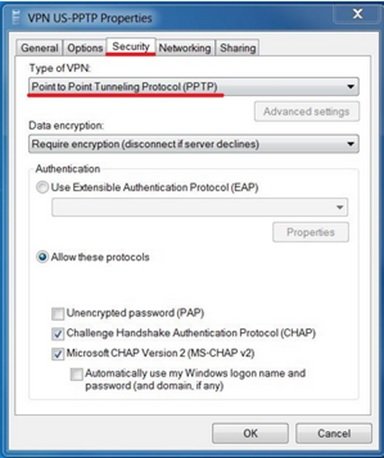
VPN Error Codes 609, 633
Error Description:
- 609: A non-existing device type was specified.
- 633: The modem or other connecting device is either already in use or not appropriately configured.
Possible Cause: This is yet another one of the most common VPN errors. This issue typically occurs when the connecting VPN Device (i.e., miniport) is not configured correctly and also when the TCP port, which is used by VPN connection is already being used by another program.
To confirm the presence of miniport Type netcfg.exe -q <miniport name> in the elevated command prompt. Below are the miniport device names for different tunnels:
- PPTP Tunnel: MS_PPTP
- L2TP Tunnel: MS_L2TP
- VPN Reconnect (IKEv2) Tunnel: MS_AGILEVPN
- SSTP Tunnel: MS_SSTP
Possible Solution:
- The possible solution for this kind of common VPN errors is a built-in diagnostic with repair is provided in Windows. This is provided for the ‘missing miniport’ issue for VPN connections which are created locally. Clicking the ‘Diagnostic’ button on the VPN connection’s Error page provides a “repair” option that will try to fix the issue automatically, provided it finds the issue to be a missing miniport.
- Stop and Start, Remote Access Connection Manager (rasman) service.
- Simply, reboot your system, and then connect to VPN.
VPN Error Code 0x80072746
Error Description: VPN Error Code 0x80072746 is one of the common VPN errors when the existing connection is forcibly closed by the remote host.
Possible Cause: This error comes when the server machine certificate binding to HTTPS is not done on the VPN server, OR the server machine certificate is not installed on the VPN server.
Possible Solution:
- To resolve this issue, you need to contact your VPN server administrator. This is to check whether the relevant machine certificate is installed on the VPN server or not.
- If it is installed correctly, check the HTTPS binding by running the following command at the VPN server command prompt:
netsh http show ssl.
Read: VPN causes computer to crash or freeze
Error message: VPN error 809 – The network connection between your computer and the VPN server could not be established because the remote server is not responding.
Possible solution: Enable the port (as mentioned above) on the firewall/router. If that is not possible, deploy an SSTP-based VPN tunnel on both the VPN server and the VPN client, which allows VPN connections across firewalls, web proxies and NAT.
Fix: VPN Error 807 on Windows 11
VPN Error Code 13801
Error Description: Though it looks like an occasional error, 13801 is one of the most common VPN errors that users face. This error occurs when IKE authentication credentials are unacceptable.
Possible Causes: This error usually comes in one of the following cases:
- The machine certificate used for IKEv2 validation on RAS Server does not have “Server Authentication” as the EKU (Enhanced Key Usage).
- The machine certificate on the RAS server has expired.
- The root certificate to validate the RAS server certificate is not present on the client.
- VPN Server Name as given on the client, doesn’t match with the subjectName of the server certificate.
Possible Solution: Unfortunately, you won’t be able to fix this issue on your own. You need to contact your VPN server administrator to verify and fix the above issue. To know more about this error, you can read the Routing and Remote Access Blog.
VPN Error Code 691
Error Description: Some of the common VPN errors have solutions that even you can implement. VPN error code 691 is one of the solvable common VPN errors. The error occurred when the remote connection was denied because the user name and password combination you provided is not recognized, or the selected authentication protocol is not permitted on the remote access server.
Possible Cause: This error occurs when the authentication phase fails due to incorrect credentials being passed.
Possible Solution:
- Make sure the correct username and password are typed.
- Make sure “Caps Lock” is not turned ON while typing credentials.
- Make sure the authentication protocol as selected on the client is permitted on the server.
VPN Error Code 0x800704C9
Possible Cause: VPN Error Code 0x800704C9 is one of the common VPN errors, and it occurs if no SSTP ports are available on the server.
Possible Solution: Thankfully, you can troubleshoot this error yourself. First, verify that the RAS server has sufficient ports configured for remote access. To do this, follow these steps:
- Start the Routing and Remote Access MMC snap-in.
- Expand the server, right-click Ports, and then click Properties.
- In the Name list, click WAN Miniport (SSTP), and then click Configure.
- Modify the number in the Maximum ports list as appropriate for your requirements, then click OK.
Note: By default, 128 ports are available for this device.
- In the Port Properties dialog box, click OK.
VPN error code 789
Error message: VPN error code 789 – The L2TP connection attempt failed because the security layer encountered a processing error during initial negotiations with the remote computer.
Possible solution: This is a generic error that is thrown when the IPSec negotiation fails for L2TP/IPSec connections. So make sure the correct certificate is used on both the client and server sides – for further details, refer to this blog. If a Pre-Shared Key (PSK) is used, make sure the same PSK is configured on both the client and the VPN server.
Apart from these common VPN errors, there are several other VPN errors that you may face. This post will also help you with VPN error codes 732, 734, 812, 806, 835, 766, 13806, 0x80070040, 0x800B0101, 0x800B0109, 0x800B010F, 0x80092013, 0x800704D4 and 0x80072746.
