
While working on your Windows computer, if you see Location is not available, The Disk structure is corrupted and unreadable error message, here are a few things you need to do right away if you wish to avoid data loss.
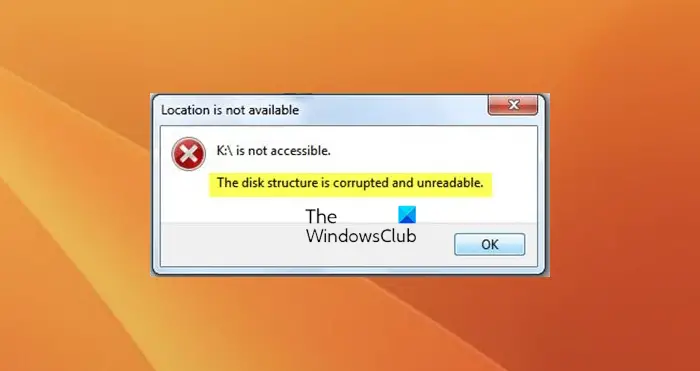
The Disk structure is corrupted and unreadable
When you see this error, it may mean that the storage media – may be your USB, Memory Card or External Drive is facing some problem. See if any of our suggestions help you:
1] Restart the computer
Sometimes, a simple step like unplugging your device, restarting your PC and replugging it can resolve this issue.
2] Run ChkDsk
Run ChkDsk on that drive and see. You may run ChkDsk by using the following command line parameters in a CMD window:
chkdsk /f /r K:
Here:
- /f Fixes errors detected
- /r Identifies Bad Sectors and attempts recovery of information
- Replace K here, with your drive letter.
If you are unable to boot into Windows 11/10, you have to boot into Advanced Startup Options, select Command Prompt and then run ChkDsk.
3] Reinstall that particular device
You can reinstall that device and see if it works. To do this, open Device Manager from the WinX Menu, right-click on the Disk Drive that is giving problems and select Uninstall. Next, restart your computer and plug in the USB Drive. The Device should install automatically.
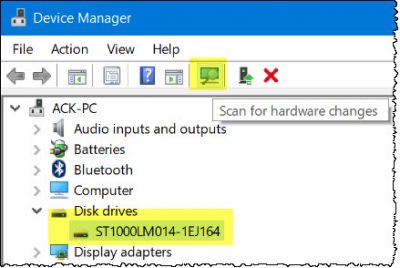
If it does not, open Device Manager again and click on the Scan for Hardware changes button. Or you could click Action > Scan for Hardware changes.
4] Backup & Format
See if you can back up the data (or at least the major important part) to another drive. If you feel the need, you could use a free Data Recovery software. If you can do that, reformat the Drive and see if that helps.
All the best!
See this post if you receive a File record segment is unreadable error and this one if you receive You need to format the disk in drive before you can use it error.
How do I uncorrupt my disk?
To fix a corrupted disk in Windows, run CHKDSK. Open Command Prompt as administrator, type chkdsk /f /r and hit Enter. This scans and repairs file system errors and bad sectors. Remember to back up important data and consider formatting or reinstalling Windows if corruption persists.
