
So, you were trying to watch your favorite show on Hulu, and suddenly, out of nowhere, an error pops up. Do not worry; we’ve got your back. In this article, we will show you what to do if you see Error Code 95 on Hulu.

How to fix Hulu Error Code 95
To fix Error Code 95 on Hulu, follow the prescribed solutions:
- Power-cycle your devices
- Check your Internet connection
- Clear cache and data
- Flush DNS, reset Winsock, and TCP/IP
Let us talk about them in detail.
1] Power-cycle your devices
First up, try power cycling your device. This simple technique has done wonders for ages and should do the trick for you. Just power off the device you are streaming on, unplug it from the power source, plug it back in and power on the device. Hopefully, this will do the trick for you.
2] Check your Internet connection
A slow Internet can also cause the error in question. You should check the speed of your Internet using an Internet speed tester. Also, use the same tool on all the devices connected to the same network. If you conclude that all devices are experiencing low bandwidth, restart your router. If the issue persists, contact your Internet Service Provider. In case yours is the only device with slow Internet, check our guide to resolve slow Internet.
3] Clear cache and data
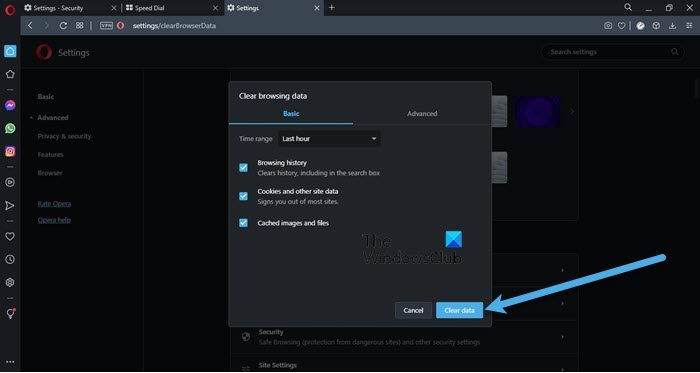
As mentioned earlier, one of the most common causes of this error code is corrupted cache and browsing data. But fortunately, they can be removed and we are going to show how. Check out our guide to remove cache and browsing data on Chrome, Firefox, Edge, and Opera.
- Android device users just long-press on the app and go to App info, or go to Settings > Apps > Hulu. Then click Clear cache (settings may differ depending on the device that you are using).
- iOS users can not clear the cache, instead, they need to delete the app and then reinstall it.
- Xbox 360 users need to go to Guide > Settings > System Settings > Storage > Memory Unit > Games and Apps > Hulu > Delete and then click Yes to confirm
- Xbox One users should go to My Games > Apps > Hulu. Then, press the Menu button, More Options will appear. Click on Manage App, and then clear the Saved data.
Hopefully, it will do the job for you.
4] Flush DNS, Reset Winsock, and TCP/IP
You can also see the issue in question because of a glitch in the network protocol. Microsoft is aware of this, which is why they have ingrained tools to reset these protocols. Mind you, they are not going to harm your system, nor will they remove any configuration you have made. So, go ahead and open Command Prompt as an administrator. You can do that by the Run utility, just hit Win + R, type “cmd”, and hit Cltr + Shift + Enter, or search it out from the Start Menu. Click Ok when the UAC box appears.
netsh winsock reset
To Flush DNS
ipconfig /flushdns
To reset TCP/IP
netsh int ip reset
After executing the commands, restart your system and check if the issue persists.
Similar posts: How to fix Hulu error 94, Hulu Error Code P-DEV320, Hulu Error Code Runtime 2 and 5.
What does Hulu Error 95 mean?
Error Code 95 will appear on your Hulu account if there is a network-related issue on Hulu’s end or on your end. It can also occur because of a corrupted cache or glitches. There are various reasons for corrupted caches, but they can be fixed, and we are going to show how. Talking about glitches, the most obvious one is with your network, they can be caused by a corrupted cache or network protocols. These protocols can be reset using the command line interpreter and see how to resolve the issue.
How do I clear my Hulu cache?
The procedure for clearing the Hulu cache varies by platform. For example, if you have Android smartphones or tablets, go to “Settings> Apps > Hulu > Storage > Clear Cache.” On Android TV, open Settings, then select Applications. Now, select Hulu and clear its cache. On Apple TV, the only way to clear the Hulu cache is to uninstall and reinstall the app. If you use Hulu on your computer browser, you just need to clear your browser cache.
Also Read: Fix Hulu keeps buffering or freezing on PC.
