
The integration of AI in web browsers has transformed the way people search, browse, and interact with information online. Google and Bing are the two most popular search engines, and both of them provide AI-powered search results. Google Search integrates an AI Mode, whereas Bing has Microsoft Copilot as a built-in AI assistant. In this article, we will talk about how Bing Search powers smarter results.
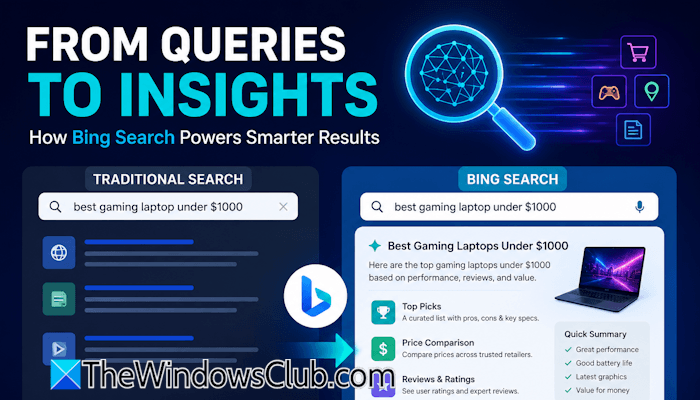
How Bing Search delivers better and smarter results
Earlier, search engines displayed links to websites in response to users’ search queries. Users had to visit multiple websites to get answers to their queries. Today, AI-powered search engines generate direct answers, summaries, and actionable insights alongside traditional web results. This helps users find the required information easily without having to visit multiple websites. In this article, we will explore how Bing Search powers smarter results by using its intelligent search capabilities.
Traditional search vs AI-powered search in Bing
The way users search on the internet has changed after the integration of AI in search engines and web browsers. Traditional search results included a list of links for each query, requiring users to visit multiple websites to find the required answers. The integration of Copilot in Bing has transformed it from a traditional search engine to an AI-powered search engine. Now, the search results contain AI-generated responses in addition to website links.
Have a look at the following points for a better comparison between traditional search and AI-powered search results in Bing:
- Search results: The traditional search results displayed a list of relevant websites. The AI-powered search results in Bing show an AI-generated response along with the links to relevant web pages.
- User effort: Traditional search engines typically showed a list of relevant web pages, requiring users to open multiple links. If the required information was not available on the first website, he had to click the next link. This consumed a lot of time. AI-powered search results in Bing give users the required information on the results page. If users are not satisfied with the AI-generated response, they can visit the websites displayed along with the AI-generated response.
- Understanding queries: The traditional Bing search worked on keyword matching. That’s why users are required to search for the same queries using different keywords. The integration of Copilot in Bing has made it a smarter search engine. Now, Bing can understand natural language, context, and user intent.
- Decision-making: Previously, users had to compare information manually, which took a lot of time. Now, Bing summarizes information and highlights key points to help users make decisions quickly.
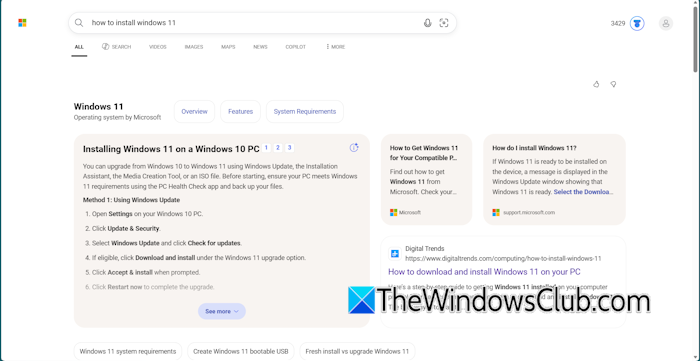
For example, if you search for how to install Windows 11 on Bing, it shows you an AI-generated response on the left side of the web page and some relevant links to websites and forums on the right side. You can read the AI-generated response and proceed with the Windows 11 installation. If you are a non-tech user, you can click on the links to visit the websites. If you scroll down, you will see links to video guides and other websites for installing Windows 11.
Features through which Bing Search powers smarter results
The integration of Copilot in Bing has transformed traditional search results into AI-powered search results. The following are some key features that make Bing Search smarter:
- AI-generated summaries: Bing generates brief AI summaries for most search queries, allowing users to understand the topic without visiting multiple websites. However, if a user wants to understand the topic deeply, he can click any of the links displayed on the search results page.
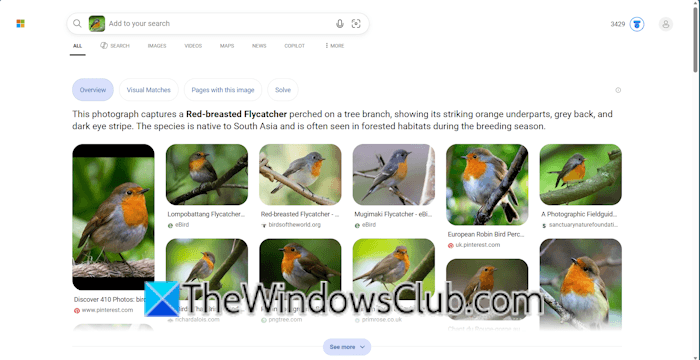
- Visual search: Bing allows users to search using an image. For example, if you have an image of a bird and you do not know its name, you can use Bing Visual Search to find the name of the bird. The Visual Search feature also supports camera input.
- Shopping intelligence: Bing makes online shopping easier by comparing pricing for the product you want to buy.
- AI-powered local search: If you search for “Best restaurants near me” in Bing, it shows you nearby restaurants by detecting your location, making it easier for you to select the best restaurant.
- Conversational search: This is the most powerful feature of Bing that makes it a smarter search engine. You can interact with Copilot for every search query.
Read: Bing Search Tips and Tricks to improve Search Experience
Some real-world examples
Let’s see some real-world examples
1] Informational search results
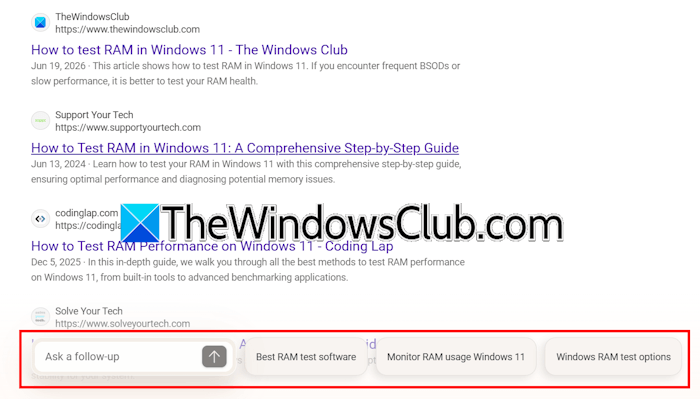
Bing shows information-rich results for informational search. For example, if you search for “How to test RAM in Windows 11,” Bing will show an AI summary on the left side and links to some videos and websites on the right side. As you scroll the page, you will see more videos and website links. A follow-up floating tab also appears as you scroll the page. The follow-up tab shows you related searches, such as best RAM test software, monitor RAM usage on Windows 11, etc.
2] Gaming search results

Gaming-related searches often require up-to-date information. Bing Search uses AI to understand gaming-related queries and delivers relevant information from trusted sources, helping gamers quickly find the answers they need. Instead of browsing multiple websites, users can access AI-generated summaries, game guides, official announcements, videos, and community resources directly from the search results. For example, if you search for “How to get free Chrono Crystals in Dragon Ball Legends,” Bing shows you an AI summary followed by videos.
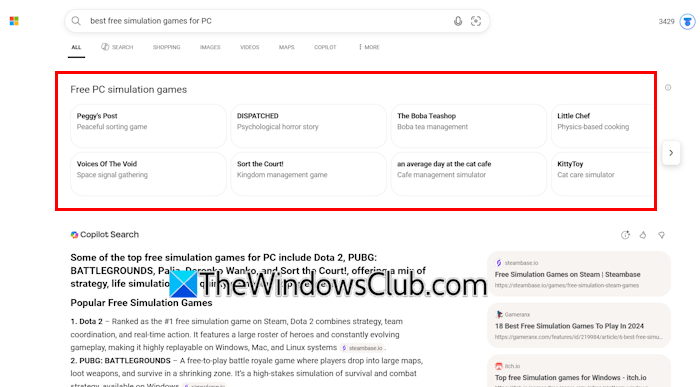
Additionally, Bing intelligently places the AI-generated response based on the search query. For example, if you search for the best free simulation games for PC, instead of placing the AI-generated response at the top of the page, it shows some popular simulation games.
3] Shopping search results
Bing helps users make purchasing decisions. For your shopping queries, Bing shows a rich result with an AI-generated response, YouTube videos, and links to shopping platforms, depending on your region. Additionally, Bing Search displays products along with their prices, making it easier to compare different options. Moreover, follow-up suggestions help users refine their search queries and make more informed purchasing decisions.
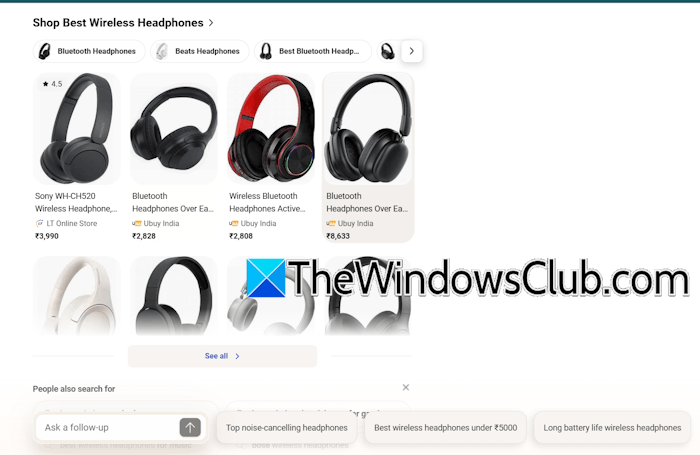
For example, if you search for the best headphones, the follow-up suggestions may include:
- Top noise-cancelling headphones
- Best wireless headphones under $100
- Long battery life wireless headphones
Bing Search vs Google Search
Bing Search results are richer than Google search results. Unlike Google, Bing does not force users to use AI features. Bing’s search results combine AI-generated responses with traditional web results, giving users the best of both experiences. Moreover, asking a follow-up question in Bing does not redirect you to a separate AI page. All the follow-up questions remain available at the end of the same page, maintaining a balance between the traditional web results and AI-powered search.
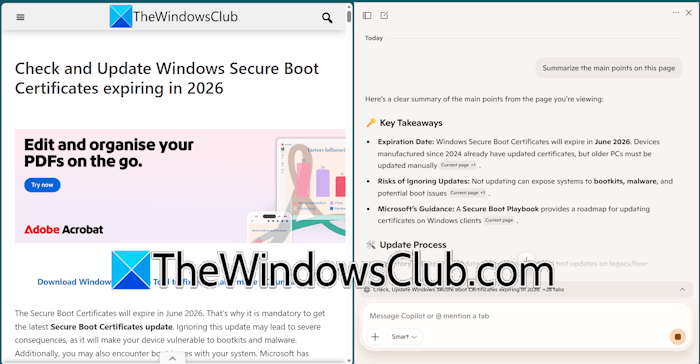
Microsoft has integrated Copilot in Edge, allowing users to generate summaries of any web page without launching the Copilot app in a separate window. Microsoft also rewards points for using Bing search that can be redeemed later for shopping.
That’s it. I hope this helps.
Read: Unlocking Bing Search Hidden Features you didn’t know existed
Is Bing safer than Google?
Both Bing and Google are among the safest search engines. They allow users to enable or disable SafeSearch to filter explicit content. Additionally, both search engines help protect users by warning them about potentially harmful or malicious websites.
How to improve Bing search results?
Although Bing uses Artificial Intelligence to show rich search results for every search query, you can still improve them by modifying the query. Be specific for your search query. For example, if you want to buy a laptop, instead of searching for the best laptops under $1000, you can search for the best Windows 11 gaming laptops under $1000. To get more specific results, you can also include the name of a laptop brand.
Read next: How to switch from Google to Bing on Edge or Chrome.
