
Most of the Windows PCs are now connected to the internet and keeping that mind, Microsoft has configured the F1 key on the keyboard to open online help. Every time you press it, it launches Edge and auto searches for ‘how to get help in Windows‘ using Bing. While this is smart, it seems to be a major cause of annoyance. Many users have reported this happening randomly, even if the key is not pressed. In this guide, we tell you what you need to do if How to get help in Windows is continuously popping up.
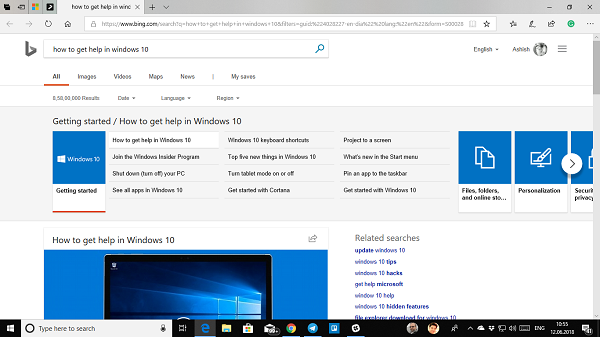
There are two major problems with this. The first is random, where a user gets this Get Help in Windows 11/10 pop-up whenever he types anywhere. The second is a malware problem where the message changes to “Get Help in Windows Virus”. Now, let’s take a look at the solutions for this issue.
How to Get Help in Windows keeps popping up in Edge browser
First, make sure that your F1 key is not stuck. Also, check if this problem occurs in Clean Boot State. If it does not, a non-Microsoft process may be causing this issue.
Solution 1: The probable virus problem
As we shared, it happens with almost anything on Windows. If the above solution doesn’t work for you, it’s time to check for a virus. It may be a virus, or it could be a glitch.
You should scan your PC with Windows Defender in Safe Mode if your favorite antivirus software doesn’t work. The chances are that this will remove the most annoying malware when the PC is offline.
Solution 2: Temporarily Disable F1 Key
This is the best solution as it lets you control the on-off status. The best part is its simple to implement with AutoHotKey.
- Download AutoHotKey from here, install it on your PC, and run it.
- Create a macro with code
f1::Return - Save, and keep it running.
- Do check out our tutorial on how to create an AutoHotKey script to learn more about it.
You will be able to toggle it from the system tray easily and make sure to start it when Windows boots up. So if you are using some other software that uses F1 in their hotkeys, you can still do it.
Related: Windows Help and Support keeps popping up automatically when I start any program
Solution 3: Rename Helppane.exe
This program from Windows generates all those pop-ups whenever you need help in Windows. If we rename this, Windows will officially fail to open any pop-up.
- When you see this annoying Get help in Windows popup, open Task Manager, and see if helppane.exe running.
- Go to C:\Windows and scroll to helppane.exe.
- Right-click on the file and rename it to helppane.old. You may need to Take ownership of the file.
That said, we have seen many reports of serious issues because of this problem. For some, typing has become a problem; some cannot use the F1 key with any other program, and some even have video delays, freezing problems, and so on.
We hope our suggestions help.
This post will help you if the Windows Get Help app is not working.
Microsoft Edge Help and Learning keeps popping up
If Microsoft Edge Help and Learning keeps popping up on your PC, it is likely that Edge is open and you accidentally pressed the F1 key. Windows will open the Help page for the app that is open on your desktop when you press the F1 key. If the page keeps popping up, you should use the solutions mentioned in this post to resolve the problem.
