
Battlefield is quite popular and gamers are pumped about the game. However, there are some users who are complaining about Battlefield DirectX Errors. According to them, they are not able to play the game, and all they see are messages such as:
- DXGI_ERROR_DEVICE_HUNG
- DXGI_ERROR_DEVICE_REMOVED.
In most cases, the issue is not due to early software; therefore, it requires some solutions to be resolved. In this article, we will provide just that.
Why am I seeing Battlefield DirectX Errors?
By looking at the error messages in question we can say that this error has something to do with the DirectX installed on your system. There are multiple versions of DirectX available and one needs to install the latest one.
Other than that, you need to ensure that you are running a compatible Graphics card and that it is up-to-date. We will mention which Graphics Card is compatible with the game, so if yours is not compatible, you can get a new one before the 19th in order to play the game.
We have also mentioned some workarounds and some tips that you should do, if you don’t want to be bombarded with error messages the moment you open the game.
What are the system requirements to run Battlefield?
To play Battlefield, your computer must meet the following system requirements.
Recommended System Requirements
- CPU: AMD Ryzen 7 5800X / Intel Core i7-11700K
- GPU: Nvidia RTX 3070 / AMD Radeon RX 6800 XT
- Video Memory: 8GB or more
- RAM: 32GB
- Storage: 55GB SSD
- Performance Target: 60 FPS at 1080p
First, check if your computer meets the minimum requirements. If it does, then you need to check out the solutions mentioned below to resolve the issue.
Resolve Battlefield DirectX Errors
If you are seeing Battlefield DirectX Errors, then the first thing you should do is make sure that you are on the latest version of Windows. Therefore, check for updates and install the latest available build.
If updating is unsuccessful, try the following solutions to resolve the issue.
- Update Graphics Drivers
- Update DirectX
- Clear Game Cache
- Repair theGame
Let’s discuss them in detail.
1] Update Graphics Drivers
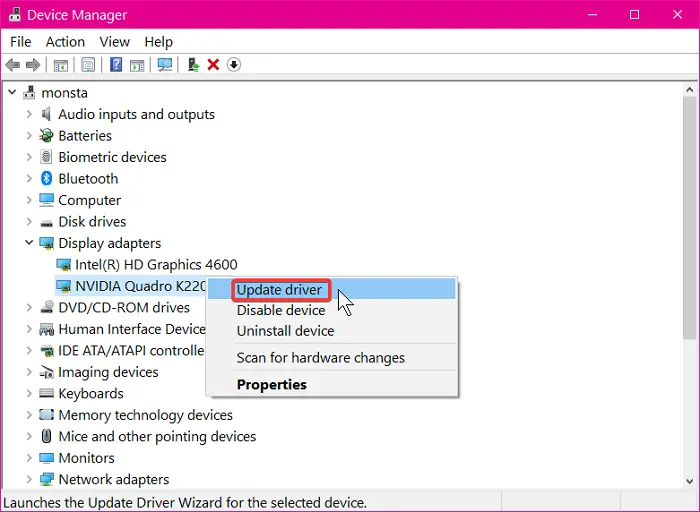
Let us start updating things. So, check if there is an update available for your Graphics Drivers and download it. After updating your Graphics Drivers, check if the issue is fixed. If the issue persists, then move to the next solution.
2] Update DirectX
Next up, we need to update DirectX and make sure that you are running the current version of the feature. So, download the latest version of DirectX from Microsoft.com and install it on your system. After installing it, check if the issue persists. In most cases, both solutions combined will resolve the issue.
3] Clear Game Cache
Sometimes, even after updating both DirectX and Graphics Drivers, one may see this error. In that case, you have to clear the game cache and see if the issue persists.
To do that, open Run by Win + R, paste the following location and click Ok.
%ProgramData%/Origin
Now, delete all the content of the folder except the LocalContent folder.
You should also remove the App Data. So, open Run and go to the following location.
%AppData%
There you need to delete the folder.
Finally, restart the game and see if the issue persists.
4] Repair the Game
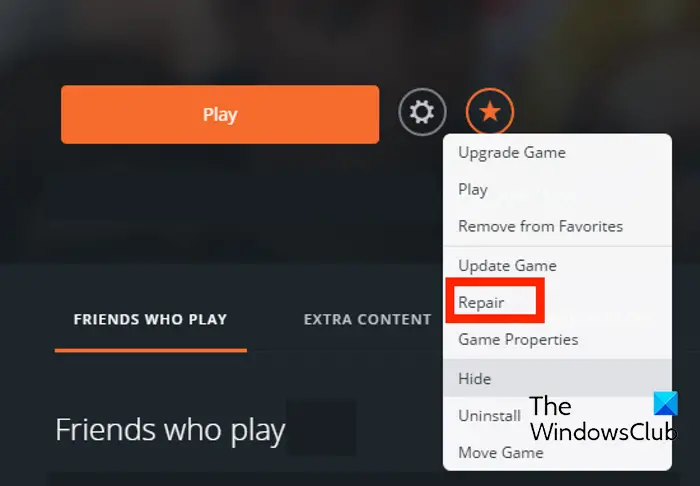
If the issue persists, it may be due to corrupted game files. If that’s the case, then there is no need to panic, as Origin launcher got you covered. Follow the given steps to repair the game.
- Open Origin.
- Go to the My Game Library > Battlefield.
- Right-click on Battlefield 2042 and select Repair.
Wait for the game to be prepared and hopefully, the DirectX issue will be resolved.
Hopefully, you will be able to resolve the issue with the provided solutions.
How do I enable DirectX 12 in Battlefield?
According to the official statement, there is no manual option to enable or disable DirectX 12 in Battlefield on your computer. It is already enabled in the background of your game, and there is no way to disable it. Therefore, if you encounter the problem above, you need to opt for only one version of DirectX.
Read Next: 10 best Role Playing Games for Windows PC
