
Kahoot is a game-based learning platform that makes learning fun for all ages. On this platform, you can create short interactive lessons with polls and quizzes, create a story for your audience, and create a course. As a player, you can join live quizzes on Kahoot hosted by other educators or creators. To join a Kahoot live quiz, you need a Kahoot Pin. In this article, I will show you how to find and enter a Kahoot join PIN for live quizzes.

How to find and enter a Kahoot join PIN for live quizzes
The Kahoot join PIN appears when a user hosts a quiz live on Kahoot’s server. This join PIN allows other participants to join the live quiz. Let’s see how you can find and enter a Kahoot join PIN for live quizzes.

When it is time to join the live game and the host screen is visible, you will see the code at the top of the screen. Click on the Game PIN to copy it. Now, you can paste the game PIN to join the live game.

If you want to join the live Kahoot game session from your mobile phone, install the Kahoot app from the App Store or Google Play Store and open it. Now, tap on the Join button at the bottom of your screen. You will see the interface to enter the PIN. Or, you can scan the QR code displayed on the Host screen.
After joining the live quiz, the game will start on the Host screen. Questions will be displayed one by one. Read and answer them by tapping the right shape on your device.
Read: Kahoot Join PIN not working
How to host a game on Kahoot
On the Kahoot platform, you can host your own games or games created by other creators. The games you create appear in the Library.
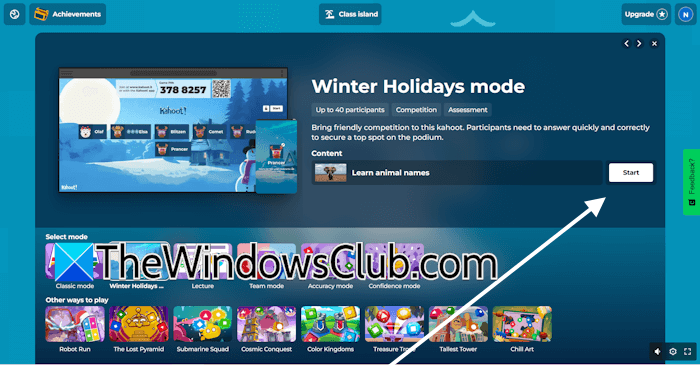
To host your own game on the Kahoot platform, go to the Library and hover your mouse cursor over the game you want to host. Click Host Live. Select the mode for the other live game and click Start. As you click Start, a code will be generated automatically. Share this code with the participants and ask them to join the live game.
To host a game created by other creators, follow these steps:
- Log in to your Kahoot account.
- Select Discover from the left pane. Here, you will find all the games created by creators. The games are organized in different sections, such as Partner collections, Categories, etc.
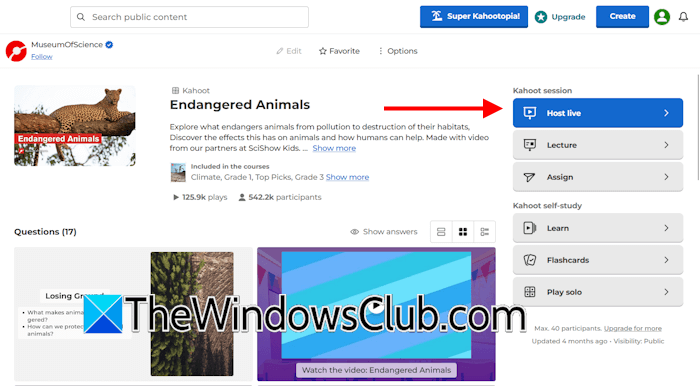
- Select a game and play it. You will see multiple options on your screen. Select Host live.
That’s it. I hope this helps.
How to find random Kahoot games?
Kahoot offers a wide range of interactive games across a variety of topics and audiences. That’s why Kahoot has organized all its games into different sections for easier navigation and a better user experience. To find a random game, log in to your Kahoot account and navigate to the Discover section. You will find different games and sections there. Now, you can select any game to play.
How do I access a Kahoot quiz?
To access a Kahoot quiz, navigate to the Discover tab. You will see many different quiz games there. Scroll down to view all available games and sections. Each section has a wide range of games. To access a quiz, click on it.
Read next: Best free Quiz Maker software for Windows PC.
